

Quillbot
Quillbot APK is an AI-powered writing assistant that helps you rewrite, summarize, and polish text directly from your Android phone or tablet. It is designed for students, professionals, and content creators who want clearer and more concise writing.
With powerful paraphrasing modes, grammar checking, and summarization in one place, you can quickly improve essays, emails, reports, and social posts on the go. The official Android app connects to your Quillbot account so your work stays in sync across devices.
You can download the official Quillbot APK latest version directly from our website and start improving your writing in just a few steps.
Rate this app
App details
- App name
- Quillbot
- Category
- Productivity
- Version
- v3.19.0
- Size
- 9.94 MB
- Requirements
- 4.1 and Up
- Package name
- com.quillbot.mobile
- Publisher
- QUILLBOT
- Price
- Free
- Mod
- No
- Downloads
- 5,000,000
- Rating
- 4.7 / 5
- Rating count
- 50,000
- Play Store
- Yes
- Requires root
- No
- Offline support
- No
- Contains ads
- No
- In-app purchases
- Yes
- Updated
- May 12, 2026
- Age rating
- Rated for 3+
Table of contents
What is Quillbot APK
Quillbot APK is the official Android application of the Quillbot writing platform. It uses artificial intelligence to rewrite sentences, fix grammar, and shorten long passages while trying to keep the original meaning intact.
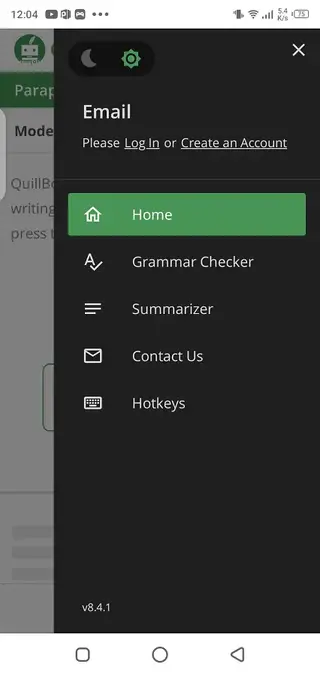
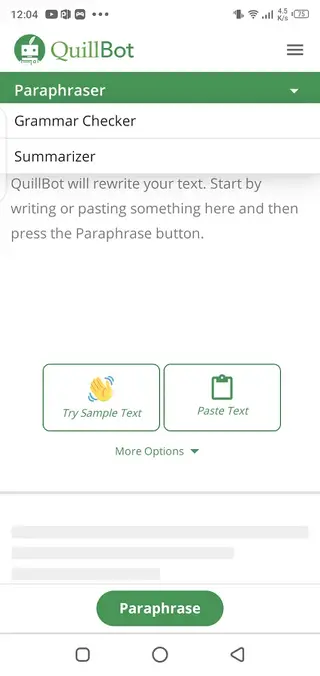
The app focuses on three core tools:
Paraphraser: Rewrites sentences and paragraphs using different vocabulary and structure.
Grammar checker: Scans text for grammar, spelling, and basic punctuation issues.
Summarizer: Creates shorter versions of long paragraphs, articles, or essays.
Students use Quillbot to polish assignments and research papers, while professionals rely on it for emails, documents, and reports. Content creators and bloggers often use it to refine drafts, adjust tone, and make text easier to read.
The Quillbot app follows the same account system as the web version. Free users get access to basic features with limits, and premium subscribers unlock higher word limits, more paraphrasing modes, and advanced suggestions.
Why download Quillbot APK from our website
Downloading Quillbot APK from our website gives you direct access to the official installation file for your Android device. You do not need to search elsewhere or rely on additional sources.
With the app installed, you can:
Paraphrase text quickly when you need new wording for essays, research work, or social posts.
Check grammar and spelling before submitting assignments or sending important messages.
Summarize long articles or study material into shorter, easier-to-review versions.
Use the same Quillbot account you already have on the web and access your premium plan if you subscribe.
Our website provides the latest available version listed in the app details, so you can keep your writing tools updated and ready to use.
How Quillbot is useful for students and writers
Quillbot is particularly useful for anyone who writes frequently on their phone or tablet. The app helps you improve clarity, reduce repetition, and fix grammar mistakes without needing a desktop computer.
For students, Quillbot can support essay writing, research summaries, and homework explanations. You can turn complex notes into clearer paragraphs, or shorten long readings into short, review-friendly versions.
For professionals and business users, the app helps polish emails, proposals, and internal documents so they sound more confident and professional.
For content creators, Quillbot can be part of the drafting process by suggesting alternative phrasing, helping you avoid repetitive wording, and adapting the tone of your copy.
Used responsibly, Quillbot can support learning, editing, and idea development. It should not be treated as a replacement for original thinking or for properly citing sources.
How to download and install Quillbot APK
You can download the official Quillbot APK file directly from our website and install it manually on your Android device. Follow these steps:
Scroll to the download section on this page.
Tap the download button for the latest Quillbot APK version.
Wait for the APK file to finish downloading to your device.
Open your phone’s settings and allow installation from your browser or file manager if prompted.
Locate the downloaded APK in your Downloads folder and tap it.
Choose Install and wait until the process completes.
Open Quillbot from your app drawer and sign in or create a new account to start using the tools.
After installation, you can update the app later by downloading the newer APK version from our website and installing it over the existing one.
Features
AI paraphrasing engine
Rewrite sentences and paragraphs while trying to preserve the original meaning using Quillbot’s AI models.
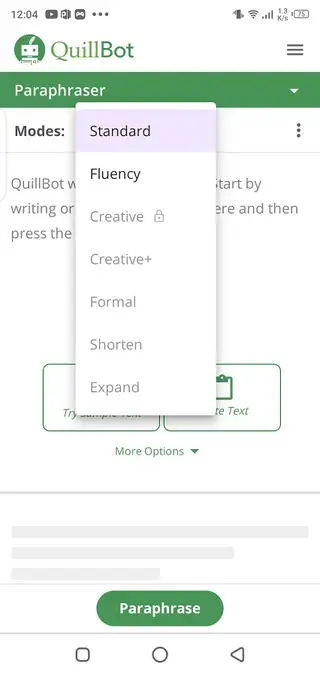
Multiple paraphrasing modes
Switch between different writing styles such as more formal, more concise, or more creative, depending on your needs.
Built-in grammar checker
Scan your text for common grammar, spelling, and basic punctuation errors before sharing or submitting.
Text summarizer
Turn long articles, essays, or notes into shorter summaries that are easier to review and understand.
Word and character controls
Adjust how much the AI changes your text and how short or long the output should be, within the app’s limits.
Account sync with web version
Sign in with your Quillbot account so your subscription and preferences stay consistent across devices.
Support for multiple languages
Paraphrase and check text in several supported languages, with quality varying by language and complexity.
Clean and simple interface
Use a minimal, touch-friendly layout optimized for quick edits on mobile screens.
Screenshots
Responsible use and academic integrity
Quillbot can be a helpful assistant for learning and improving your writing style, but it should be used responsibly. When working on academic tasks, research assignments, or professional documents, you remain responsible for the originality and accuracy of the final text.
Always review the AI-generated suggestions, verify facts, and add your own understanding and voice. If you use ideas or information from external sources, follow your school or organization’s rules for citations and references. Treat Quillbot as an editing and brainstorming tool, not as a replacement for your own work.
Tips for getting better results
To get more consistent results from Quillbot, try these simple practices:
Start with clear, complete sentences so the AI has enough context.
Paraphrase in smaller chunks instead of pasting very long documents at once.
Experiment with different paraphrasing modes to match your desired tone.
Use the summarizer to create an overview, then refine it manually.
Always proofread the output before submitting or publishing.
Following these tips helps you keep control over your text while still saving time during drafting and editing.
FAQs
Pros
- Powerful AI paraphrasing, summarizing, and grammar tools in one app
- Useful for students, professionals, and content creators across many use cases
- Clean, simple interface that is easy to learn on mobile
- Supports sign-in with existing Quillbot accounts and syncs subscription
- Free tier available with core features and optional premium upgrade
Cons
- Most features require an active internet connection
- Free plan has word limits and restricted modes compared to premium
- AI output quality can vary and still needs human review
- Not ideal for very long documents in a single pass due to limits
Conclusion
Quillbot APK brings the core Quillbot writing tools to your Android device so you can paraphrase, summarize, and correct text wherever you work. Download the latest official version from our website, install it in a few steps, and use it as a practical assistant to refine your writing while still keeping control over your own ideas and voice.
If you don’t want to spend your time writing, then Quillbot Apk is the best available application for you. So, enjoy your free time with the available services. If you want to get more apps, then keep visiting our Apkoll.




Comments
No approved comments yet.