

Read Along
Read Along by Google is a children’s reading app that uses a friendly in-app tutor to help kids practice reading out loud in a fun and playful way. The app supports multiple languages and offers short activities that fit easily into a child’s daily routine.
Using speech recognition, Read Along listens as kids read, gives instant feedback on pronunciation, and rewards progress with stars and badges. You can download the official Read Along APK directly from our website and install it on compatible Android phones and tablets.
To make children learn different languages, you don’t have to force them. You just need to use an application like Gabay Guro, which provides services to parents as well as kids. It offers basic features by which any kid will improve his ability to talk and also increase his confidence level.
The app works largely offline after the initial setup, so children can explore stories, games, and reading exercises even when the internet connection is limited or unavailable.
Rate this app
App details
- App name
- Read Along
- Category
- Educational
- Version
- v0.5.906727519
- Size
- 72.99 MB
- Requirements
- 7.0 and Up
- Package name
- com.google.android.apps.seekh
- Publisher
- Offered By Google LLC
- Price
- Free
- Mod
- No
- Downloads
- 55,000
- Rating
- 4.6 / 5
- Rating count
- 26,000
- Play Store
- Yes
- Requires root
- No
- Offline support
- Yes
- Contains ads
- No
- In-app purchases
- No
- Updated
- May 11, 2026
- Age rating
- Rated for 7+
Table of contents
What is Read Along App for Android
Read Along is an educational reading app from Google designed to help children improve their reading skills through interactive practice. It was originally introduced in India under the name Bolo and later expanded globally as Read Along.
The app includes a built-in reading companion named Diya. When kids read stories on the screen, Diya listens, highlights words, and gently corrects mispronunciations. This transforms reading practice into a guided, conversational experience rather than silent study.
Read Along offers content in several languages, including English, Spanish, Portuguese and a range of Indian languages such as Hindi, Bangla, Urdu, Telugu, Marathi and Tamil. Parents can choose the language that fits their child, then let them explore age-appropriate stories and learning paths.
The Android app is free to download and use, does not show ads, and is designed for offline use after the initial download of stories and language packs.
Why download the Read Along APK from our website
Installing the Read Along APK directly on your device gives you quick access to Google’s child-friendly reading tutor without waiting for staged rollouts or device-specific delays. The file available on our website is the official Android package listed for the app version shown on this page.
By downloading from our website, you can:
Save the APK for offline installation on multiple devices.
Keep a backup copy in case you need to reinstall later.
Install the same version across your children’s phones and tablets for a consistent experience.
Once installed, parents can set up learner profiles, pick languages and stories, and let kids practice reading anytime, even when the internet connection is unstable or not available.
How Read Along helps children learn
Read Along focuses on building strong reading habits through short, repeatable activities. Instead of long lessons, children read bite-sized stories, play simple word games and receive instant feedback, which keeps them engaged.
The speech-based tutor listens as kids read out loud and responds in real time. Correctly read words earn praise and rewards, while difficult words are repeated slowly so children can model the correct pronunciation. This approach supports both reading fluency and speaking confidence.
Because the app supports multiple languages, it can help children learn to read in their native language, practice English, or switch between languages as they progress. This is particularly useful for multilingual families and regions where English is taught as a second language.
Parents can let kids learn independently inside a controlled, ad-free environment, knowing that most of the learning content remains available even when the device is offline.
How to download and install Read Along APK
You can download the official Read Along APK file directly from our website and then install it on your Android device. Follow these steps to get started:
Scroll to the download section on this page and tap the Read Along APK download button.
Wait until the APK file finishes downloading to your phone or tablet.
Open your device settings, go to the security or apps section and allow installation from unknown or browser sources if asked.
Open your file manager or downloads app and tap the downloaded Read Along APK file.
Confirm the installation prompt and wait for the app to install.
Once installed, open Read Along, choose your language, create a learner profile and start exploring stories with Diya.
After you complete these steps, you can launch the app anytime from your app drawer and let your child practice reading, even when the device is offline.
Features
Voice-based reading tutor
Built-in character Diya listens as kids read, highlights text and gives instant feedback on pronunciation and fluency.
Multiple language support
Includes English, Spanish, Portuguese and several Indian languages such as Hindi, Bangla, Urdu, Telugu, Marathi and Tamil.
Offline reading experience
Most stories and exercises can be accessed offline after initial download, so kids can keep learning without constant internet.
Gamified learning
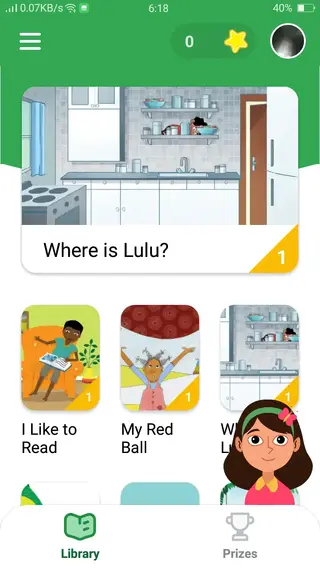
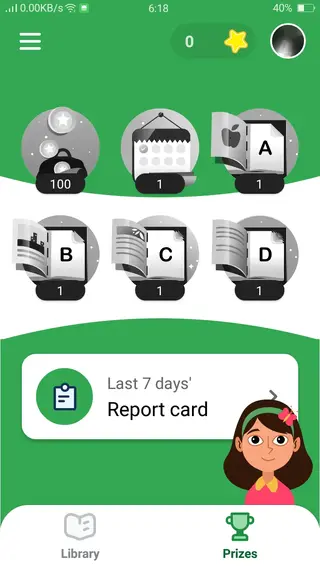
Children earn stars, badges and rewards for reading correctly, which helps maintain motivation and regular practice.
Child-friendly interface
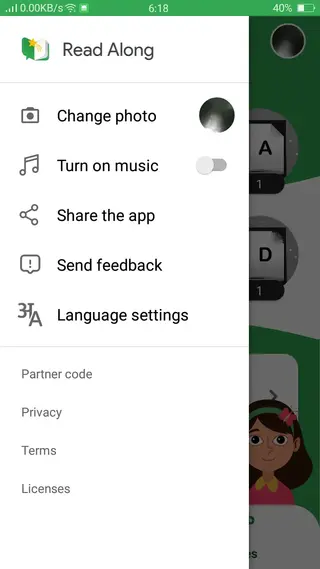
Simple navigation, large icons and clear visuals make it easy for young learners to use the app on their own.
Short daily activities
Lite courses and bite-sized stories fit into short study sessions, supporting consistent reading practice every day.
Profile-based progress tracking
Separate learner profiles allow each child to track their own reading progress and achievements on a shared device.
Ad-free experience
The app does not display ads, reducing distractions and offering a safer environment for children.
Screenshots
Languages and regions supported
Read Along was initially launched in India and later expanded to many other countries. The app focuses on making reading practice accessible to children who speak different languages at home and at school.
Available language options commonly include:
English
Spanish
Portuguese
Hindi
Bangla
Urdu
Telugu
Marathi
Tamil
Google continues to improve and expand the content library, particularly for English and major regional languages, so families can choose material that matches their child’s reading level and context.
Tips for parents using Read Along
Parents can get more value from Read Along by treating it as a companion to real books and schoolwork rather than a complete replacement. A few practical tips include:
Set short daily reading goals, such as 10 to 15 minutes of app-based practice.
Sit with younger children during the first few sessions to help them understand how to interact with Diya.
Encourage kids to read the same story more than once to improve fluency and confidence.
Mix digital reading with printed books and ask children to retell the stories in their own words.
Regularly check their progress and celebrate new badges or milestones to keep motivation high.
Used this way, Read Along becomes a supportive tool in a broader reading routine, helping children enjoy the process of learning to read.
Device compatibility and permissions
The Read Along APK available on this page is built for Android phones and tablets that meet the minimum system version mentioned in the version details. For the best experience, use a device with a stable microphone, speaker and enough storage for offline stories.
When you first start the app, it will request microphone permission so Diya can listen while kids read. Granting this permission is necessary for the voice-based feedback to work correctly. You can review and manage permissions at any time from your device settings.
Keeping your Android system and the app itself updated helps maintain performance, audio quality and security while your children use Read Along.
FAQs
Pros
- Free to download and use with no subscription required
- Developed and maintained by Google with a focus on education
- Supports multiple languages including English and several Indian languages
- Works largely offline after initial content download
- Ad-free environment suitable for young children
- Interactive voice-based tutor gives instant feedback on reading and pronunciation
Cons
- Requires microphone access for speech features to work
- Content library may feel limited in some languages compared to English
- Older or very young children may outgrow the available stories and games
- Performance can be slower on very low-end or outdated Android devices
Conclusion
Read Along by Google is a practical reading companion for children who need more confidence and fluency when reading out loud. With its voice-based tutor, multilingual support and mostly offline design, it offers parents a simple way to turn a phone or tablet into a small reading classroom. You can download the official Read Along APK from our website, install it on compatible Android devices and let kids start exploring stories at their own pace.




Comments
No approved comments yet.