
Relens Camera
Relens Camera is a mobile photography app that adds DSLR-style controls, portrait blur, and rich filters to your existing Android camera. It aims to give you more creative control without needing a dedicated professional camera.
With support for high-resolution photos, manual focus, and multiple portrait modes, you can fine-tune every shot directly from your phone. Whether you shoot landscapes, portraits, or short videos, the app offers practical tools to improve color, sharpness, and background blur.
You can download the latest Relens Camera APK directly from our website and install it on compatible Android mobiles and tablets in a few simple steps.
Rate this app
App details
- App name
- Relens Camera
- Category
- Photography
- Version
- v4.2.0
- Size
- 166.13 MB
- Requirements
- 5.0 and Above
- Package name
- com.accordion.pro.camera
- Publisher
- Accordion
- Price
- Free
- Mod
- No
- Downloads
- 5,624,563
- Rating
- 4.3 / 5
- Rating count
- 56,875
- Play Store
- Yes
- Requires root
- No
- Offline support
- Yes
- Contains ads
- Yes
- In-app purchases
- Yes
- Updated
- Jun 2, 2026
- Age rating
- Rated for 12+
Table of contents
What is Relens Camera?
Relens Camera is an Android photography application from Accordion designed to enhance the capabilities of your built-in camera. Instead of replacing your hardware, it works on top of the existing lens to give you more control over focus, exposure, color, and depth of field.
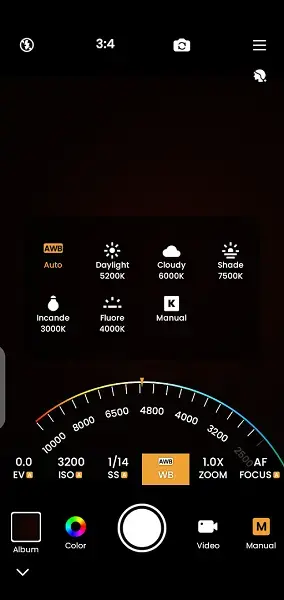
The app focuses on DSLR-like features such as background blur, portrait modes, and higher resolution output. You can shoot both photos and videos, experiment with different lenses and perspectives where supported by your device, and apply filters and effects to refine the final look.
Relens Camera targets users who want better-looking photos without investing in an expensive camera body and lenses. It brings many of the familiar tools from dedicated cameras into a clean, touch-friendly Android interface.
Therefore, capturing high-quality pictures and videos is possible with this unique app. Get high-quality settings and features to improve picture quality and colors. Photography enthusiasts can access similar or even better services with GCAM BSG as well.
Why download Relens Camera APK from our website
Downloading the Relens Camera APK from our website lets you install the current version directly on your Android device without waiting for staged rollouts or region restrictions. The file is available for mobiles and tablets that meet the minimum system requirements.
Once installed, you get access to DSLR-style blur, portrait shooting options, and a wide range of filters that work on both new captures and existing images. You can switch between different modes, adjust quality settings up to supported high resolutions, and fine-tune focus with simple taps.
If you like experimenting with mobile photography, having the APK on your device means you can update or reinstall the app whenever needed, even if you switch ROMs or reset your phone.
How Relens Camera is useful for mobile photography
Relens Camera is useful for anyone who feels limited by the default camera app but still wants to shoot on a phone. It adds several creative tools that help you separate your subject from the background, control the look of portraits, and quickly adjust colors and contrast.
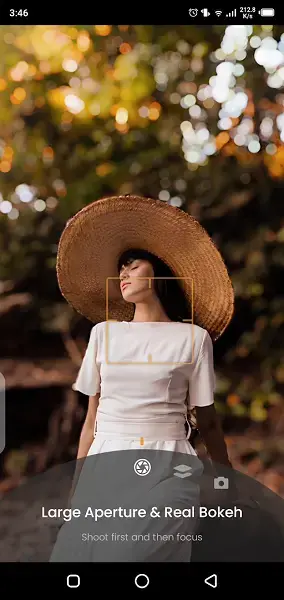
The tap-to-focus and blur features are particularly handy for close-up shots, product photos, and people photography. Instead of relying on fixed auto mode, you can tell the app exactly where to focus and let it soften the rest of the frame.
Its collection of filters and effects can speed up your editing workflow, since you can apply a style while shooting rather than editing every photo later. For casual creators, social media users, and hobby photographers, this can save time while still improving overall image quality.
How to download and install Relens Camera APK
You can get the official Relens Camera APK file directly from our website and install it manually on your Android phone or tablet.
Follow these steps to download and install:
Scroll to the download section on this page and tap the APK download button.
Wait for the Relens Camera APK file to finish downloading to your device.
Open your device settings and enable app installs from unknown sources if it is not already allowed.
Locate the downloaded APK in your Downloads folder or file manager.
Tap the file, review the install prompt, and confirm to start installation.
After installation completes, open Relens Camera from your app drawer and grant the required camera and storage permissions.
Once these steps are complete, you can start using Relens Camera as your main photography app alongside the default camera.
Features
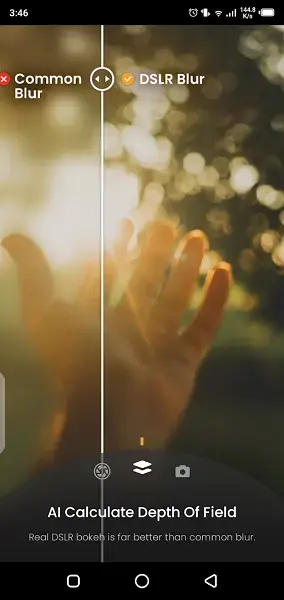
DSLR-style background blur
Add depth-of-field style blur behind your subject to mimic DSLR portraits and make the main object stand out more clearly.
High-resolution photo and video capture
Capture photos and videos in high quality, with options to adjust resolution within the app according to your device capabilities.
Tap-to-focus controls
Tap any area on the screen to set focus and let the app automatically adjust blur and clarity around your chosen subject.
Portrait shooting modes
Use dedicated portrait modes designed for people photos and profile pictures, with tuned depth and enhancement options.
Filters and visual effects
Choose from a large set of filters and effects to change color tone, contrast, and mood of your images with one tap.
Multiple lens support
On supported phones, switch between available camera lenses such as wide, main, or telephoto directly from the app.
Simple, user-friendly interface
Navigate clear controls and organized menus that make advanced camera features easier to understand and use.
Photo and video in one app
Use a single camera interface to capture both still images and videos instead of switching between separate tools.
Screenshots
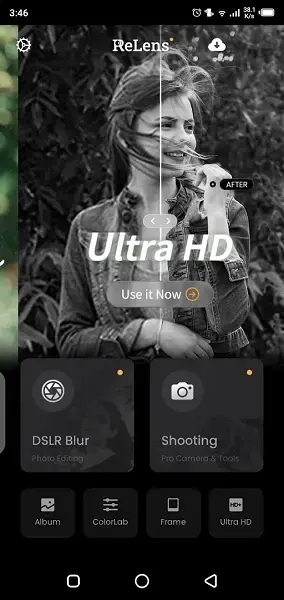
App compatibility and requirements
Relens Camera is built for Android smartphones and tablets running at least Android 5.0 or later. Performance and available options can vary depending on your device’s camera hardware and chipset. Phones with multiple rear lenses, larger sensors, or better image processing will generally see more benefit from the app’s advanced features.
For the best experience, keep enough free storage for high-resolution photos and videos and close unused background apps before long shooting sessions. This helps the camera and editing tools run more smoothly.
Tips for getting better results with Relens Camera
To get the most out of Relens Camera, treat it like a lightweight version of a professional camera. Take a moment to set up each shot rather than relying only on full auto mode.
Tap on your subject’s face or the main object to set focus before capturing.
Experiment with different portrait and blur levels to find a natural look.
Test several filters on the same scene and save your favorites for quick reuse.
Shoot in good lighting whenever possible to reduce noise and keep details clear.
Review your images in the gallery and make small adjustments instead of heavy edits.
By combining these habits with the app’s built-in tools, you can noticeably improve the quality of your daily photos.
FAQs
Pros
- Offers DSLR-style blur and portrait features on mobile
- Supports high-quality photo and video capture where the device allows
- Simple tap-to-focus and enhancement tools are easy to use
- Large selection of filters and effects for quick styling
- Interface is clean and approachable for beginners
Cons
- Advanced modes may not work equally well on all devices
- High-resolution capture and effects can use more battery and storage
- Requires manual APK installation and updates when installed from file
Conclusion
Relens Camera is a practical photography app for Android users who want more control over focus, blur, and image style than the stock camera usually provides. By downloading the APK from our website, you can quickly add DSLR-inspired tools and filters to your phone and experiment with more creative mobile shots.




Comments
No approved comments yet.