

Remove China Apps
Remove China Apps is a lightweight Android utility that scans your phone for apps developed by companies based in China and helps you uninstall them quickly. It was created during the Aatma Nirbhar Abhiyan movement to support local alternatives.
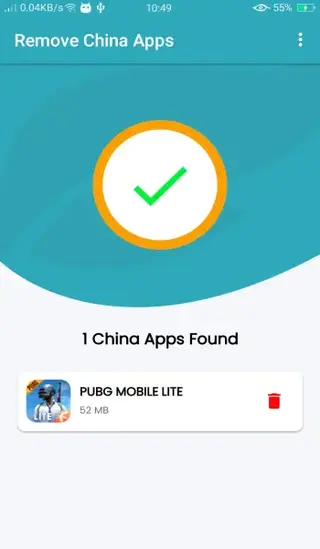
With a single tap on the Scan button, the tool lists detected China-based apps installed on your device and lets you remove them individually. You can download the original APK file for Remove China Apps directly from our website.
The interface is simple, runs on older Android versions, and focuses only on identifying and uninstalling user-installed apps. It does not require root access and does not modify system files on your phone.
Rate this app
App details
- App name
- Remove China Apps
- Category
- Tools
- Version
- v1.6
- Size
- 7.6 MB
- Requirements
- 4.3 and Above
- Package name
- com.chinaappsremover
- Publisher
- One Touch App Labs
- Price
- Free
- Mod
- No
- Downloads
- 51,958
- Rating
- 4.6 / 5
- Rating count
- 17,493
- Play Store
- No
- Requires root
- No
- Offline support
- Yes
- Contains ads
- No
- In-app purchases
- No
- Updated
- May 9, 2026
- Age rating
- Rated for 3+
Table of contents
What is Remove China Apps for Android
Remove China Apps is an Android application developed by One Touch App Labs. It scans your device to find installed apps that are identified as being developed by companies based in China and then lets you uninstall those apps with a tap.
The tool was launched at a time when many users in India and other regions wanted to reduce their reliance on Chinese software. Instead of checking each app manually, users could run a quick scan and see a list of apps that match the tool’s internal detection rules.
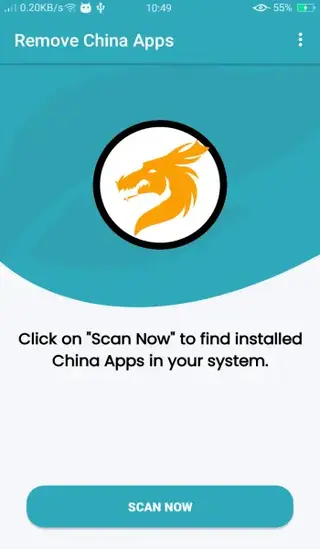
The app focuses on simplicity. After installation, you only see a basic home screen with a Scan Now button. When you tap it, the app reviews installed packages on your phone, compares them against its internal database and then shows you the apps it flags as China-based. You can then choose which ones you want to uninstall through the normal Android uninstall flow.
Remove China Apps does not remove system applications or bloatware and does not require root access. It is designed as a straightforward uninstaller for regular user-installed apps.
Why download the Remove China Apps APK
Many users want more control over which companies’ apps they keep on their phones. Remove China Apps provides a focused way to identify and uninstall apps from Chinese publishers without digging through long lists in system settings.
By downloading the Remove China Apps APK from our website, you get direct access to the original installer file, even if the app is not currently listed on major app stores. This is useful if you want to keep a backup of the tool or install it on multiple devices that meet the Android version requirements.
The app keeps the process non-technical. You do not need advanced knowledge, root tools or complex security utilities. A single tap on Scan Now is enough to see which apps the tool detects, and you can then decide what to keep or remove.
How Remove China Apps can be useful
Remove China Apps can be useful for users who consciously manage which regions their installed apps come from. It centralizes the process of finding China-based apps instead of checking each app’s publisher details manually in Google Play or system settings.
The app also helps users who are participating in campaigns that promote local or non-Chinese software alternatives. By listing detected China-based apps in one place, it becomes easier to review your setup and replace specific tools or games with options that better match your preferences.
Because the application does not require root and works through the standard Android uninstall mechanism, it keeps the process safer and more transparent than using aggressive debloating tools that alter system partitions. You stay in control of every uninstall decision.
How to download and install Remove China Apps APK
You can download the Remove China Apps APK file directly from our website. We provide the available versions so you can choose the release that matches your needs.
Follow these steps to download and install:
Scroll to the download section on this page and choose your preferred Remove China Apps APK version.
Tap the download button to start saving the APK file to your Android device.
On your phone, open Settings and go to Security or Apps & notifications to allow installation from unknown sources if it is not already enabled.
Open your file manager, locate the downloaded Remove China Apps APK file and tap on it.
When the installation wizard appears, tap Install and wait for the process to finish.
Once installed, open Remove China Apps, tap Scan Now and review the list of detected apps before uninstalling anything.
After setup, you can keep the APK file as a backup or download another available version from our website whenever you need it.
Features
One-tap device scan
Scan your Android device with a single tap to detect apps identified as coming from China-based developers.
Simple uninstall flow
View a list of detected apps and start the standard Android uninstall process directly from the app.
Clean and minimal interface
Uses a straightforward layout so even first-time users can run a scan and manage results without confusion.
No root required
Works on non-rooted phones and tablets by relying on the normal package uninstall system.
Lightweight utility
Designed as a small, focused tool that runs on older Android versions starting from 4.3 and above.
Focused purpose
Built specifically to help users who want to identify and optionally remove China-based apps from their devices.
Screenshots
Limitations and important considerations
Remove China Apps is designed as a basic helper tool and has several limitations you should understand before using it. It cannot access or modify system partitions, so pre-installed apps and manufacturer bloatware remain untouched. The app also relies on its own rules and database to decide which apps it flags, which means detection might not be complete or perfect.
You always decide what to uninstall. Before removing any app, make sure you understand what it does and whether it affects your daily use, logins or data. Deleting communication tools, payment apps or work apps without planning replacements can cause inconvenience. Use the list shown by Remove China Apps as a starting point for review rather than an automatic uninstall list.
Device compatibility and performance
Remove China Apps supports Android 4.3 and above, which covers many older smartphones and tablets. Because the app is compact and runs a relatively quick scan, its impact on performance and battery life is generally low during normal use.
To keep your device responsive, it is better to run scans when you are not actively gaming or using heavy apps. Once the scan is complete and you have reviewed the results, you can close the app and continue using your phone normally.
FAQs
Pros
- Very easy to use with a single Scan Now button
- Helps quickly identify apps from China-based developers
- Does not require root access to work
- Lightweight tool that supports older Android versions
- Uninstall actions use the normal Android package manager, keeping you in control
Cons
- Cannot remove pre-installed system apps or bloatware
- Detection is limited to the app’s internal database and may not be perfect
- No advanced filtering or customization options for power users
- App availability on official stores has been unstable over time
Conclusion
Remove China Apps is a small, focused Android utility for users who want to identify and uninstall China-based applications from their devices with minimal effort. If you like this article and want more latest Android apps then keep visiting our Website.




Comments
No approved comments yet.