

Revancify
Revancify is an Android patch manager that helps you build and update YouTube ReVanced and YouTube Music ReVanced on your device. It combines patching, downloading and updating into one simple interface.
With this tool you can fetch the latest patches, apply them to compatible YouTube APKs, and keep your modded client up to date with fewer manual steps. It is designed for users who want more control over their YouTube experience without a complex setup.
You can download the official Revancify APK file directly from our website and start patching supported YouTube versions in a few minutes.
Rate this app
App details
- App name
- Revancify
- Category
- Tools
- Version
- v1.25.7
- Size
- 44.4 MB
- Requirements
- 5.0 and Above
- Package name
- app.rvx.manager.flutter
- Publisher
- RVX
- Price
- Free
- Mod
- No
- Downloads
- 93,318
- Rating
- 4.6 / 5
- Rating count
- 41,490
- Play Store
- No
- Requires root
- No
- Offline support
- Yes
- Contains ads
- No
- In-app purchases
- No
- Updated
- Jun 2, 2026
- Age rating
- Rated for 7+
Table of contents
What is Revancify App
Revancify is an Android patcher tool created to manage YouTube ReVanced and related mods. Instead of being a media streaming app itself, it works as a companion utility that downloads patches, prepares compatible APKs, and applies the selected patches to build a customized YouTube client.
ReVanced YouTube Extended is the modified version of YouTube. This YT Mod provides users access to Premium YT functions completely free. So, users will get a smooth streaming platform with millions of videos and relevant content. Enjoy getting nonstop entertainment on YouTube with the free premium features.
The app focuses on ReVanced YouTube Extended and other ReVanced variants. It provides an easy way to get features such as background playback, picture-in-picture, ad-free viewing and extra customization options, depending on the patches you select and how you configure the build.
Revancify offers:
A guided workflow for building or updating a ReVanced-based YouTube client
Built-in access to current patch lists from supported repositories
Controls for choosing which patches and integrations to apply
Tools to clean up unused libraries and temporary files after patching
The app does not replace YouTube on its own. Instead, it helps you prepare a patched APK that you then install as a separate YouTube or YouTube Music client on your device.
Why Download Revancify for Android
Revancify simplifies a process that can otherwise feel technical and confusing. Building a ReVanced client by hand normally requires command line tools, patch files, a compatible base APK and careful configuration. Revancify wraps these steps in a guided Android interface so you can focus on the options you want.
By installing Revancify from our website, you get a ready-to-use manager that can:
Download compatible YouTube and YouTube Music APKs from supported sources inside the app
Fetch the latest ReVanced patches and integrations
Apply updates to your existing patched client with a few taps
Automate some housekeeping, such as removing temporary or unused files
If you want more control over your YouTube experience without spending time on manual patching scripts, Revancify offers a convenient and focused solution.
How Revancify Is Useful
Revancify is useful for Android users who prefer a graphical patch manager instead of a desktop-based tool. It centralizes patch management, APK selection and build configuration in one place, which reduces the chance of errors and incompatible combinations.
For regular users, the key benefit is a smoother update cycle. When new ReVanced patches or YouTube versions appear, you can trigger a rebuild from inside Revancify instead of repeating the entire manual process. Advanced users can fine-tune which patches to apply and experiment with different builds while keeping everything organized.
Because Revancify focuses on patch management and cleanup, it also helps keep storage usage more efficient by removing unneeded libraries and leftover temporary files after a successful build.
How to Download and Install Revancify APK
You can get the latest Revancify APK file directly from our website. Follow these steps to download and install it on your Android device:
Scroll to the download area on this page.
Tap the download button to save the Revancify APK file to your device.
Open your device settings and enable installation from unknown sources for your browser or file manager if needed.
Locate the downloaded APK in your downloads folder.
Tap the file and confirm the installation prompt.
Once installed, open Revancify and follow the on-screen instructions to configure patches and build your ReVanced client.
After installation, you can return to this page whenever you want to download a newer version of Revancify.
Features
Integrated ReVanced patch manager
Manage ReVanced and ReVanced Extended patches directly from an Android interface without using desktop tools.
Support for YouTube and YouTube Music
Build patched versions of both YouTube and YouTube Music, as long as compatible base APKs are available.
In-app downloader for base APKs
Find and download compatible YouTube or YouTube Music APKs from within the app to use as a base for patching.
Selectable patch list
Choose which individual patches and integrations to apply so you can customize the feature set you want.
Auto update for patches
Enable automatic fetching of newer patches so your ReVanced build can be rebuilt with recent changes more easily.
Update existing builds
Use your current patched YouTube as a base and update it when new patches or versions are released.
Cleanup of unused files
Remove temporary files and unneeded libraries after patching to save storage space and keep things tidy.
Organized interface
Navigate through clearly separated sections for patches, integrations, downloads and settings.
Screenshots
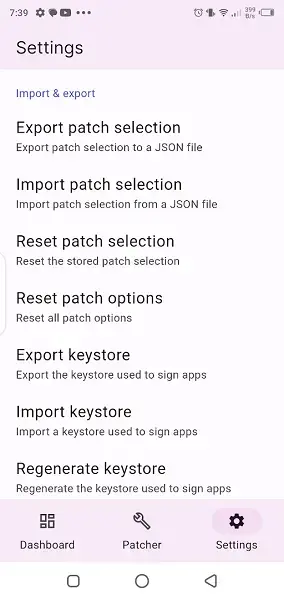
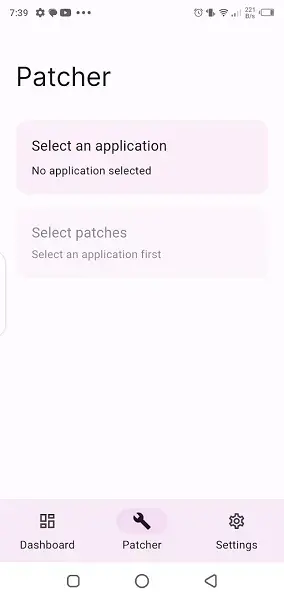
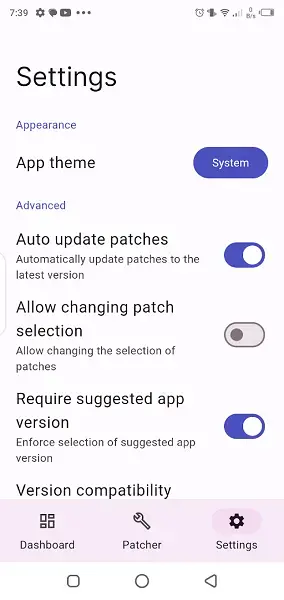
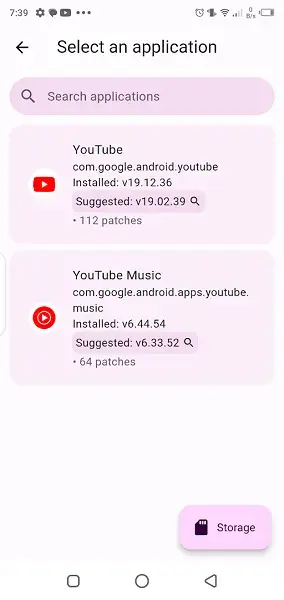
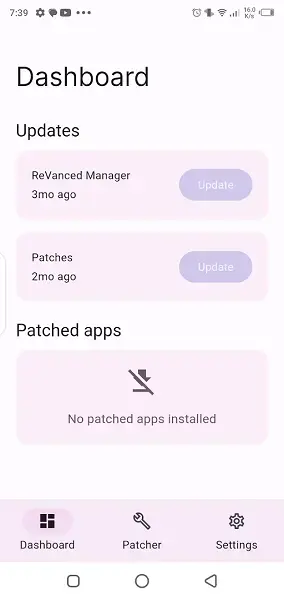
How Revancify Works in Practice
Revancify follows a step-by-step workflow. First, it helps you obtain a compatible base APK of YouTube or YouTube Music. Next, it retrieves the latest patch list from supported repositories. You then choose which patches and integrations you want to apply and let the app build a new APK based on those settings.
When the process finishes, you install the newly generated APK as your patched YouTube client. Over time, when new patches or app versions appear, you repeat the build process from within Revancify to keep your client current.
Tips for New Revancify Users
If you are new to patch managers, start with the default or recommended patch selection so you can get a stable build first. Later, experiment by enabling or disabling individual patches to see which combination matches your viewing habits.
Always read patch descriptions carefully, especially when combining experimental or advanced options. Keeping a backup of your current working build before testing new configurations is also a good practice.
FAQs
Pros
- Dedicated patch manager for YouTube ReVanced and related builds
- Simplifies a complex technical process into a guided Android interface
- Supports both YouTube and YouTube Music builds
- Lets you select exactly which patches and integrations to apply
- Includes options for automatic patch updates
- Helps clean up unnecessary files to save storage space
Cons
- Requires some understanding of how patched YouTube clients work
- Cannot function as a standalone video streaming app without a patched client
- Features and supported patches may change as ReVanced projects evolve
- Initial configuration can feel complex for complete beginners
Conclusion
Revancify offers a practical way to manage YouTube ReVanced builds directly from Android. If you want more control over your YouTube experience and prefer not to handle patching on a computer, downloading the Revancify APK from our website gives you a focused tool to build, update and maintain your customized client with fewer manual steps.




Comments
No approved comments yet.