

Sam Helper
Sam Helper is an Android optimization tool that gives you direct access to hidden system settings, device information, and app controls from a single dashboard. It is especially popular among Samsung users who want more control over their phones.
The app combines system tweaking, theme customization, and app management, so you can adjust refresh rates, animations, fonts, icons, and more without digging through multiple menus. Many functions work on non-root devices, while some advanced tweaks may require root access.
You can download the latest Sam Helper APK directly from our website and start optimizing your Android device with a lightweight, easy-to-use utility.
Rate this app
App details
- App name
- Sam Helper
- Category
- Tools
- Version
- v2.8
- Size
- 3.32 MB
- Requirements
- 7.0 and Above
- Package name
- com.litebyte.samhelper
- Publisher
- Lite Byte
- Price
- Free
- Mod
- No
- Downloads
- 156,791
- Rating
- 4.3 / 5
- Rating count
- 2,812
- Play Store
- No
- Requires root
- No
- Offline support
- Yes
- Contains ads
- No
- In-app purchases
- No
- Updated
- Jun 4, 2026
- Age rating
- Rated for 3+
Table of contents
What is Sam Helper APK
Sam Helper APK is a utility app for Android designed to help users tweak and optimize different parts of their device. It focuses on easy access to system settings, visual customization, and app control, all from one simple interface.
The tool offers sections for CPU and system optimization, app management, and detailed phone information. It is particularly useful on Samsung phones, where it can unlock additional labs and lock features, but it also works on many other Android devices running Android 7.0 or higher.
With Sam Helper, you can adjust refresh rates, customize themes, manage fonts and icons, change network and display options, and inspect installed apps without needing to install several separate tools.
This application provides a unique combination of multiple functions. Hence, get detailed information related to the available unique features of this app here. Get a similar system booster experience with the Legit Game Booster.
Why download Sam Helper for Android
Users download Sam Helper to gain deeper control over how their Android device behaves and looks. Instead of relying only on stock settings, the app centralizes many advanced options that are normally spread across different menus or hidden behind codes.
It is helpful if you want to experiment with different screen refresh rates, tune animation speeds, clean up unused apps, or quickly check package details. Samsung users also get extra value from the dedicated Lock & Labs tools that allow app locking and additional system tweaks.
Because the APK is available directly on our website, you can install it quickly and start exploring its optimization tools without going through long setup processes.
How Sam Helper is useful
Sam Helper is useful for users who like to fine-tune their phones beyond the basic settings. It collects several practical tools in one place so you can:
Adjust visual elements such as themes, wallpapers, icons, and fonts.
Modify system options like network settings, animations, and refresh rate.
View detailed phone and app information including package names and system data.
Lock selected apps on supported Samsung devices for extra privacy.
Export or uninstall apps quickly using the built-in App Manager.
This makes it a compact toolkit for enthusiasts who want more control while still keeping the interface straightforward and usable for everyday tweaking.
How to download and install Sam Helper APK
You can get the Sam Helper APK directly from our website. Follow these steps to download and install it on your Android device:
Scroll to the download section on this page.
Tap the download button for the latest Sam Helper APK version.
Wait for the APK file to finish downloading to your device.
Open your phone settings and enable installation from unknown sources if it is not already allowed.
Locate the downloaded APK file in your Downloads or file manager.
Tap the file and follow the on-screen instructions to complete the installation.
After installation, open Sam Helper from your app drawer, grant the requested permissions, and start configuring system, theme, and app options as you prefer.
Features
Theme tools and personalization
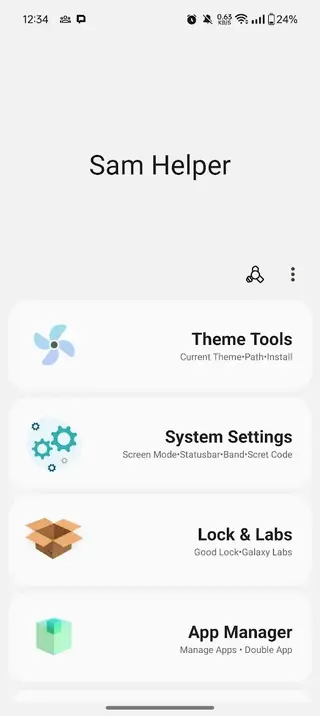
Customize themes, icons, wallpapers, fonts, and font size, and even add new themes or fonts using package names.
Advanced system settings access
Reach network options, screen modes, animations, refresh rate controls, phone info, and SystemUI-related settings from one app.
Samsung Lock and Labs functions
On supported Samsung devices, lock selected apps and access extra labs options to control installed applications more tightly.
Powerful app manager
View all installed apps, uninstall or export them, copy package names, and even attempt double-install where supported.
Device and hardware information
Check hardware details and performance-related information to better understand how your device is running.
CPU and performance tweaks
Use built-in optimizers to help reduce lag, manage loads, and keep the device running more smoothly where supported.
No account registration
Use the app without creating an account or signing in, keeping setup quick and simple.
Lightweight and easy interface
The app is small in size and designed with a clear layout so both beginners and advanced users can navigate it easily.
Screenshots
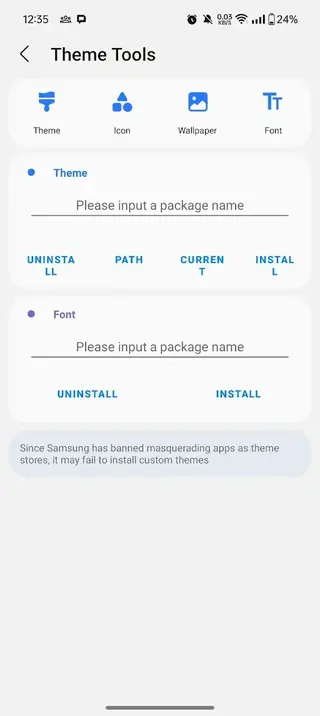
Theme and UI customization in detail
Sam Helper places strong focus on how your device looks and feels. In the Theme Tools section, you can:
Apply multiple built-in themes that instantly change the overall UI style.
Adjust app icons and replace them to match your preferred look.
Browse and set wallpapers that fit your home and lock screens.
Use the font collection to switch between different typography styles.
Control font size for better readability or a more compact layout.
Add new themes or fonts using their package names, where supported.
This mix of options lets you build a more personalized interface without needing several separate customization apps.
System settings and optimization controls
The System Settings section in Sam Helper focuses on giving you easier access to deeper options that can influence performance and responsiveness. Depending on your device, you can:
Adjust network-related settings for Wi-Fi and mobile data behavior.
View phone information, including model, build, and other technical details.
Use secret code functions where supported to access hidden menus.
Interact with SystemUI-related options to refine the interface layout.
Modify screen mode, animations, and refresh rate to balance smoothness and battery use.
These tools are aimed at users who understand how such settings affect their device and want to fine-tune the experience.
Samsung Lock and Labs features
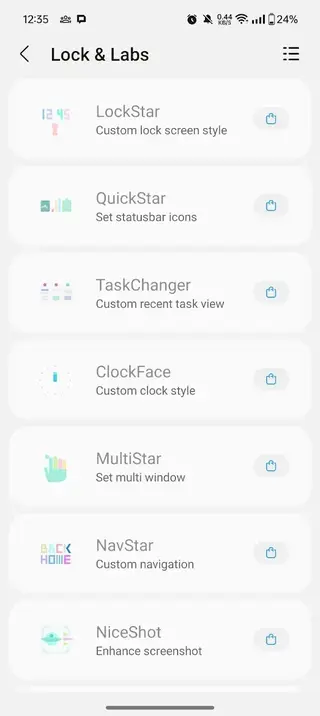
On supported Samsung devices, Sam Helper unlocks a dedicated Lock & Labs area. Here, you can:
Select individual apps that you want to lock for privacy.
Set a code or pattern to protect access to those apps.
Control certain Samsung-specific labs options when available on your firmware.
This is particularly useful if you share your phone with others or want a quick way to protect sensitive apps such as messaging or banking tools.
App Manager and device information
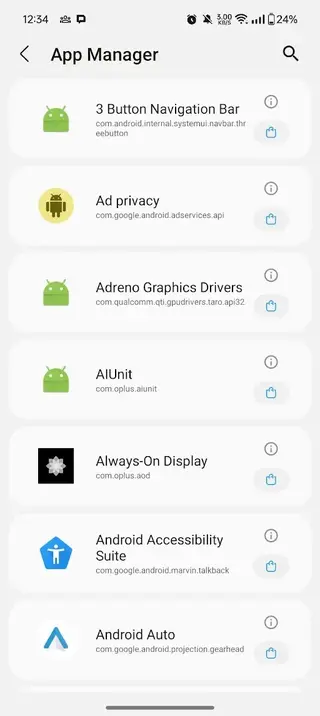
The built-in App Manager in Sam Helper gives you a detailed overview of your installed applications. In this section, you can:
See all user and possibly some system apps in one list.
Uninstall apps you no longer need to free up space.
Export APKs of installed apps where permitted.
Copy package names for debugging, modding, or sharing purposes.
Attempt double installation in certain scenarios supported by your device.
Together with the hardware and performance information provided by the app, this makes Sam Helper a convenient dashboard for understanding and managing what runs on your phone.
FAQs
Pros
- Gives centralized access to many advanced system settings
- Offers rich theme and font customization options
- Includes a practical app manager for uninstalling and exporting apps
- Provides extra lock and labs tools on supported Samsung devices
- Lightweight app that is simple and quick to use
- No registration or account required to start using the app
Cons
- Some advanced animation tweaks may require root access
- Features can vary between devices and Android versions
- No clear information about ads or monetization inside the app
- Improper use of settings might affect device behavior if users are not careful
Conclusion
Sam Helper is a compact Android toolkit that combines system tweaks, visual customization, and app management in one place. If you want more control over how your phone looks and behaves, you can download the latest Sam Helper APK directly from our website and explore its options at your own pace.




Comments
No approved comments yet.