

Saral Data
Saral Data is an official education app used in Gujarat schools to scan weekly assessment sheets and submit student performance data digitally. It supports teachers in tracking learning outcomes in a structured way.
With Saral Data, teachers use their Android phone camera to scan OMR-style answer sheets, verify responses, and send the results directly to the monitoring system. This reduces manual checking effort and helps education authorities review progress more quickly.
There are different features and services available in this tool, through which users can easily benefit. So, just stay with us and explore more Govt Apps like, Nishtha App & Jagananna Vidya Kanuka App.
You can download the latest Saral Data APK directly from our website and install it on compatible Android mobiles and tablets that support the app’s camera-based scanning features.
Rate this app
App details
- App name
- Saral Data
- Category
- Educational
- Version
- v3.1.7
- Size
- 85.95 MB
- Requirements
- 4.1 and Above
- Package name
- com.hwrecognisation
- Publisher
- Sarva Shiksha Abhiyan – MIS
- Price
- Free
- Mod
- No
- Downloads
- 79,443
- Rating
- 4.7 / 5
- Rating count
- 28,640
- Play Store
- No
- Requires root
- No
- Offline support
- No
- Contains ads
- No
- In-app purchases
- No
- Updated
- May 21, 2026
- Age rating
- Rated for 7+
Table of contents
What is Saral Data App
Saral Data is an educational assessment app for Android developed under the Sarva Shiksha Abhiyan initiative in Gujarat. The app helps teachers conduct regular learning outcome tests and upload student responses in digital form using their phone camera.
The Gujarat Council of Educational Research and Training (GCERT) provides standardized question papers and OMR-style answer sheets. Teachers distribute these sheets in class, and after students complete the test, the Saral Data app scans and records each response.
The app is mainly designed for registered teachers and authorized school staff. It supports weekly or periodic tests, makes it easier to collect and store assessment data, and sends it to the central education management system for analysis. This process helps authorities understand how students are learning and where extra support is needed.
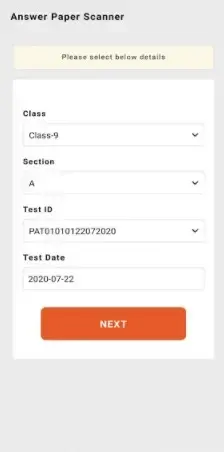
Saral Data focuses on simple workflows: select the test, scan the sheet, check the captured responses, and submit the data. Recent updates have improved the scanner accuracy and stability, so answer sheets can be processed more reliably on supported Android devices.
Why Download Saral Data APK from Our Website
Downloading Saral Data APK from our website allows teachers and school staff to get the latest available version quickly when Play Store access is limited or devices are managed differently. The APK file on our website is prepared to match the package name and version details used in schools.
By installing the app through the APK, teachers can set up Saral Data on compatible Android phones and tablets and start scanning answer sheets without waiting for device-specific rollouts. This is especially useful in regions with slow updates or network restrictions.
Our download page keeps the essential information together in one place, including version name, basic requirements, and installation guidance, so users can focus on assessments instead of searching multiple pages.
How Saral Data Helps Teachers and Schools
Saral Data is useful because it turns traditional paper-based tests into structured digital data without changing classroom habits too much. Students still write on printed answer sheets, but teachers no longer need to check every paper manually.
The app reads student responses through the camera, which saves time during large assessments and reduces calculation errors. Schools can complete weekly or monthly tests and share performance data in a consistent format across multiple classes and schools.
Education departments benefit from faster reporting. Aggregated data from Saral Data helps identify learning gaps, monitor program impact, and plan academic support. For teachers, quick feedback means they can adjust teaching methods and focus on topics where students struggle.
Support for regional languages, including Gujarati and Hindi, makes the interface easier to use for many educators. Overall, Saral Data helps digitize assessment workflows while keeping the process straightforward for teachers in the field.
How to Download and Install Saral Data APK
You can get the Saral Data APK directly from our website. Make sure that your device meets the minimum Android version mentioned on the download page before installing.
Follow these steps to download and install:
Scroll to the download section on this page.
Tap the APK download button for Saral Data.
Wait until the APK file finishes downloading to your device.
Open your phone settings and enable app installs from unknown sources for your browser or file manager.
Locate the downloaded APK in your Downloads folder and tap it.
Review the permissions and proceed with the installation.
Once installed, open Saral Data, sign in with your authorized credentials, and start using the scanner for assessments.
After installation, keep the app updated by checking back on our website whenever a newer version becomes available.
Features
Digital scanning of answer sheets
Use the phone camera to scan OMR-style answer sheets and capture student responses automatically.
Weekly and periodic assessments
Supports regular tests designed by GCERT and SSA to track learning outcomes at classroom level.
Centralized data submission
Sends scanned responses to the central system so education authorities can review performance data.
Improved scanner accuracy
Recent versions focus on better recognition of bubbles and layout for more reliable results.
Data storage on device until upload
Keeps scanned results on the device until they are successfully submitted, reducing data loss risk.
Access for registered users only
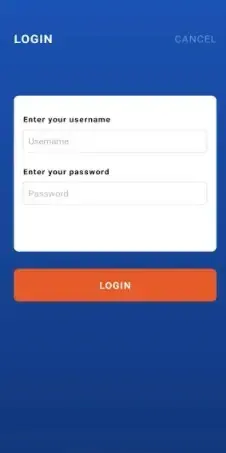
Requires authorized login so only verified teachers and staff can scan and submit assessments.
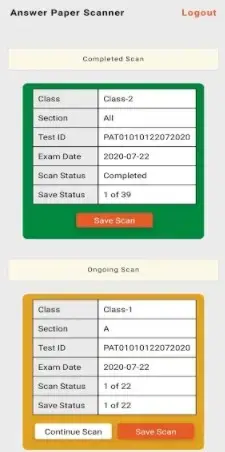
Multiple school and class handling
Lets users manage assessments for more than one class or school based on their assigned role.
Support for local languages
Provides interface options for regional languages such as Gujarati and Hindi where supported.
Screenshots
System Requirements and Compatibility
Saral Data is built for Android smartphones and tablets. According to the version details, it typically runs on Android 4.1 or higher, although performance and scanning accuracy are better on newer devices.
For a smoother experience, it is recommended to use a device with:
A clear rear camera with autofocus
Good processing power to handle image recognition
Sufficient storage space for app data and cached scans
Reliable internet access when you need to upload assessment results
Because the app relies on camera-based scanning, devices with damaged cameras or very low resolution may not provide the expected results.
Best Practices for Scanning Answer Sheets
To improve scan quality and reduce recognition errors while using Saral Data, teachers can follow a few simple best practices.
Place the answer sheet on a flat, contrasting surface.
Ensure good lighting without strong glare or shadows over the bubbles.
Hold the phone steady so the entire sheet fits clearly within the camera frame.
Avoid folded, torn, or heavily marked sheets that may confuse the scanner.
Double-check captured responses on-screen before submitting the data.
Following these steps helps the app read bubbles correctly and reduces the need for rescans or manual corrections.
Security and Data Handling
Saral Data uses login access so that only authorized users can scan and submit assessments. This helps protect student data and ensures that records come from valid schools and teachers.
Assessment data is typically linked with school and class information and sent to official servers for analysis. Users should keep their login credentials private, avoid sharing devices with unauthorized people, and log out when not using the app on shared phones.
FAQs
Pros
- Official assessment app used by Gujarat schools for weekly tests
- Reduces manual checking time through camera-based answer sheet scanning
- Provides structured performance data for teachers and education departments
- Supports multiple classes and schools from a single login
- Interface supports local languages to help regional users
- Available as an APK download for devices with limited Play Store access
Cons
- Requires stable camera focus and proper lighting for accurate scanning
- Designed mainly for registered teachers, not for general learners
- Depends on network connectivity for submitting scanned data
- Not all features are available outside supported government programs
Conclusion
Saral Data is a focused assessment tool that helps Gujarat schools scan answer sheets and send learning outcome data in a consistent, digital format. Teachers who participate in these assessment programs can download the APK from our website, install it on compatible Android devices, and streamline weekly test management with reliable camera-based scanning.




Comments
No approved comments yet.