

Scarlet
Scarlet is a finance app for Android that works with a Scarlet debit card to help you manage everyday spending. It connects with Walgreens so you can use your card and app together at participating locations.
With the app you can track transactions, move money, and access reload and withdrawal options at Walgreens and Duane Reade locations. Eligible purchases can also earn rewards, which you can later redeem toward future shopping.
You can download the official Scarlet APK file directly from our website and install it on compatible Android phones and tablets without using any other source.
Rate this app
App details
- App name
- Scarlet
- Category
- Finance
- Version
- v1.2000.0.1
- Size
- 27 MB
- Requirements
- 4.4 and Above
- Package name
- com.incomm.scarlet
- Publisher
- Interactive Communications International, Inc.
- Price
- Free
- Mod
- Yes
- Downloads
- 61,847
- Rating
- 4.6 / 5
- Rating count
- 20,194
- Play Store
- Yes
- Requires root
- No
- Offline support
- No
- Contains ads
- No
- In-app purchases
- No
- Updated
- Jun 2, 2026
- Age rating
- Rated for 3+
Table of contents
What is Scarlet Android app
Scarlet is a prepaid debit and budgeting app for Android issued by InComm in partnership with Walgreens. It is designed to help users manage day-to-day money, pay at stores, and access cash while also participating in a rewards program.
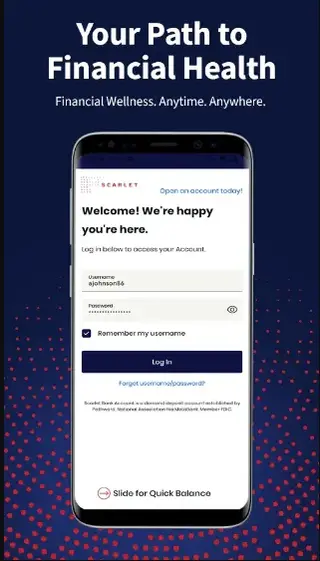
After opening a Scarlet account and getting your Scarlet card, you can link it with the app to see your available balance, view transaction history, and manage basic account settings. The app focuses on simple money management rather than full-service mobile banking.
Scarlet is closely integrated with Walgreens and Duane Reade locations in the United States, where you can add cash, withdraw at participating locations, and shop using your Scarlet card while earning rewards on qualifying purchases.
Why download Scarlet APK from our website
Installing Scarlet through the APK lets you set up and manage your Scarlet account even if the Play Store download option is not convenient for you. The file available on our website is the official Android package linked in the original store listing.
Once installed, you can use the app to activate your card, keep an eye on your balance before shopping, and manage everyday transactions tied to your Scarlet account. Downloading the APK directly from our website also makes it easier to keep a backup installer for later use on your Android devices.
How Scarlet can be useful
Scarlet is useful for people who want a prepaid-style spending tool that connects tightly with Walgreens. You can load money to your Scarlet account, use the card in-store or online where it is accepted, and then monitor your spending in the app.
The integration with Walgreens and Duane Reade locations helps with reloading and cash access, which can be more convenient than visiting a traditional bank branch. The rewards structure on eligible Walgreens branded items and other purchases adds an extra benefit for frequent shoppers.
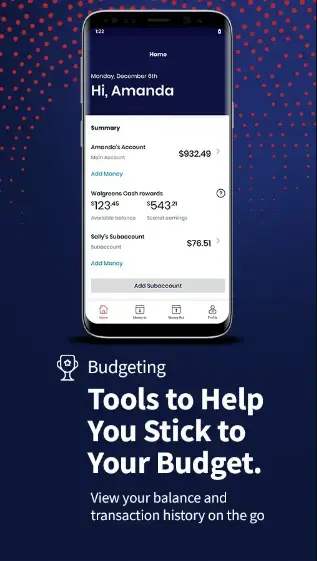
Because your day-to-day activity appears directly inside the app, you can quickly see how much you have left to spend, which categories you spend the most on, and whether you are staying within your personal budget.
How to download and install Scarlet APK
You can get the Scarlet APK file directly from our website and then install it manually on your Android device. Follow these basic steps if you are installing an APK for the first time.
Download the Scarlet APK file from the download button provided on our page.
On your Android phone, open Settings and allow app installs from your browser or file manager if prompted.
Open your Downloads folder and tap the Scarlet APK file.
Confirm the installation request and wait until the process finishes.
Launch Scarlet from your app drawer, review the terms, and sign in or start account setup.
After installation, you can update the app later either through the Play Store or by downloading a newer APK version from our website when it becomes available.
Features
Linked to Scarlet debit card
Connect the app to your Scarlet card to see balance, recent transactions, and account details in one place.
Walgreens and Duane Reade integration
Use supported Walgreens and Duane Reade locations for card use, cash reload options, and other account-related activities.
Reload options
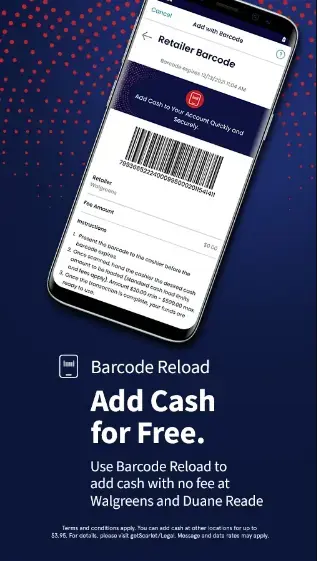
Access online reload methods and in-store barcode reload options at participating Walgreens and Duane Reade stores.
ATM and cash access
Request a Scarlet card that can be used for ATM withdrawals at compatible ATMs and for cash services at some Walgreens locations.
Rewards on eligible purchases
Earn rewards on qualifying Walgreens branded items and a smaller percentage on other eligible purchases as described in the program terms.
Spending overview
Track transactions and monitor how much you are spending directly from your phone.
Account alerts and notifications
Receive notifications about account activity, such as card transactions and important updates, depending on your settings.
Simple interface
Navigate balances, movements, and settings through a clean and straightforward interface suited for everyday users.
Screenshots
Walgreens partnership and rewards
Scarlet is closely tied to Walgreens, making it more attractive if you already shop there regularly. The program offers rewards on qualifying Walgreens branded items and typically a smaller percentage on other eligible purchases, subject to current terms.
Inside the app you can monitor earned rewards and see account activity connected to eligible transactions. This connection between daily spending and rewards makes Scarlet useful as a companion for frequent Walgreens and Duane Reade shoppers.
Managing money with Scarlet on Android
Using Scarlet on Android can support simple budgeting habits. By checking your balance before each shopping trip and reviewing your history after purchases, you can keep closer control of how much you spend.
The app helps separate everyday spending from other bank accounts, which can be helpful if you want to dedicate one card for routine expenses like pharmacy items, small groceries, and personal care products.
Security and account control
Scarlet includes security measures typical of modern financial apps, such as protected sign-in and controls managed from your account. For specific security features, limits, and policies, you should review the official Scarlet documentation and cardholder agreement.
Always keep your device locked with a PIN or biometric, avoid sharing login details, and sign out of the app on any shared device to reduce the risk of unauthorized access.
FAQs
Pros
- Integrated with Walgreens and Duane Reade for reloads and shopping
- Helps track balance and recent transactions in one app
- Rewards on eligible Walgreens branded products and other purchases
- Prepaid-style spending helps limit overspending
- Simple interface suitable for everyday money management
Cons
- Service primarily targeted to users in the United States
- Requires an active Scarlet account and card to use most features
- Limited offline functionality since transactions and balances need internet
- Not a full traditional bank with broad financial products
Conclusion
Scarlet for Android is a practical option for users who want a prepaid-style card with Walgreens integration and basic budgeting tools. You can download the official Scarlet APK directly from Apkoll, install it on a compatible Android device, and then use the app to manage your Scarlet account, track transactions, and access rewards tied to eligible purchases.




Comments
No approved comments yet.