

Script ML
Script ML is an injector tool for Mobile Legends: Bang Bang that lets you load custom scripts, visual tweaks, and controller presets on Android. It focuses on script-based modifications instead of full mod APKs.
With this app, players can apply drone views, unlock selected visual items, and adjust movement controls through ready-made scripts. You can download the Script ML APK directly from our website and install it on your phone or tablet.
The tool works without root and does not require in-app registration, so you can set it up quickly and start testing scripts in supported versions of MLBB.
Rate this app
App details
- App name
- Script ML
- Category
- Tools
- Version
- v11.1.1001
- Size
- 61.27 MB
- Requirements
- 4.4 and Above
- Package name
- com.chuchu.scriptmobile
- Publisher
- ScriptMobile
- Price
- Free
- Mod
- No
- Downloads
- 63,227
- Rating
- 4.1 / 5
- Rating count
- 12,540
- Play Store
- No
- Requires root
- No
- Offline support
- No
- Contains ads
- No
- In-app purchases
- No
- Updated
- Jun 1, 2026
- Age rating
- Rated for 3+
Table of contents
What is Script ML
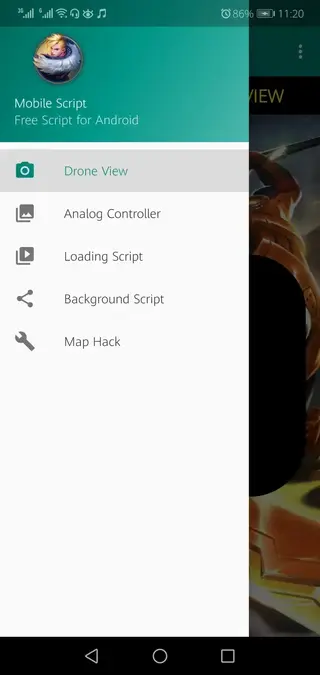
Script ML is a third-party Mobile Legends injector app that loads external scripts into the game to change how it looks and feels. Instead of modifying the original MLBB APK, it offers a separate interface where you pick scripts for camera view, controls, backgrounds, and cosmetic elements, then apply them before starting the game.
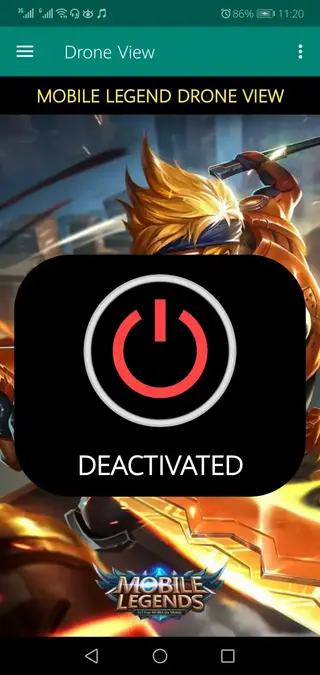
The app targets Android users who want more control over gameplay visuals and input behavior. It includes controller scripts for specific heroes, drone map views, and options to apply custom backgrounds and wallpapers. Script ML is free to download from our website and supports most modern Android devices.
Because this is not an official Moonton product, it operates outside the standard MLBB ecosystem. Players should understand the risks of using injectors in competitive games and use them at their own discretion.
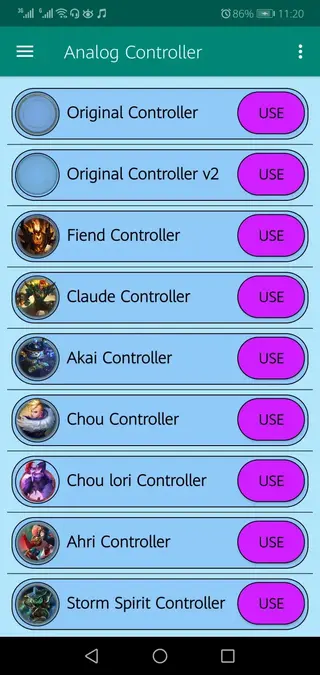
You can activate powerful in-game movements and control settings with custom analog controllers. These scripts make your movements smoother, help you react quicker, and play like a pro during intense battles. ML Plus Injector and Sphynx Injector also offer similar options if you want to give them a try.
Why download Script ML APK from our website
Downloading Script ML APK from our website gives you direct access to the installer file without searching multiple sources. The latest available version, package name, and core details are clearly listed so you know exactly what you are installing.
Our download page keeps the important information in one place, including Android requirements, developer name, and basic usage notes. You can keep a backup of the APK on your device and reinstall it whenever needed without relying on app stores.
Since Script ML is a niche injector rather than a mainstream app, having a direct APK download on our website is often the most straightforward way for MLBB players to try the tool.
How Script ML can be useful
Script ML can be useful for players who want to experiment with MLBB using external scripts. Its controller presets can make hero movement and skill casting feel different from the default layout, which some users find more comfortable.
Drone view and visual scripts can change how much of the map you see and how the match environment appears on screen. This can make the game feel fresh and provide a different tactical perspective.
The app also includes scripts that unlock certain visual elements like skins, effects, and backgrounds on the client side. While these do not replace regular progression or official purchases, they allow users to customize the look of the game interface in ways that are not normally available.
All of this is handled through a simple menu-driven interface, without root access or account sign-up, which lowers the barrier to entry for casual experimenters.
How to download and install Script ML APK
You can download the Script ML APK file directly from our website and install it manually on your Android device. Follow these steps to get started:
Scroll to the download section on this page.
Tap the Script ML APK download button and wait for the file to start downloading.
On your Android device, open Settings and enable installation from unknown sources for your browser or file manager if it is not already enabled.
Once the download finishes, open your file manager and locate the Script ML APK in the Downloads folder.
Tap the APK file, review the permissions, then press Install.
After installation completes, open Script ML, choose the scripts you want to apply, and then launch Mobile Legends.
If you install a new MLBB update later, revisit our website to check for an updated Script ML version that matches the latest game build.
Features
Script-based MLBB injector
Loads and manages Mobile Legends scripts instead of using a full modded game client, keeping changes organized in one place.
Controller presets for multiple heroes
Offers custom controller scripts for heroes such as Claude, Chou, Natalia, Akai, Alucard, Ahri and more to fine-tune movement and skill control.
Drone view and map customization
Applies drone view scripts to extend visible map area and adjust camera distance for a wider tactical overview during matches.
Visual skins and effects unlocker
Includes scripts that unlock selected skins, emotes, battle effects and backgrounds on the client side to personalize your match experience.
Anti-ban toggle option
Provides an in-app anti-ban toggle intended to reduce detection risk, although it cannot guarantee protection from penalties.
No root required
Works on standard Android devices without root access, so you can install and use it like a regular APK.
No login or registration
Does not require creating an account or logging in; you can open the app and start selecting scripts immediately.
Support for smartphones and tablets
Designed for Android phones and tablets running Android 4.4 or higher, covering a wide range of MLBB-capable devices.
Screenshots
Is Script ML legal and allowed in MLBB
Script ML operates outside the official Mobile Legends ecosystem. From the perspective of most online games, using injectors, scripts or cheats violates the terms of service. While many users still choose to try these tools, they do so at their own responsibility.
Moonton actively updates MLBB with security measures that can detect suspicious behavior. If the game flags an account for unusual activity related to third-party tools, that account can face temporary or permanent penalties. For this reason, it is important to understand that Script ML is not endorsed by the game developer and may conflict with the game rules.
Tips for using Script ML more safely
If you decide to experiment with Script ML, it helps to follow a few basic precautions:
Avoid using your main or high-value MLBB account when testing scripts.
Enable the in-app anti-ban option, but do not rely on it as a guarantee.
Apply only the scripts you actually need instead of enabling everything at once.
Update Script ML regularly from our website so it stays closer in sync with the current MLBB version.
Stop using the tool immediately if you notice unusual errors, crashes, or warnings from the game.
These steps cannot remove all risk, but they can help you approach script-based tools in a more cautious way.
FAQs
Pros
- Free to download and use on most Android devices
- Does not require root access or account registration
- Offers multiple controller scripts for popular MLBB heroes
- Provides drone view and other visual tweaks through scripts
- Simple interface that makes applying scripts straightforward
Cons
- Use of injectors can lead to account bans or penalties
- Not an official Mobile Legends or Moonton application
- May stop working or cause issues after major MLBB updates
- Online connection is required since it targets an online game
- Likely contains in-app advertising to support the tool
Conclusion
Script ML is a script injector for Mobile Legends players who want extra control over visuals and controls through configurable scripts. It is free, easy to install from our website, and works without root, but it remains a third-party tool that carries ban risks and may not always be compatible with future MLBB updates. Use it carefully and only if you are comfortable with these limitations.




Comments
No approved comments yet.