

SkyTube
SkyTube is a lightweight open-source YouTube client for Android that lets you watch and manage videos without using the official app. It focuses on privacy, ad-free viewing, and smooth performance on both new and older devices.
With SkyTube Extra, you can browse YouTube, subscribe to channels, and organize your playlists while keeping control over what loads on your screen. The app blocks in-video ads and offers flexible playback options for a cleaner viewing experience.
You can download the original SkyTube APK file directly from our website and install it on compatible Android phones and tablets to explore its extended YouTube features.
Most of the applications and platforms provide limited free services for the users like YouTube. So, users have to pay some amount of money to access more services. Similar services are available for YT users, which is why we are here with the alternative Apps like YouTube Black and YouTube Blue.
Rate this app
App details
- App name
- SkyTube
- Category
- Video Players & Editors
- Version
- v2.995
- Size
- 9.71 MB
- Requirements
- 4.4 and Above
- Package name
- free.rm.skytube.extra
- Publisher
- SKYTUBE EXTRA
- Price
- Free
- Mod
- Yes
- Downloads
- 66,393
- Rating
- 4.7 / 5
- Rating count
- 23,759
- Play Store
- No
- Requires root
- No
- Offline support
- Yes
- Contains ads
- No
- In-app purchases
- No
- Updated
- May 14, 2026
- Age rating
- Rated for 3+
Table of contents
What is SkyTube Android App
SkyTube is an Android YouTube client that provides an alternative way to browse, watch, and manage YouTube content without relying on the official YouTube application. The Extra variant, available under the package name free.rm.skytube.extra, integrates the original YouTube player components while adding more control and privacy options.
The app allows you to search and watch almost all publicly available YouTube videos, follow your favorite channels, and manage local playlists. It removes in-video advertisements and offers powerful content filtering so you can focus on the videos you actually want to see.
Unlike the official app, SkyTube does not require you to sign in with a Google account to start watching. You can use most features anonymously, which appeals to users who prefer a more private viewing setup on their Android devices.
Why download SkyTube APK from our website
Downloading SkyTube APK from our website gives you direct access to the official file for the latest available version mentioned here. You do not need to visit multiple sites or search through different mirrors. The download link on this page points straight to the current APK release so you can install it quickly.
By using the APK provided on our site, you can install SkyTube on devices that do not have Google Play services or where the Play Store is not available. You stay in control of updates, storage, and permissions, which is especially helpful for privacy-focused or older Android phones.
Our page also explains the key features, Android requirements, and basic usage so you understand what the app offers before installing it. That makes it easier to decide whether SkyTube fits your viewing habits and expectations.
How SkyTube is useful for YouTube viewers
SkyTube is particularly useful for users who want more control over their YouTube experience. It helps reduce distractions by blocking in-video advertisements and offering detailed channel and video filters. You can hide unwanted content categories, limit recommendations, or even block specific channels from appearing.
The app also supports downloading videos for offline playback, which is valuable when you have limited data or unstable internet. You can save selected videos in different resolutions and watch them later without streaming again.
Because SkyTube does not force you to sign in, it suits privacy-conscious users who want to enjoy YouTube content without linking activity to a Google account. Combined with its simple interface and small size, it works well on both budget and older Android devices.
How to download and install SkyTube APK
You can get the SkyTube APK file directly from our website using the download button on this page. Follow these basic steps to download and install it on your Android device.
Tap the download button shown on this page to start downloading the SkyTube APK file from our server.
Wait until the APK file finishes downloading to your phone or tablet.
Open your device settings and enable installation from unknown or external sources if it is not already allowed.
Locate the downloaded APK file in your downloads folder and tap it to begin installation.
Review the requested permissions and confirm to install the app.
Once installed, open SkyTube from your app drawer and start browsing and watching videos.
If you install an updated version later, you can usually install it over the existing app while keeping your basic data, provided the package name remains the same.
Features
Ad-free playback
Watch YouTube videos without in-video advertisements so your viewing is more focused and less interrupted.
No Google account required
Start watching and browsing videos immediately without signing in or creating a Google account.
Video downloading for offline use
Save selected videos to your device in available resolutions for offline playback when you are not connected.
Channel and video filtering
Filter content by language, country, or channel and block unwanted channels so you only see relevant videos.
Subscription management
Subscribe to channels inside the app, keep track of new uploads, and manage your favorite creators in one place.
User-friendly interface
Navigate videos, channels, and playlists with a clean layout designed to be simple and easy to use.
Background and popup playback
Continue listening while using other apps or browsing your device by enabling background or popup player modes where supported.
Small and lightweight app
Enjoy smooth performance on a wide range of Android devices thanks to the compact app size and optimized code.
Screenshots


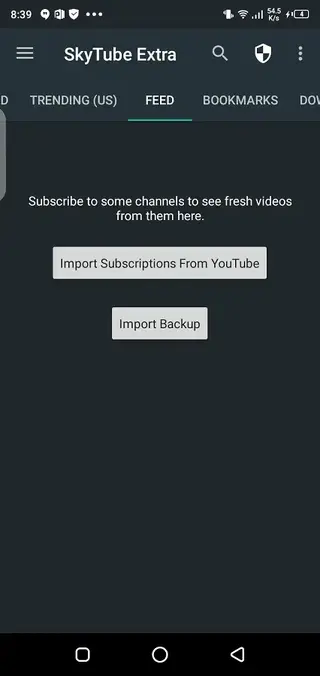
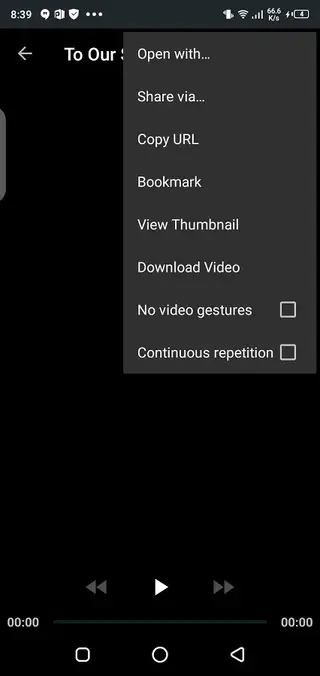
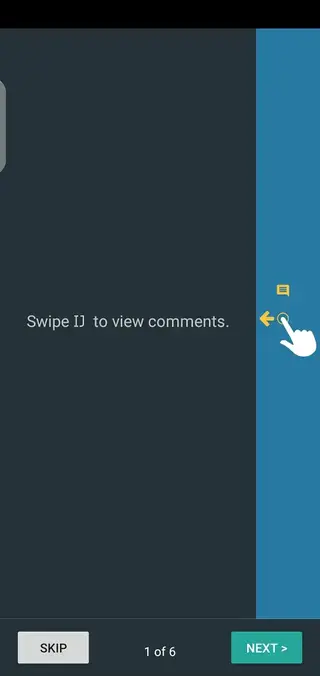
SkyTube Extra vs SkyTube standard
SkyTube is available in two main variants: the standard build and SkyTube Extra. The package name free.rm.skytube.extra corresponds to the Extra version, which integrates some official YouTube player components for broader compatibility.
SkyTube Extra generally offers better playback support and fewer issues with certain videos, at the cost of depending on additional libraries from the original YouTube environment. The standard build focuses more strictly on open-source components and reduced dependencies.
Both versions share a similar interface and feature set, including ad blocking, subscriptions, and content filters. Choosing between them usually depends on whether you prefer maximum openness or wider playback compatibility.
Supported Android versions and performance
The version referenced on this page is designed for Android 4.4 and above, which covers many older smartphones and tablets. Because the app is compact and efficient, it often runs smoothly even on devices with limited RAM or storage.
For best performance, it helps to keep your device updated, clear excess background apps, and maintain some free internal storage. SkyTube does not require powerful hardware, which makes it a practical option for users with budget or secondary devices.
Privacy and permissions
SkyTube aims to reduce tracking compared with the official YouTube app by avoiding mandatory sign-in and limiting the data it requests. Most core functions work without linking the app to any personal Google profile.
When installing, review the permissions requested by the APK and only proceed if you are comfortable with them. As with any media app, access to network connectivity and storage is typically needed for streaming and saving videos.
FAQs
Pros
- Ad-free video playback improves the viewing experience
- Does not require a Google account to watch content
- Supports video downloads for offline playback
- Offers filtering and channel blocking for better content control
- Lightweight app that runs well on older devices
- Open-source project with a focus on privacy and user control
Cons
- Not available on Google Play Store for most users
- Features may differ from the official YouTube app
- Some region-restricted or DRM-protected content may not work
- Interface and behavior can feel unfamiliar to long-time YouTube app users
Conclusion
SkyTube offers a focused, ad-free, and privacy-friendly way to enjoy YouTube on Android. If you want more control over what you watch, the APK available on our website makes it easy to install and try this alternative client on your device.




Comments
No approved comments yet.