

Solo VPN
Solo VPN is a simple one-tap VPN app that helps Android users browse the internet through virtual locations. It focuses on quick connection, easy controls, and wide server coverage.
With Solo VPN you can route your traffic through secure tunnels, hide your real IP address, and reach apps and sites that may be restricted in your region. The app offers both free and premium servers with different speed and stability levels.
You can download the official Solo VPN APK directly from our website and install it on compatible Android phones and tablets in just a few steps.
Rate this app
App details
- App name
- Solo VPN
- Category
- Tools
- Version
- v2.0.5.2023042826
- Size
- 9.32 MB
- Requirements
- 5.0 and Above
- Package name
- com.solovpn.fastsupernet.connect.ultimateproxies
- Publisher
- WEAVER HNQ
- Price
- Free
- Mod
- No
- Downloads
- 66,578
- Rating
- 4.3 / 5
- Rating count
- 3,658
- Play Store
- Yes
- Requires root
- No
- Offline support
- No
- Contains ads
- Yes
- In-app purchases
- Yes
- Updated
- Jun 1, 2026
- Age rating
- Rated for 3+
Table of contents
What is Solo VPN?
Solo VPN is an Android virtual private network application that creates an encrypted tunnel between your device and remote servers. When you connect, your traffic is routed through a selected server location, so websites and online services see that server’s IP address instead of your own.
The app is built for users who want a quick way to switch regions, reduce basic tracking, or reach region-locked content without dealing with complex settings. You tap once to connect, and Solo VPN automatically chooses or switches to an available server. Advanced users can manually pick specific countries when needed.
Solo VPN Android is a newly available in-app premium tool providing the most advanced-level VPN services. This application provides a unique combination of paid and free services. However, even the free services are available on private servers. Hence, users will get a smooth Internet surfing experience. You can also try Big Mama VPN and Argo VPN providing similar services.
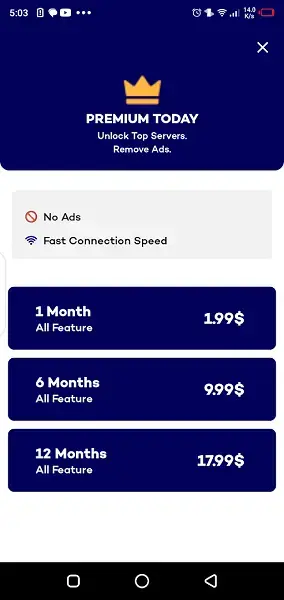
Solo VPN offers a mix of free and paid connectivity. Free users get access to selected private servers, while premium subscribers can unlock more locations, higher capacity lines, and an ad-light or ad-free experience depending on the chosen plan.
Why download Solo VPN APK from our website
Downloading the Solo VPN APK directly from our website lets you get the current Android package without visiting additional app stores. You can keep a copy of the installer, share it with your other devices, or install it on phones where Google Play is not available.
By using the APK from our site you can:
Install Solo VPN on compatible Android devices quickly.
Update or roll back the app manually if needed.
Use the same installer on phones and tablets that share your account.
The APK we list matches the version and package name shown in the app details, so you know exactly which build you are installing on your device.
How Solo VPN is useful for Android users
Solo VPN can be helpful in everyday browsing for users who want simpler access to different regions and basic privacy improvements. By connecting to a remote server, you can appear online from another country, which may help when local networks restrict specific apps or services.
The app relies on data encryption to protect the connection between your device and the VPN server, which can add an extra layer of protection on public Wi-Fi or shared networks. Features like one-tap connect, country-based servers, and automatic routing aim to make the VPN experience straightforward even for beginners.
For heavier users, premium plans expand the server list and remove many of the limitations of the free tier, such as slower lines or fewer regions. This combination of free access and optional upgrades makes Solo VPN flexible for casual and frequent VPN users alike.
How to download and install Solo VPN APK
You can download the official Solo VPN APK file directly from our website and install it on any compatible Android phone or tablet.
Download steps
Scroll to the download area on this page.
Tap the Solo VPN APK download button.
Wait for the APK file to finish downloading to your device.
Installation steps
Open your device Settings and enable installation from unknown sources for your browser or file manager, if required.
Locate the downloaded Solo VPN APK in your Downloads folder.
Tap the file and confirm Install on the system prompt.
Wait for the installation to complete, then tap Open to launch Solo VPN.
After installation you can connect to a server with one tap, or explore the settings and premium options inside the app.
Features
One-tap connection
Connect to the VPN with a single tap, without manual configuration or complex settings.
Virtual IP and location change
Route your traffic through remote servers so websites see the VPN server IP instead of your real address.
Encrypted VPN tunnel
Use encryption between your device and the VPN server to help protect data on public or shared networks.
Multiple server locations
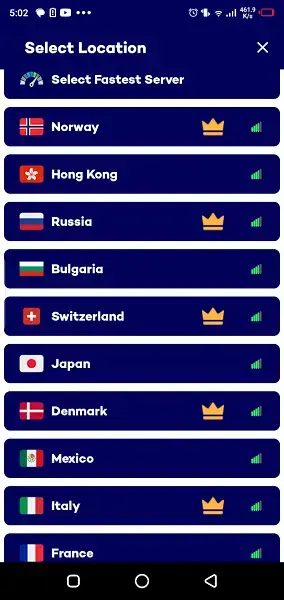
Choose from a list of server regions and countries to match your content or latency needs.
Combination of free and premium servers
Access selected free private servers and upgrade to premium for more locations and higher capacity.
Bypass geo-restricted content
Reach apps, streaming pages, and websites that may be limited or unavailable in your current region.
Simple user interface
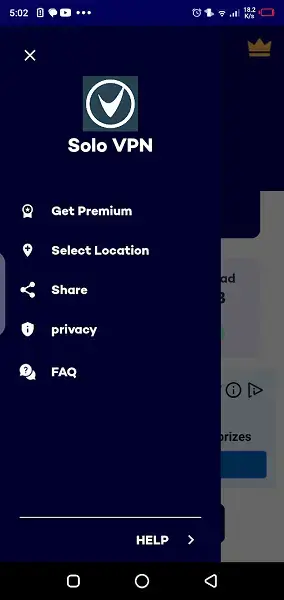
Navigate a clean, beginner-friendly layout with clear buttons for connect, disconnect, and server selection.
No root required
Run the app on standard Android devices without rooting or special system modifications.
Screenshots

Tips for getting better performance with Solo VPN
VPN performance depends on several factors such as distance to the server, network congestion, and your own internet speed. To improve your experience with Solo VPN, you can try a few simple adjustments.
Select a server that is geographically closer to you for potentially lower latency.
Test different locations to see which ones work best with the apps or sites you use.
Switch to another server if speeds drop or the connection becomes unstable.
Consider upgrading to a premium plan if you frequently use VPN for streaming or high-bandwidth tasks.
FAQs
Pros
- Very simple one-tap connection suitable for beginners
- Offers both free and premium servers for flexible use
- Supports multiple countries and server locations
- No root access needed to run the app
- Lightweight APK suitable for most Android devices
Cons
- Free servers can be slower or busier at peak times
- Contains ads, especially on the free tier
- Some advanced configuration options are limited compared to expert VPN clients
- Performance and access to specific sites can vary by region
Conclusion
Solo VPN is a straightforward Android VPN client that focuses on fast one-tap connections, region switching, and a mix of free and premium servers. If you need an easy way to change your virtual location and add an encrypted tunnel to your connection, you can download the Solo VPN APK from our website and start using it within minutes.




Comments
No approved comments yet.