

Speed Booster Proxy
Speed Booster Proxy is a lightweight VPN and proxy app for Android that helps you bypass geo-restrictions and access blocked websites, apps, and online games. It focuses on quick connection and simple controls, so you can get online with a single tap.
The app offers a range of global proxy servers that route your traffic through different locations, giving you a new IP address in seconds. This makes it easier to open region-locked content and reduce network throttling on some connections.
You can download the original Speed Booster Proxy APK directly from our website and install it on compatible Android phones and tablets without using the Play Store.
As you know, there are multiple types of applications and websites, which are blocked in specific regions. So, users from the region cannot access such sites or apps, which is why VPNs such as VPN SAKTI and Shoora VPN have been introduced. Hence, learn about the newly available tool here.
Rate this app
App details
- App name
- Speed Booster Proxy
- Category
- Tools
- Version
- v1.2.6
- Size
- 17.85 MB
- Requirements
- 5.0 and Above
- Package name
- com.free.speedfiy
- Publisher
- PRIME DIGITAL PTE. LTD.
- Price
- Free
- Mod
- No
- Downloads
- 69,543
- Rating
- 4.4 / 5
- Rating count
- 2,610
- Play Store
- No
- Requires root
- No
- Offline support
- No
- Contains ads
- Yes
- In-app purchases
- Yes
- Updated
- May 13, 2026
- Age rating
- Rated for 3+
Table of contents
What is Speed Booster Proxy?
Speed Booster Proxy is an Android VPN and proxy application that provides virtual private network tunnels through multiple servers around the world. By connecting through these servers, the app masks your real IP address and lets you appear online from another region.
The app is designed for users who want a quick way to access blocked or restricted services without complex settings. After installation, you choose a server location, tap connect, and the app does the rest in the background.
Although it is often promoted for smoother gameplay and faster browsing, the real value of Speed Booster Proxy is its ability to create an encrypted tunnel between your device and the selected server. This can add an extra layer of privacy on public Wi-Fi and open networks, as long as you use it responsibly and follow local laws and service terms.
Why download Speed Booster Proxy APK from our website
Downloading the Speed Booster Proxy APK from our website lets you install the app directly on your Android device, even if it is not available or visible in your local Play Store region. You get the version listed on this page with the package name com.free.speedfiy and the stated Android requirements.
Our download page provides a direct APK file link, so you do not need to search multiple sites or use additional stores. Once you have saved the file, you can install it manually and start using the VPN features right away.
This is especially useful for users who want to test the app on different devices, sideload it on tablets without Play Store, or keep a backup of the installer for offline use.
How Speed Booster Proxy can be useful
Speed Booster Proxy can be useful in several common mobile scenarios. If certain apps, streaming platforms, or websites are restricted in your region, you can connect to a server in another country and attempt to access them from there. Many users also use VPNs to join game servers that are otherwise unavailable in their location.
On shared or public Wi-Fi networks, routing your traffic through a VPN may help reduce exposure of your browsing activity to others on the same network. While no VPN can make you completely anonymous, it can add a practical layer of privacy for everyday tasks like checking email or social media.
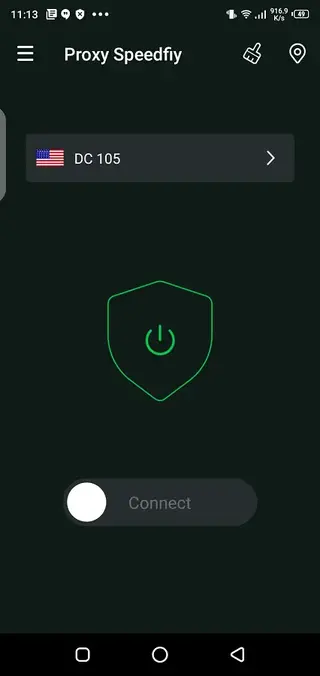
The app keeps the process simple with one-tap connection, so you do not need deep technical knowledge. You choose a server, tap connect, wait for the status to turn active, and then use your apps as usual while the VPN runs in the background.
How to download and install Speed Booster Proxy APK
You can get the Speed Booster Proxy APK directly from our website. Follow these steps to download and install it on your Android device:
Scroll to the download section on this page.
Tap the APK download button to start saving the file to your device.
Wait until the APK file finishes downloading completely.
Open your device settings and enable installation from unknown sources for your browser or file manager if needed.
Locate the downloaded APK in your Downloads folder or file manager.
Tap the APK file and follow the on-screen prompts to complete the installation.
Once installed, open Speed Booster Proxy, choose a server, and tap connect to start using the VPN.
After the first setup, you can launch the app from your app drawer and connect with a single tap whenever you need VPN protection or access to restricted content.
Features
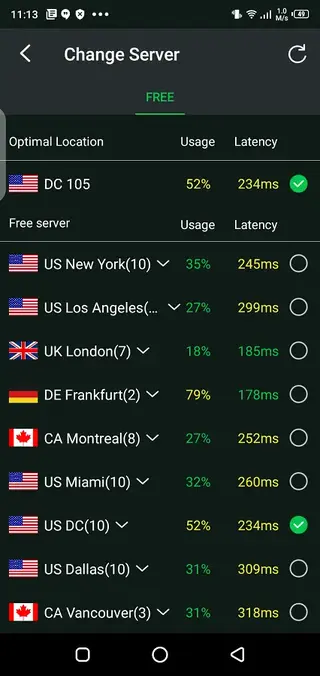
Global proxy servers
Offers a range of proxy and VPN servers in different regions so you can change your apparent online location.
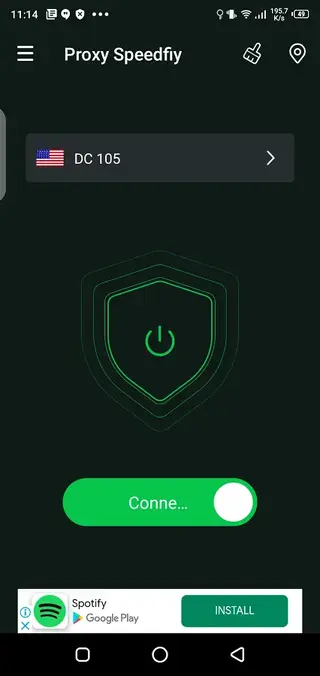
One tap connection
Connects to the selected server with a single tap, without complex setup or configuration steps.
Simple user interface
Uses a clean layout with clear buttons and status indicators that are easy to understand for new users.
Bypass geo restrictions
Helps you try to open apps, games, and websites that may be blocked or restricted in your country or network.
Encrypted VPN tunnel
Creates a secure tunnel between your device and the server to help protect data on open and public Wi-Fi.
Optimized for mobile data
Designed to work over mobile and Wi-Fi connections with lightweight traffic handling for Android devices.
Free to start
Provides free access to core VPN functionality, with optional monetization such as ads or premium options depending on the version.
Automatic reconnection
Attempts to maintain or restore the VPN connection if the network drops or changes between Wi-Fi and mobile data.
Screenshots
System requirements and compatibility
Speed Booster Proxy is built for Android smartphones and tablets. The version listed on this page requires at least Android 5.0 or higher, which covers most modern devices.
For best performance, you should have a stable Wi-Fi or mobile data connection, as VPN traffic passes through remote servers and can be sensitive to weak networks. Low-end devices can still run the app, but connecting to distant servers or multitasking with heavy apps may affect speed.
Tips for better connection quality
VPN speed and stability depend on many factors such as your base internet speed, server distance, and current load. You can follow a few simple tips to improve your experience with Speed Booster Proxy:
Choose a server that is geographically closer to your real location when you want better speed.
Use a strong Wi-Fi network instead of a weak mobile signal whenever possible.
Close other bandwidth-heavy apps, such as large downloads or streaming in the background.
If a server feels slow, disconnect and try another region or nearby country.
These practices can help you get more consistent performance while using the app for browsing, social media, or light gaming.
Privacy and responsible use
Like any VPN, Speed Booster Proxy should be used responsibly. While it can help mask your IP address and add an extra layer of privacy on public networks, it does not make you completely invisible online.
You should always follow local laws, the terms of service of the apps and websites you use, and any workplace or school network policies. Avoid using VPN connections for harmful, abusive, or illegal activities.
For sensitive activities, consider reviewing the developer’s official privacy policy and checking how connection logs and user data are handled before relying on any VPN service.
FAQs
Pros
- Easy one tap VPN connection for beginners
- Multiple global servers to change virtual location
- Helps access blocked or region-restricted content
- Lightweight app suitable for many Android devices
- Can add a layer of privacy on public Wi-Fi
Cons
- Free servers may be slower during peak times
- Connection stability can vary by network and server
- May display ads in the free version
- Not all streaming or gaming services will work reliably with a VPN
Conclusion
Speed Booster Proxy is a straightforward VPN and proxy app for Android users who want quick access to global servers, basic privacy, and a simple interface. If you need an easy way to test different regions, open restricted apps, or add an extra layer of security on public networks, you can download the Speed Booster Proxy APK from our website and start using it within minutes.




Comments
No approved comments yet.