

SPlayer
SPlayer is an Android video player that combines smooth local playback, online streaming, and torrent support in one lightweight app. It focuses on simple controls and reliable performance on phones and tablets.
With support for popular video and audio formats, subtitle files, and Chromecast, SPlayer helps you enjoy media from your device storage, network links, and magnet or torrent URLs. You can download the original APK file directly from our website.
The app also includes tools like privacy folders, playback speed control, and gesture navigation so you can tailor the viewing experience to your preferences without complex settings.
Therefore, we are here with these amazing applications, which provide the most amazing features for the users Muzio Player Pro and Xplayer Pro. These Apps provide multiple features and services for users. We are going to share all about this new app and the best alternatives. So, if you want to know more about this app, then just stay with us and get all the information.
Rate this app
App details
- App name
- SPlayer
- Category
- Video Players & Editors
- Version
- v1.3.7
- Size
- 100.61 MB
- Requirements
- 5.0 and Above
- Package name
- com.ttee.leeplayer
- Publisher
- S Media Team
- Price
- Free
- Mod
- No
- Downloads
- 86,291
- Rating
- 4.8 / 5
- Rating count
- 42,202
- Play Store
- Yes
- Requires root
- No
- Offline support
- Yes
- Contains ads
- Yes
- In-app purchases
- Yes
- Updated
- May 19, 2026
- Age rating
- Rated for 3+
Table of contents
What is SPlayer Android App
SPlayer is a multimedia player for Android that supports local files, online streams, and torrent-based playback in a single interface. It is developed by S Media Team and is available on Google Play as a free application.
The app scans your device storage and SD card to organize videos and audio files into a clean library. It plays common formats such as MP4, MKV, AVI, MOV, and others, and includes support for multiple subtitle files and audio tracks where available.
Beyond standard playback, SPlayer lets you open video URLs, magnet links, and torrent files so you can stream or download content directly inside the app. It also offers options like Chromecast casting, background play for audio, and gesture-based controls to keep navigation quick and intuitive.
Why Download SPlayer APK from Our Website
Downloading the SPlayer APK from our website gives you direct access to the official installation file for your Android device. You can keep a backup of the version you prefer, install it on multiple compatible devices, or roll back if a future update does not work well on your phone.
Our download section provides the version information, package name, and other technical details clearly so you know exactly what you are installing. Once downloaded, you can install the APK manually and start using SPlayer without waiting for store updates on each device.
Because torrent playback, online streaming, and local media handling all live in one app, having the APK ready on your device makes it easy to set SPlayer as your default video player whenever you need fast, stable playback.
How SPlayer Is Useful on Android
SPlayer helps Android users manage and enjoy media without juggling multiple apps. It plays local videos in high quality, supports subtitles, and handles a wide range of codecs, which is especially helpful for users who download diverse formats.
For users who rely on magnet links and torrent files, SPlayer removes the need for a separate torrent client. You can paste a URL or open a torrent directly and either stream or download the content from within the player, then continue watching offline later.
The app also adds convenience features such as Chromecast support for watching on a TV, privacy folders protected by a password, and detailed playback control including speed adjustments and gesture-based seeking. Together, these tools make it a practical daily media hub on Android.
How to Download and Install SPlayer APK
You can download the SPlayer APK file directly from our website and install it manually on your Android device. Make sure your device meets the minimum Android version requirement before you start.
Follow these steps to get started:
Scroll to the download section on this page.
Tap the APK download button for the available SPlayer version.
Wait for the APK file to finish downloading to your device.
Open your device settings and enable installation from unknown sources if prompted.
Locate the downloaded APK file in your Downloads folder and tap it.
Confirm the installation prompts and wait for the process to complete.
Launch SPlayer from your app drawer and adjust the initial settings as needed.
After installation, you can set SPlayer as the default video player so local files, links, and supported torrents open in the app automatically.
Features
Wide format support
Plays most common video and audio formats including MP4, MKV, AVI, MOV, and more for flexible media playback.
Torrent and magnet playback
Opens torrent and magnet links so you can stream or download media files directly in the app.
Online video streaming
Supports playback from video URLs so you can watch online streams without a separate browser player.
Local media library scan
Automatically scans device and SD card to organize videos and audio into a clear, browsable library.
HD and Ultra HD playback
Optimized decoder and player engine deliver smooth playback for HD and compatible higher resolution videos.
Subtitle file support
Supports multiple subtitle files and tracks with options to switch, sync, and customize display.
Playback speed control
Lets you slow down or speed up videos and fine-tune playback progress for detailed viewing.
Gesture controls
Gesture-based controls for brightness, volume, and seeking provide quick adjustments during playback.
Screenshots
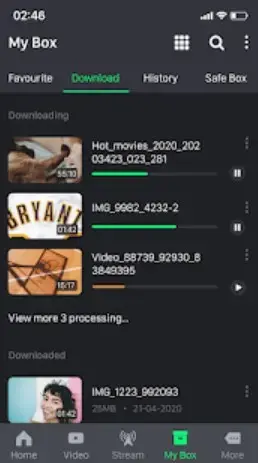
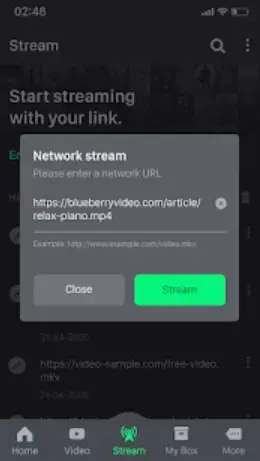
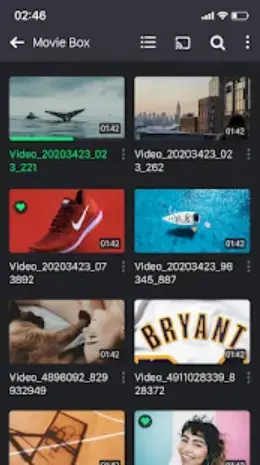
Privacy Folder and Content Protection
SPlayer includes a privacy folder feature that lets you hide selected videos from the main library. You can move sensitive clips into a protected area and secure it with a password or lock pattern, depending on the app version.
This makes it easier to hand your phone to others without exposing personal videos in the default gallery or player list. You can manage, add, or remove files from the privacy folder at any time from inside the app.
Subtitle and Audio Track Management
The app supports external subtitle files such as SRT and similar formats. You can load multiple subtitle files for a video, switch between available tracks, and adjust timing if the subtitles are slightly out of sync.
Where videos contain more than one audio track, SPlayer allows you to select your preferred track and remember it for that file. These options are helpful when watching international content with various language options.
Chromecast and Large Screen Playback
SPlayer can cast compatible media to Chromecast-enabled TVs and devices. Once connected, you can control play, pause, seeking, and volume directly from your phone while watching on a larger display.
This setup is useful for watching downloaded movies and series on a TV without transferring files manually. You only need both devices on the same network and a supported Chromecast receiver.
FAQs
Pros
- Supports local, online, and torrent playback in one app
- Works offline for videos stored on the device
- Offers subtitle support and multiple audio tracks
- Includes playback speed and gesture controls
- Provides Chromecast casting for large screen viewing
- Features private folders for hiding sensitive videos
Cons
- Contains ads in the free version
- Some torrent links may buffer or fail depending on network
- Advanced options can feel complex for new users
- Performance may vary on low-end devices with large HD files
Conclusion
SPlayer is a capable Android media player that combines local file playback, online streaming, and torrent support with practical tools like subtitles, privacy folders, and casting. If you want a flexible all-in-one video player, you can download the official SPlayer APK from our website and start using it on your compatible Android phone or tablet.




Comments
No approved comments yet.