

Story Bit
Story Bit is a story and reel maker app for Android that helps you turn photos and short clips into eye-catching social media stories in a few taps.
With ready-made animated templates, stylish fonts, and music support, you can design posts for Instagram, WhatsApp, Facebook, TikTok, and more without advanced editing skills.
You can download the official Story Bit APK directly from our website and start creating professional-looking content on your phone or tablet.
Rate this app
App details
- App name
- Story Bit
- Category
- Video Players & Editors
- Version
- v3.0.9
- Size
- 41.35 MB
- Requirements
- 5.0 and Above
- Package name
- storybit.story.maker.animated.storymaker
- Publisher
- Nucleus Lab
- Price
- Free
- Mod
- No
- Downloads
- 29,384,616
- Rating
- 4.0 / 5
- Rating count
- 89,900
- Play Store
- Yes
- Requires root
- No
- Offline support
- Yes
- Contains ads
- Yes
- In-app purchases
- Yes
- Updated
- May 8, 2026
- Age rating
- Rated for 3+
Table of contents
What is Story Bit Android App?
Story Bit is an Android video and story editor focused on creating vertical content for social platforms. It combines a simple interface with animated templates so users can design stories, reels, and status updates quickly.
The app provides pre-built layouts where you just insert your photos, short videos, and text. Effects, transitions, and basic animations apply automatically based on the template you choose, which makes it beginner friendly.
Story Bit is mainly used for Instagram Stories, WhatsApp Status, Facebook stories, and short-form video platforms. You can create slideshow-style posts, collages, montage videos, and themed intros without building complex timelines or layers.
The app is free to install and use, contains ads, and offers optional in-app purchases to unlock more templates, styles, and premium resources.
Green Kinemaster Pro and Video Star Pro are some of the best video editor platforms, which you can also access to enjoy your free time. You will get more similar apps on our website. So, don’t forget to explore more apps on this website.
Why Download Story Bit APK from Our Site?
Downloading the Story Bit APK from our website allows you to install the app directly on your Android device without searching around or dealing with confusing listings. The package name, version information, and details are clearly provided so you know what you are installing.
Once installed, you can start using animated templates, text effects, and filters to create stories and reels that stand out on social media. You do not need professional editing knowledge, and the app guides you through simple, step-by-step creation flows.
If you want a lightweight tool for quick social posts, highlight clips, travel memories, or promotional stories for small businesses, Story Bit offers a practical, mobile-first workflow.
How Story Bit Is Useful for Creators?
Story Bit is useful for anyone who wants polished social content without learning complex editors. Influencers, small brands, shop owners, students, and casual users can all create presentable stories by combining photos, short videos, and text.
Instead of starting from a blank canvas, you pick a template category such as Trending, Slideshow, Collage, or Classic. The app then arranges your media, adds transitions, and applies matching effects automatically, which saves time and reduces guesswork.
This is especially helpful when you need to post frequently. You can quickly generate multiple story variations, keep a consistent visual style, and share directly to platforms from your phone.
How to Download and Install Story Bit APK?
You can download the official Story Bit APK directly from our website and install it on your Android phone or tablet. Follow these basic steps to get started:
Scroll to the download section on this page.
Tap the APK download button for Story Bit.
Wait for the APK file to finish downloading on your device.
Open your device settings and enable installation from unknown sources if required.
Locate the downloaded APK file in your downloads folder.
Tap the file and follow the on-screen prompts to complete installation.
Open Story Bit, grant the necessary permissions, and start creating your first story.
After installation, you can update the app later from the Play Store or by downloading a newer APK from our website when available.
Features
Animated story templates
Choose from many ready-made animated templates designed for Instagram, WhatsApp, Facebook, and other social platforms.
Easy drag and drop editing
Add photos, short clips, and text into templates without dealing with timelines or complicated layers.
Multiple style categories
Browse sections like Trending, PUBG montage, Movie, Particle, Slideshow, Collage, Classic, and more.
Auto-applied effects and filters
Effects, transitions, and filters apply automatically based on the selected template to speed up editing.
Text and font customization
Insert captions, quotes, and titles with different fonts, colors, and basic text animations.
Music and sound support
Attach background music or sound to stories and reels to match the mood of your content.
Social sharing options
Export your edited stories and share them directly to popular social networks from the app.
Regular template updates
New templates and layouts are added over time to match current social media trends.
Screenshots
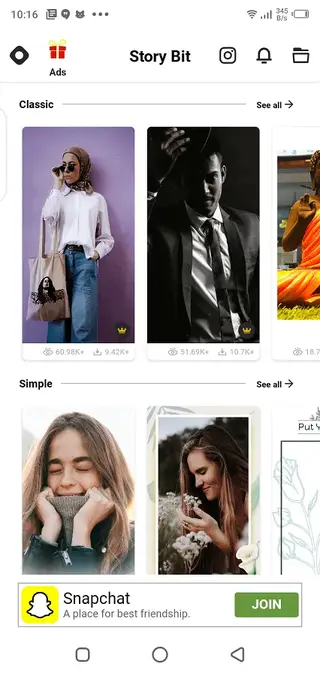
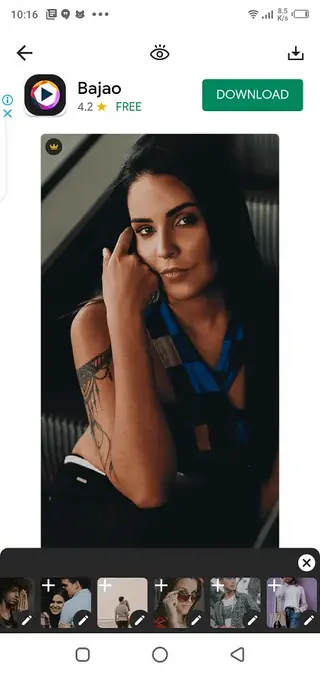
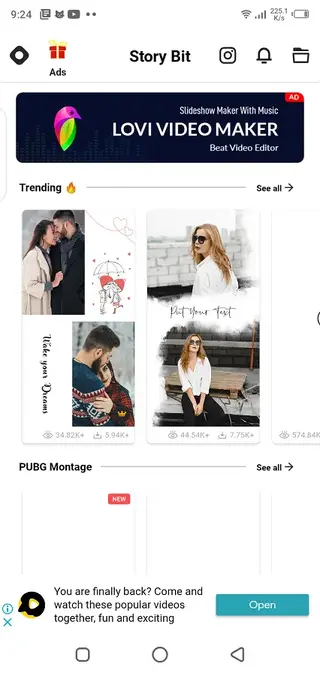
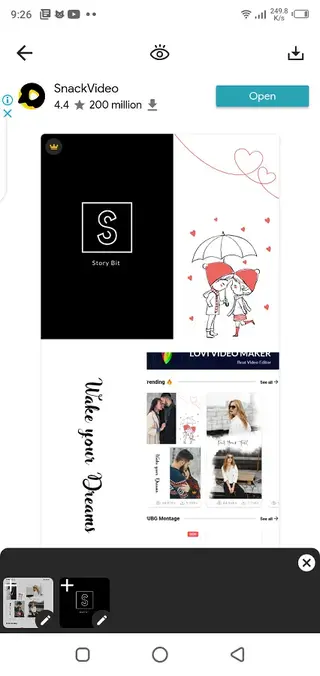
Template Categories and Styles
Story Bit organizes its resources into clear template categories, which helps you pick a style that matches your content goal. Popular sections include Trending, PUBG montage, Movie, Particle, Slideshow, Collage, Classic, and Simple layouts.
Each category has multiple designs optimized for vertical videos. You can preview them, insert your media, and export in just a few steps. This layout-focused approach makes it easier to maintain a consistent brand or theme across your stories.
Editing Workflow on Mobile
The editing workflow in Story Bit is designed for quick use on mobile screens. You typically follow three steps: choose a template, add media, and export. The app handles transitions, basic motion, and alignment in the background.
You can still tweak text, change fonts, adjust clips, and apply basic filters. This balance between automation and control allows you to work fast while keeping enough customization to make each story feel unique.
Device Compatibility and Requirements
Story Bit works on most modern Android phones and tablets that meet the minimum Android version requirement listed for the app. For the smoothest performance, it is better to have enough free storage, a stable system, and reasonably recent hardware.
Higher-end devices will usually export videos faster and handle heavier templates more easily, while older phones may take longer to render complex effects.
FAQs
Pros
- Beginner friendly with simple, guided editing flow
- Large selection of animated story and reel templates
- Automatic effects and transitions save editing time
- Good for Instagram, WhatsApp, TikTok, and other vertical platforms
- No advanced editing skills required to get good results
- Available to download directly as APK from our website
Cons
- Frequent ads can interrupt the editing experience
- Some advanced templates and assets require in-app purchases
- Limited manual control compared to full desktop editors
- Exports and performance can depend on device hardware
Conclusion
Story Bit offers a straightforward way to design animated stories and reels from your Android device. If you want quick, polished social posts without complex editing work, downloading the Story Bit APK from our website is a practical choice for everyday content creation.




Comments
No approved comments yet.