

StoryChic
StoryChic is a story maker app for Instagram, Facebook, WhatsApp, and other social networks. It helps you turn everyday photos and short clips into polished vertical stories in a few minutes.
With ready-made templates, stylish fonts, filters, and music options, you can design posts that look closer to professional graphics than quick snapshots. You can download the official StoryChic APK directly from our website and start designing right away.
The app focuses on simple drag-and-drop editing, so you do not need advanced design skills to create clean, on-trend stories for personal use, brands, or small businesses.
Rate this app
App details
- App name
- StoryChic
- Category
- Photography
- Version
- v2.37.552
- Size
- 57.62 MB
- Requirements
- 4.3 and Up
- Package name
- instagramstory.maker.unfold
- Publisher
- Sweet Snap Studio
- Price
- Free
- Mod
- No
- Downloads
- 55,000
- Rating
- 4.2 / 5
- Rating count
- 19,000
- Play Store
- Yes
- Requires root
- No
- Offline support
- Yes
- Contains ads
- Yes
- In-app purchases
- Yes
- Updated
- May 9, 2026
- Age rating
- Rated for 3+
Table of contents
What is StoryChic APK?
StoryChic is an Android story editor and collage maker designed for vertical content. It focuses on Instagram Stories but also works for Facebook, Snapchat, WhatsApp Status, TikTok covers, and other platforms that use portrait layouts.
It is an Android application, which is developed by Selfie Camera & Photo Editor & Beauty Shop. It is the best app to edit your pictures and videos after Illisiumart. It provides some of the best more than 1000 templates, through which you can make any of the best collusions.
The app includes hundreds of prebuilt templates, typography styles, filters, and layout combinations. You simply pick a template, insert your photos or short video clips, customize the text, and export the story.
According to the original listing, StoryChic is developed by Sweet Snap Studio. The APK on this page uses the package name instagramstory.maker.unfold and is available as a free download for Android devices running version 4.3 and above.
StoryChic does not require root access and works as a standard mobile editor. You can prepare stories offline once assets and templates are loaded, then upload them to your social accounts whenever you go online.
Why download StoryChic for Android?
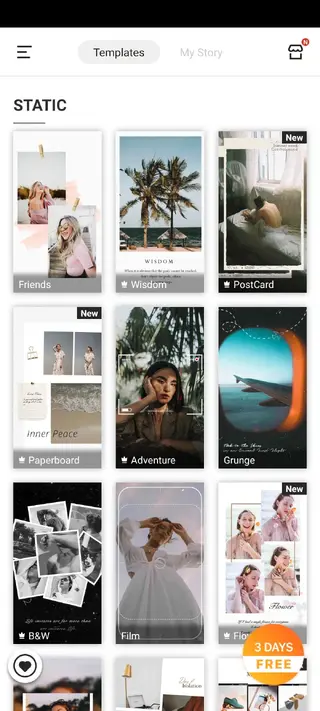
StoryChic gives you a quick way to design stories that look more professional than default in-app editors. Instead of building layouts from scratch, you can browse categories of templates for fashion, travel, food, lifestyle, quotes, promotions, and more.
The app is helpful if you want consistent branding for your personal page or business profile. You can reuse favorite templates, apply similar fonts and colors, and build a recognisable style without hiring a designer.
Downloading the StoryChic APK from our website lets you keep the installer locally, reinstall when needed, and share it across your Android devices without going through extra setup steps.
How StoryChic is useful for creators
StoryChic is useful for content creators, influencers, shop owners, and anyone who posts regularly to stories. It reduces the time needed to achieve a clean layout, legible text, and coherent color styling.
Templates act as a starting point, so you can focus on your message instead of spending time on spacing and alignment. Built-in fonts and filters help you keep posts on trend without manually tweaking every detail.
Because it also supports collages, stickers, and simple music integration, you can create multi-image stories, highlight product sets, or recap events in a single sequence.
How to download and install StoryChic APK
You can download the official StoryChic APK file directly from our website. Follow these steps to get it on your Android device:
Scroll to the download section on this page and tap the APK download button for StoryChic.
Confirm the download in your browser and wait for the APK file to finish downloading.
Open your phone settings, go to security or privacy, and allow installation from unknown apps for your browser if it is not already enabled.
Locate the downloaded StoryChic APK in your notifications or file manager and tap it.
Review the permissions, then press Install and wait for the process to complete.
Once installed, open StoryChic, grant the requested access, and start creating your first story.
If you later need to reinstall the app, you can repeat these steps using the same APK file from our website.
Features
Large template library
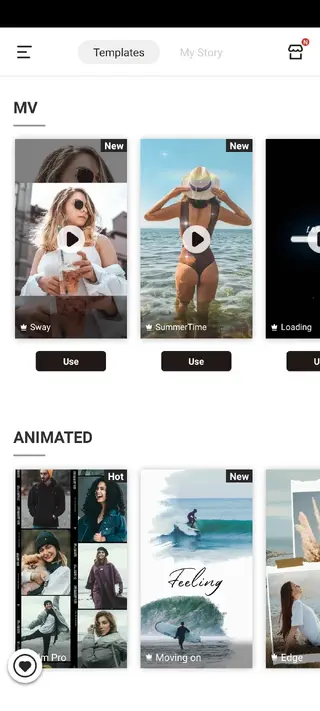
Access hundreds of premade vertical story templates for travel, lifestyle, promo posts, quotes, and more so you can design quickly.
Photo and video story support
Combine photos and short video clips in the same template to build richer stories instead of static single-image posts.
Collage maker layouts
Create multi-image collages with adjustable grids and frames, ideal for before and after shots, lookbooks, or product collections.
Stylish fonts and text effects
Choose from different fonts, sizes, and spacing, plus animated or hype-style text options to highlight key phrases.
Stickers and emoji
Add stickers, emojis, and decorative elements to personalize stories and match them to your mood or campaign.
Filters and color presets
Apply filters and color tones to keep a consistent visual style across all of your stories without manual editing.
Background music for story templates
Attach background music to supported video templates to make your stories more engaging and dynamic.
Frequent content updates
Receive new templates, layouts, and tools through regular updates so your story designs stay current.
Screenshots

System requirements for StoryChic
StoryChic is built for Android phones and tablets. The APK available here targets Android 4.3 and above, which covers most modern devices.
Operating system: Android 4.3 or higher
Device: Phone or tablet with portrait screen support
Storage: Enough free space for the APK plus cache and exported stories
Permissions: Access to storage, media, and optionally camera and microphone for capturing content
For the smoothest experience, a device with sufficient RAM and up-to-date system software is recommended, especially if you work with longer video clips or many high-resolution photos.
Editing workflow inside StoryChic
The editing workflow in StoryChic is straightforward, even if you are new to story design:
Pick a template category that matches your goal, such as daily recap, announcement, promotion, or quote.
Choose a specific layout and import photos or videos from your gallery.
Adjust crop and position to fit the frames in the chosen template.
Edit text by changing the copy, font, size, alignment, and color.
Add stickers, emojis, or simple effects if needed.
Apply filters to unify the color tone across all images.
Preview the final story and export it to your device, then upload it to Instagram, Facebook, or other apps.
This process lets you create visually consistent stories in just a few steps, even when working with content from different days or devices.
Tips for better Instagram stories with StoryChic
To get more from StoryChic, it helps to follow a few simple design habits:
Reuse a small set of templates so your followers quickly recognise your style.
Stick to two or three main colors that match your brand or profile theme.
Keep text short and readable, especially on smaller screens.
Use collages for event recaps or product collections instead of posting many similar single stories.
Pair filters and fonts that complement each other instead of mixing too many styles at once.
These small adjustments improve clarity and make your stories feel more intentional and professional.
FAQs
Pros
- Large variety of story templates for different themes and occasions
- Simple interface that is easy to learn for beginners
- Supports both photos and short videos in story layouts
- Built-in fonts, stickers, and filters reduce the need for other editors
- Useful for creating consistent branding across Instagram and other platforms
Cons
- Some advanced templates and assets require in-app purchases
- Contains ads in the free version
- Heavy template sets may feel slow on low-end or older devices
- Internet connection is needed to download new templates and resources
Conclusion
StoryChic is a practical story editor for anyone who wants better-looking vertical posts without advanced design skills. With templates, fonts, filters, and collage tools in one place, it helps you publish cleaner, more consistent stories on Instagram and other platforms. You can download the official StoryChic APK directly from our website and start editing on your Android device in minutes.




Comments
No approved comments yet.