
Sub Translate
Sub Translate is an Android app that adds multi language subtitles to YouTube videos, so you can follow content that is not available in your native language.
The app connects to YouTube, detects available captions, and translates them into more than 110 languages in real time while you watch.
You can download the official Sub Translate APK directly from our website and start watching foreign videos with clear, readable subtitles on your phone or tablet.
Rate this app
App details
- App name
- Sub Translate
- Category
- Tools
- Version
- v2.7
- Size
- 40.45 MB
- Requirements
- 4.2 and Above
- Package name
- asia.zsoft.subtranslate
- Publisher
- ZSoft.asia
- Price
- Free
- Mod
- No
- Downloads
- 59,873
- Rating
- 4.8 / 5
- Rating count
- 22,054
- Play Store
- Yes
- Requires root
- No
- Offline support
- No
- Contains ads
- Yes
- In-app purchases
- No
- Updated
- Jun 2, 2026
- Age rating
- Rated for 7+
Table of contents
What is Sub Translate APK
Sub Translate is an entertainment and learning focused Android application developed by ZSoft.asia. It works as a companion tool for YouTube that helps you read translated subtitles on top of the original video.
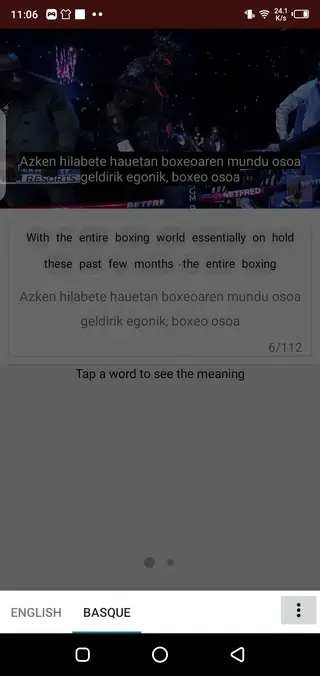
The app pulls in YouTube videos, reads their captions or auto captions, and then translates those subtitles into over 110 supported languages. Instead of relying only on the language provided by the uploader, you can switch the subtitle language to something you actually understand.
Sub Translate does not replace YouTube and it does not remove YouTube branding or watermarks. It simply offers a more flexible subtitle layer with additional tools such as word meaning lookup, caption control, and quick navigation while you watch.
To use the app, you usually sign in with your Google account, browse trending or recommended videos, search for any topic, and then select your desired subtitle language from the built in panel before or during playback.
Why Download Sub Translate for Android
Many YouTube videos are only available in one or two languages, which makes it hard to follow lectures, news, tutorials, or entertainment from other countries. Sub Translate reduces that language barrier and opens more content to you.
By downloading the Sub Translate APK from our website, you can:
Watch foreign videos with subtitles in your own language.
Improve language learning by comparing original and translated captions.
Search for videos directly inside the app and enable translation in a few taps.
Read clear explanations of unknown words by double tapping on them in the subtitle line.
If you often watch international content or learn from foreign creators, this tool can make those videos far easier to understand on an Android phone or tablet.
How Sub Translate Helps You
Sub Translate is especially useful for viewers who regularly face language limitations on YouTube. It helps in three main ways.
Better comprehension
You can instantly switch subtitles into any supported language and follow complex topics, interviews, and discussions more precisely than with raw auto generated captions.
Language learning support
Because the app keeps subtitles visible and lets you tap individual words or phrases, you can quickly check meanings, compare translations, and reinforce new vocabulary while watching real world content.
Smarter video navigation
The subtitle bar and caption controls make it easier to pause, rewind, and read lines at your own pace. You can focus on a specific segment, scroll through subtitles, and control playback while still keeping the translation on screen.
How to Download and Install Sub Translate APK
You can get the official Sub Translate APK directly from our website and install it on any compatible Android device. Follow these basic steps to start using the app.
Scroll to the download section on this page.
Tap the download button for the latest Sub Translate APK file.
Wait for the APK file to finish downloading on your device.
Open your device settings and enable installation from unknown sources if it is not already allowed.
Locate the downloaded APK in your downloads folder and tap it.
Confirm the installation prompt and wait until the process completes.
Launch Sub Translate, sign in if required, and start playing YouTube videos with translated subtitles.
After the first setup, you can simply open the app from your app drawer and continue watching videos with your preferred subtitle language.
Features
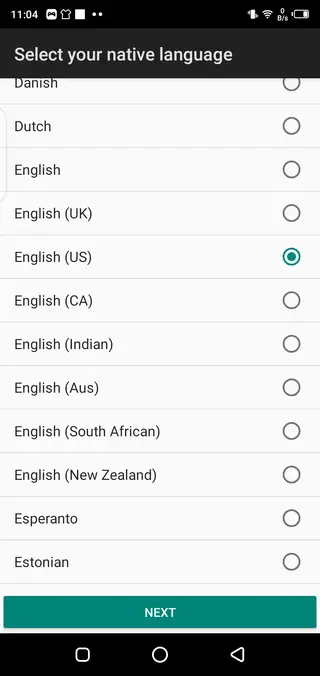
Translate YouTube subtitles into 110+ languages
Convert available YouTube captions into more than 110 different languages for easier understanding of any video.
Full access to YouTube video catalog
Browse trending videos or search any topic and play the corresponding YouTube content with translated subtitles.
Subtitle language switcher
Change subtitle languages manually during playback to the language you prefer without restarting the video.
Word and sentence meaning lookup
Double tap a word or subtitle line to see its meaning or a clearer translation, useful for study and clarification.
Trending and recommended panel
Open a dedicated panel that lists trending and popular videos you can start watching with translation immediately.
Built in search bar
Search for videos by keyword inside the app to quickly find the exact YouTube video you want to watch.
Caption and playback controls
Control subtitles and video playback together, with options to pause, seek, and read lines comfortably.
Favorite videos list
Mark videos as favorites so you can return to them later and continue watching with your chosen subtitle settings.
Screenshots
App compatibility and requirements
Sub Translate is designed for Android smartphones and tablets that meet the minimum system requirement of Android 4.2 or higher. Performance will usually be smoother on newer devices with more RAM and stable network connections, especially when streaming high resolution videos with live subtitle translation.
Because the app works on top of YouTube, you also need access to YouTube in your region. Signing in with your Google account can help sync recommendations and improve the list of suggested and trending videos inside the app.
Tips for better subtitle translation results
To get the best experience from Sub Translate, it helps to follow some simple usage tips.
Choose videos that already include subtitles or captions, since translation quality depends on the base text.
Select a language you are comfortable with, and adjust it if the initial translation feels unclear.
Use the double tap meaning feature whenever you find a confusing word or phrase in the subtitles.
Pause and scroll through subtitles when watching detailed lectures or tutorials to avoid missing important information.
Add useful videos to your favorites list for quick access and repeated viewing when learning.
Privacy and account usage
Sub Translate typically needs a Google account sign in to personalize content and access certain YouTube features. The app focuses on subtitles and playback, and it does not position itself as a file sharing or downloading tool.
As with any app that connects to online services, you should review the permissions it requests during installation and manage them in your Android settings according to your preferences.
FAQs
Pros
- Translates YouTube subtitles into more than 110 languages
- Makes foreign videos easier to understand for non native speakers
- Includes search and trending panels for discovering videos inside the app
- Supports double tap word meaning lookup for learning and clarification
- Offers favorite list and caption controls for a better viewing experience
- Simple and user friendly interface suitable for most Android users
Cons
- Requires an internet connection for streaming and translation
- Depends on available YouTube captions or auto captions to work correctly
- Contains ads that may interrupt the viewing experience
- Not all translations will be perfect, especially for complex phrases
Conclusion
Sub Translate is a practical subtitle translation tool for YouTube viewers who want to watch videos in other languages on Android. With support for 110 plus languages, caption controls, and in app search, it makes foreign content more accessible. You can download the latest official APK from our website and start using translated subtitles within minutes. For more amazing apps, keep visiting our Website.




Comments
No approved comments yet.