

Trade in Plus
Trade in Plus is an Android app that helps you diagnose your phone and estimate its trade-in value in a few simple steps. It is designed for users who want to sell or upgrade their smartphones with more clarity.
With automated hardware checks and instant valuation, the app reduces guesswork when you decide to exchange your device. You can run a quick test, see the health report, and then use the estimated value while trading your phone at participating stores.
You can download the latest Trade in Plus APK directly from our website and install it on compatible Android phones and tablets without any registration fee.
Rate this app
App details
- App name
- Trade in Plus
- Category
- Tools
- Version
- v3.2.85
- Size
- 16 MB
- Requirements
- 4.4 and Above
- Package name
- com.plusphone.android
- Publisher
- ENB MOBILE CARE
- Price
- Free
- Mod
- No
- Downloads
- 618,261
- Rating
- 4.5 / 5
- Rating count
- 6,172
- Play Store
- Yes
- Requires root
- No
- Offline support
- No
- Contains ads
- Yes
- In-app purchases
- Yes
- Updated
- Jun 4, 2026
- Age rating
- Rated for 3+
Table of contents
What is Trade in Plus Android App?
Trade in Plus is a free Android application developed by ENB MOBILE CARE that focuses on smartphone diagnostics and trade-in valuation like Mercado Pago False. It runs a series of automated tests on your device to check important components like display, battery, camera, sensors, and basic performance indicators.
After completing the checks, the app calculates an estimated market value for your phone based on its condition, model, and current demand trends. This helps you understand how much your device is roughly worth before you visit a shop or trade-in point.
The app works on both Android phones and tablets running Android 4.4 or higher. It has a straightforward interface so even non-technical users can start a full check-up, review the report, and then proceed to trade their phone at supported locations.
Originally focused on electronic trading in African markets, Trade in Plus has gradually expanded its reach and now supports users in multiple regions where partner stores and programs are active.
Why Download Trade in Plus APK from Our Website?
Downloading the Trade in Plus APK from our website gives you quick access to the latest available version without searching around. You can keep a copy of the installer and reinstall it when needed, even if it is not easily accessible through other channels in your region.
The app helps you walk into a shop with a clearer idea of your device’s approximate trade-in price. Instead of relying only on verbal estimates, you can show a diagnostic report and valuation that reflect your phone’s condition after a structured check-up.
By installing the APK directly from our website, you stay in control of the update process. You can update when you are ready, compare new features with older ones, and keep the file stored locally for future use on multiple compatible devices that you own.
How Trade in Plus is Useful for Smartphone Owners?
Trade in Plus is particularly useful if you plan to sell or exchange your smartphone and want a more transparent process. Instead of visiting several shops to compare offers blindly, you can first run a detailed diagnostic on your device and see an estimated value.
The automated checks reduce the risk of missing hidden issues that might affect the trade-in price. For example, a minor display problem or sensor fault can be flagged by the app before you reach the counter, so you are not surprised when a technician points it out.
It also helps buyers or upgraders who are comparing options. Knowing the fair value of your current phone makes it easier to plan your budget for the next device and decide whether a specific trade-in offer is reasonable.
How to Download and Install Trade in Plus APK?
You can download the official Trade in Plus APK file directly from our website and install it manually on your Android device. Follow these steps to complete the process safely and smoothly:
Scroll to the download section on this page and tap the Trade in Plus APK download button.
Confirm the download in your browser and wait until the APK file finishes downloading.
Open your phone’s Settings, go to Security or Apps & notifications, and allow installation from unknown or external sources for your browser or file manager.
Locate the downloaded APK in your Downloads folder using a file manager app.
Tap the APK file, review the installation prompt, and tap Install.
Once the installation completes, tap Open to launch Trade in Plus and start the device diagnostics.
Whenever a newer version becomes available on our website, you can download the updated APK and install it over the existing app to keep your tools and valuation data current.
Features
Comprehensive phone diagnostics
Run automated tests on screen, battery, camera, sensors and key components to assess the overall health of your device.
Instant trade-in valuation
Get an estimated trade-in value based on device model, detected condition and current market demand data.
Real-time health report
View a clear health summary with pass or fail indicators so you can understand potential issues before trading your phone.
Turbo mode experience
Enable Turbo mode for a smoother interface, fewer interruptions and access to extra diagnostic tools where available.
Support for multiple regions
Use the app in markets where partner stores are available to help you convert your diagnostic report into a trade-in deal.
Android phone and tablet support
Install and run the app on most Android smartphones and tablets running Android 4.4 or higher.
Simple guided testing flow
Follow on-screen instructions for each test step so even first-time users can complete the full device check quickly.
Store-friendly trade process
Use the final report as a reference when you visit a participating shop to negotiate or confirm your trade-in value.
Screenshots
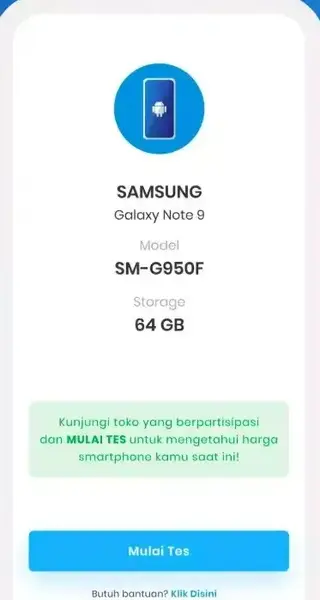
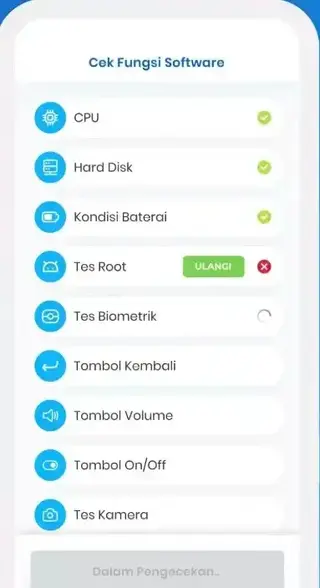
Trade in Plus Turbo Mode Explained
Turbo mode in Trade in Plus focuses on improving your everyday experience while you use the app. When enabled, it aims to minimise distractions from ads and streamline navigation so you can complete checks and review your phone’s value more quickly.
For users who run diagnostics frequently or manage multiple devices, Turbo mode can save time and reduce the chance of interruptions during important testing steps. Availability and exact behaviour of Turbo mode may vary by version, so it helps to keep the app updated using the APK downloads from our website.
Tips for Getting a Better Trade-In Value
While Trade in Plus provides an estimated value, there are a few practical steps you can take to improve real-world trade-in offers:
Back up and remove personal data before handing your phone to a store.
Clean the device and use the original box or accessories if you still have them.
Charge the battery so the shop can run quick checks without delay.
Use the diagnostic report from Trade in Plus as a discussion point when negotiating value.
These small preparations, combined with the app’s detailed health report, can often make the trade-in experience smoother and more transparent.
FAQs
Pros
- Free smartphone diagnostic and valuation tool for Android users
- Provides a structured health report that highlights device issues clearly
- Helps users estimate trade-in value before going to a store
- Simple interface that guides non-technical users through tests
- Works on a wide range of Android phones and tablets
Cons
- Requires an internet connection for valuation and some features
- Contains ads which may affect the overall experience for some users
- Trade-in options may depend on availability of partner stores in your region
- Valuation shown in the app may differ from final offers made by individual shops
Conclusion
Trade in Plus gives Android users a practical way to check the health of their smartphones and estimate trade-in value before they visit a store. With automated diagnostics, a clear report, and easy-to-use tools, it can make upgrading or selling your device more informed and less stressful. You can download the latest APK directly from our website and start evaluating your phone within minutes.




Comments
No approved comments yet.