

TXD Tool
TXD Tool is a powerful Android utility that lets you open and edit TXD texture files from GTA Vice City and GTA San Andreas directly on your phone. It is designed for players and modders who want deeper visual control over their game.
With TXD Tool you can replace textures, tweak properties, and manage texture archives without using a PC. You get a focused workspace for importing, exporting, and adjusting images used for cars, characters, weapons, buildings, and more.
You can download the official TXD Tool APK latest version directly from our website and start customizing your GTA SA and VC installation on any compatible Android device.
There is no doubt that GTA Vice City and GTA San Andreas are two of the most popular PC games of all time, developed by the famous gaming franchise Grand Theft Auto (GTA). The availability of their modified versions to play on Android devices is a huge blessing for fans, and with tools like TXD, they can take the gaming experience to a new level.
Rate this app
App details
- App name
- TXD Tool
- Category
- Tools
- Version
- v1.7.4
- Size
- 11.53 MB
- Requirements
- 4.4 and Above
- Package name
- com.viseksoftware.txdw
- Publisher
- VIS Apps
- Price
- Free
- Mod
- No
- Downloads
- 91,783
- Rating
- 4.5 / 5
- Rating count
- 1,815
- Play Store
- Yes
- Requires root
- No
- Offline support
- Yes
- Contains ads
- Yes
- In-app purchases
- Yes
- Updated
- Jun 3, 2026
- Age rating
- Rated for 3+
Table of contents
What is TXD Tool APK?
TXD Tool APK is an Android application created by VIS Apps for editing TXD texture archives used in classic Grand Theft Auto titles such as GTA Vice City and GTA San Andreas. These TXD files store the images that define how cars, characters, weapons, buildings, UI elements, and many other objects look in game.
The app loads TXD files from the game directory on your device and presents all texture entries in a clear list. From there you can preview, modify, replace, rename, or remove textures without needing desktop software.
TXD Tool is aimed at users who already understand the basics of 3D graphics or game modding. If you work with textures, skins, or visual mods for GTA, this app gives you a convenient mobile workflow to manage and test your ideas directly on Android.
Why download TXD Tool for Android?
TXD Tool is useful for anyone who wants to personalize GTA Vice City or GTA San Andreas beyond simple save-game mods. Instead of relying on pre-made texture packs, you can build your own designs and apply them directly to the game files installed on your phone.
By downloading the TXD Tool APK from our website, you get the official Android package ready to install, so you can start editing textures on your existing GTA installation right away. This saves time, removes the need for a PC, and gives you full control over how your game looks.
Whether you want custom car skins, unique character outfits, or redesigned HUD icons, TXD Tool gives you a dedicated texture editor tailored to the GTA file format on mobile.
How TXD Tool is useful for GTA modders?
TXD Tool focuses on one task: working with GTA texture archives on Android. This specialization makes it a practical companion for modders who regularly experiment with new visual styles.
Instead of transferring files back and forth between a PC and phone, you can:
Open TXD files stored in your GTA SA or VC directories
Inspect every texture entry with quick previews
Import replacement textures in supported image formats
Export textures for editing in external image editors
Adjust properties such as compression and filtering where supported
Save the modified TXD and test changes in game within minutes
This workflow speeds up experimentation and makes it easier to learn how GTA textures work, especially if you are already familiar with basic 3D or texture editing concepts.
How to download and install TXD Tool APK?
You can get the official TXD Tool APK directly from our website and install it like any other Android app. Follow these steps on your phone or tablet:
Scroll to the download area on this page.
Tap the TXD Tool APK download button to start downloading the latest available version.
Wait for the APK file to finish downloading to your device.
Open your file manager and locate the downloaded TXD Tool APK file.
Tap the file and, if prompted, enable installation from unknown sources in your device settings.
Confirm the installation and wait until the app is installed successfully.
Launch TXD Tool from your app drawer and grant the required storage permissions so it can access your GTA game files.
After installation, locate your GTA Vice City or San Andreas TXD files within the game directory and start editing textures directly with TXD Tool.
Features
Dedicated TXD texture editor
Open and manage TXD archives used by GTA Vice City and GTA San Andreas directly on Android devices.
Import and export textures
Replace existing textures with your own images and export original textures to edit them with external tools.
View and manage texture entries
Browse a list of all textures in a TXD file, preview them, and organize them as needed.
Rename and delete textures
Clean up TXD archives by renaming entries or removing textures you no longer need.
Edit texture properties
Adjust supported properties such as compression or filtering options for more control over appearance and performance.
Works with GTA VC and SA ports
Designed for the Android versions of GTA Vice City and GTA San Andreas installed on your device.
Auto operations and batch tools
Use automated functions to handle multiple textures more efficiently where the app supports it.
Touch friendly interface
Simple, mobile friendly layout that keeps key tools within easy reach for quick editing.
Screenshots
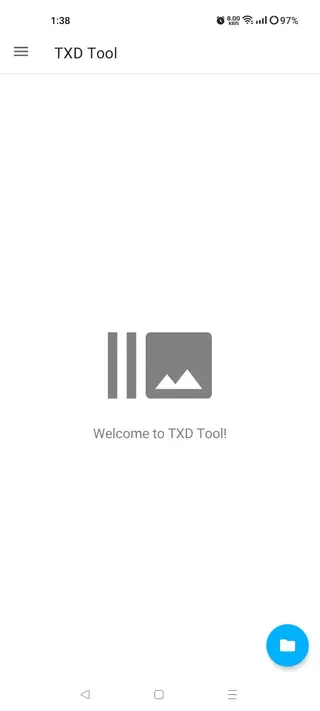
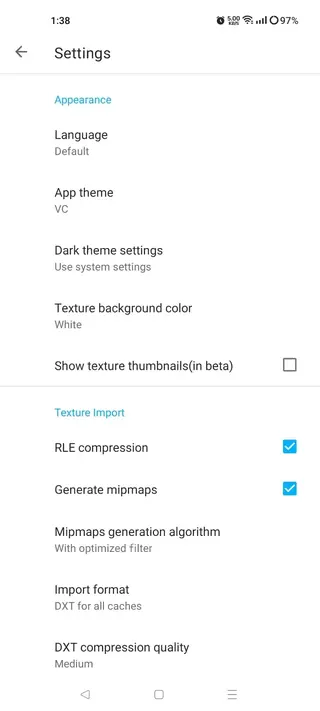
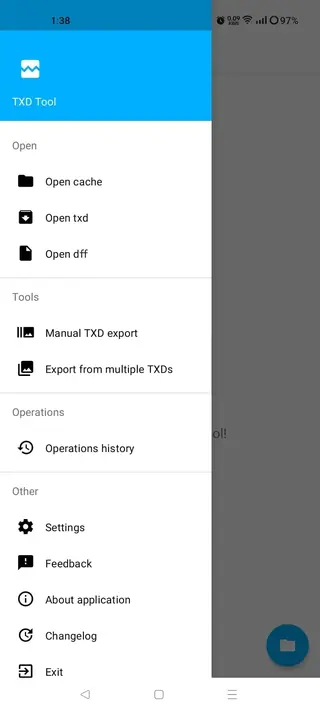
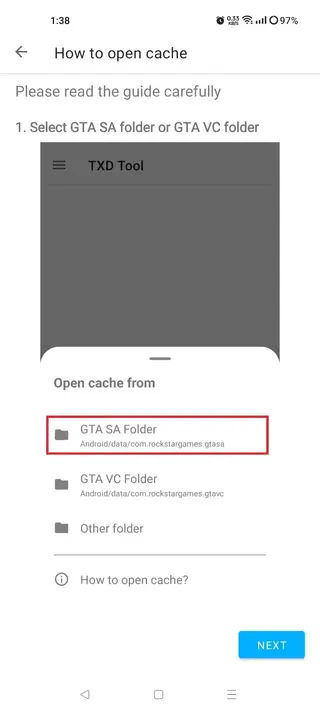
Basic workflow for editing TXD files
Once TXD Tool is installed and your GTA games are set up on the same device, the basic workflow is straightforward:
Open TXD Tool and browse to your GTA Vice City or San Andreas game folder.
Select the TXD file you want to edit, such as one used for vehicles or character models.
Wait for the app to load all textures and display them as a list.
Preview each texture to understand where it appears in game.
Export a texture if you want to edit it in an external image editor, or import a new image to replace an existing texture.
Adjust texture properties where appropriate and save the TXD file.
Launch GTA on your device and check the results directly in game.
By repeating this process and keeping backups of original files, you can gradually build complex visual overhauls or small cosmetic tweaks tailored to your preferences.
Tips for safer GTA texture modding
Because you are working directly with game resources, taking a few precautions helps avoid problems:
Always back up TXD files before editing so you can restore the game if something goes wrong.
Change a few textures at a time and test them in game instead of editing dozens at once.
Match image formats and dimensions as closely as possible to the originals to reduce visual issues.
Use a capable device with enough RAM and storage, as large TXD archives and high resolution textures can be demanding.
Keep your APK updated by downloading newer versions from our website when they are available.
Following these simple guidelines will help you get better results from TXD Tool and keep your GTA installation stable while you experiment with new designs.
FAQs
Pros
- Specialized TXD editor designed for GTA Vice City and San Andreas
- Allows texture editing on Android without needing a PC
- Supports importing and exporting textures for deeper customization
- Lets users rename, delete, and manage texture entries in one place
- Interface is focused and relatively simple once you understand textures
- Speeds up testing of visual mods directly in the mobile game
Cons
- Requires some understanding of 3D graphics or texture editing to use effectively
- Improper edits can cause visual glitches or issues in game files
- May perform slowly or crash on low end or older Android devices
- Primarily useful only for GTA titles that use TXD archives
Conclusion
TXD Tool APK offers a focused way to edit GTA Vice City and San Andreas textures directly on Android. If you already work with game mods or want precise visual control, downloading the app from our website gives you a practical and portable TXD editor for your GTA installations.




Comments
No approved comments yet.