
Vegol TV
Vegol TV APK is a sports-focused IPTV app for Android that lets you stream live TV channels and match coverage directly on your phone or tablet. It focuses heavily on Turkish broadcasts and popular football leagues.
With a simple interface and categorized sports channels, the app makes it easy to find live football, basketball, volleyball, and more. You can install the official Vegol TV APK directly from our website and start watching without any registration.
The app also supports match highlights, sports news, and flexible video quality options, so you can adjust streams according to your internet speed and enjoy smoother playback.
People used to stay home and watch all the games on their premium subscription channels. But there are tons of people, who cannot afford to buy any subscription. So, for all of them, we are here with these amazing applications including Futbol Max and Epic Sports, through which they can also enjoy their free time.
Rate this app
App details
- App name
- Vegol TV
- Category
- Sports
- Version
- v4.0
- Size
- 8.43 MB
- Requirements
- 4.4 and Above
- Package name
- com.vegol.app
- Publisher
- Ollo App
- Price
- Free
- Mod
- No
- Downloads
- 189,669
- Rating
- 4.6 / 5
- Rating count
- 4,368
- Play Store
- No
- Requires root
- No
- Offline support
- No
- Contains ads
- No
- In-app purchases
- No
- Updated
- May 21, 2026
- Age rating
- Rated for 3+
Table of contents
What is Vegol TV APK
Vegol TV APK is an Android IPTV application that aggregates a wide range of live sports TV channels, mainly in the Turkish language. It focuses on football but also covers other sports such as basketball and volleyball through different channel categories.
The app organizes streams into clearly labeled sections, allowing users to browse by sport or channel type. Within each category, Vegol TV offers multiple network options, so if several matches are live at the same time, viewers can quickly switch between channels.
Instead of requiring a paid subscription or an account, Vegol TV offers direct access to live streams. Users can preview a small live window, open a feed in full screen if they like it, or move to another channel if the quality or match is not what they want.
Vegol TV also includes quality selection for video playback, which helps maintain stable streaming on different connection speeds. Combined with a simple, graphical user interface, it aims to provide a straightforward way to follow live sports on Android devices.
Why Download Vegol TV for Android
Sports fans who want quick access to live matches without going through complex sign-up processes often look for lightweight IPTV apps. Vegol TV offers exactly that by focusing on live sports channels and minimizing extra steps.
The app is especially useful for users who follow Turkish sports coverage and major football competitions. With multiple channels in each sports category, you can usually find an active stream when matches are on air.
Downloading the official Vegol TV APK from our website gives you direct access to the latest available version. Once installed, you can start browsing live channels, add favorites, and receive update alerts related to your preferred matches and teams.
How Vegol TV Is Useful for Sports Fans
Vegol TV is designed to make live sports viewing more convenient on mobile devices. Instead of searching for scattered links, users get a structured list of channels grouped by sport and competition.
The favorites section helps you build a personalized list of channels, so you do not need to scroll through the full catalog every time a match starts. Notifications related to your favorites can help you notice when coverage, highlights, or updates become available.
Support for different video resolutions allows you to adapt streaming quality to your internet connection. On faster networks, you can enjoy high-definition playback, while on slower connections you can lower the quality for fewer interruptions.
For fans of events like the Indian Premier League and major football leagues, having an all-in-one sports streaming app on Android can be a practical way to follow live action, post-match highlights, and sports news from a single place.
How to Download and Install Vegol TV APK
You can get the official Vegol TV APK file directly from our website. Follow these steps to download and install it on your Android device safely.
Scroll to the download section on this page and tap the Vegol TV APK download button.
Confirm the download in your browser and wait for the APK file to finish downloading.
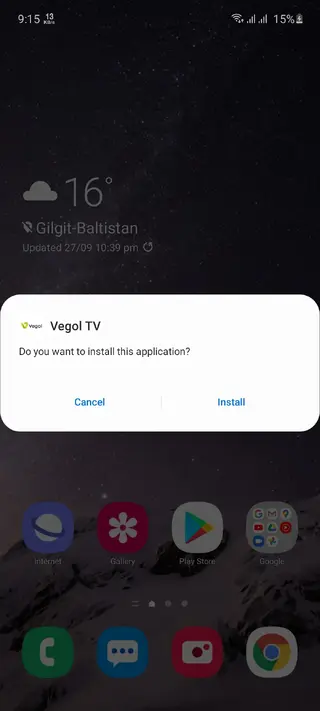
Open your phone settings and enable the option to install apps from unknown sources, if it is not already enabled.
Locate the downloaded APK file in your Downloads folder and tap it to start the installation.
Follow the on-screen instructions and complete the installation process.
Launch Vegol TV from your app drawer, allow any required permissions, and start browsing live sports channels.
Features
Live sports IPTV channels
Access a wide range of live TV channels focused mainly on sports and football coverage.
Turkish language content
Most of the available channels and coverage are provided in the Turkish language.
Dedicated football section
Browse a special football category with multiple networks showing ongoing matches and leagues.
Multiple networks per category
Switch between several channels in each sports section to find the best live stream at any moment.
Channel preview window
Use a small preview screen to quickly check a stream before opening it in full view.
Favorites list
Mark channels as favorites to create a personal list and access them faster later.
Match and update notifications
Receive alerts about updates, highlights, or changes related to channels you marked as favorites.
High-definition video support
Enjoy high-quality video playback when your device and connection support higher resolutions.
Screenshots


Streaming Quality and Performance
Vegol TV is built around IPTV technology, which means the viewing experience depends on your internet connection. With a fast and stable network, you can select higher resolutions for sharp and detailed streams. On slower connections, you can lower the video quality to reduce buffering and keep the audio and video in sync.
Because the app focuses on live channels, performance may fluctuate based on server load and broadcaster conditions. Using the preview window and switching between available networks in a category can help you find the most stable stream at any given time.
Interface and User Experience
The app uses a graphical user interface with labeled categories so users can quickly understand where to find specific sports. Menus are generally straightforward, which is helpful for new users who are not familiar with IPTV apps.
By combining category lists, a favorites tab, and simple playback controls, Vegol TV aims to keep navigation light and focused on watching matches instead of managing complex settings.
Device Compatibility and Requirements
Vegol TV APK is designed for Android devices running Android 4.4 or higher. It works on most modern smartphones and tablets that support third-party APK installation.
No root access is required, and the app usually runs with standard permissions such as internet access and basic device storage access for installation and configuration.
FAQs
Pros
- Free to download and use without registration
- Organized sports categories with a strong focus on football
- Multiple channels per sport for better chances of finding live coverage
- Favorites and notifications help track preferred matches and channels
- Video quality selection improves streaming on different network speeds
- Simple, graphical interface suitable for most Android users
Cons
- Requires a stable internet connection for smooth streaming
- Content is mainly in Turkish, which may limit accessibility for some users
- Not available on Google Play Store and must be installed via APK
- Channel availability and working streams can vary over time
Conclusion
Vegol TV APK offers an easy way to watch live sports channels and highlights on Android, especially for Turkish coverage and football fans. Download the official APK from our website, install it, and use the categorized channels, favorites, and quality controls to follow your favorite matches more comfortably on mobile.




Comments
No approved comments yet.