

VerificaC19
VerificaC19 is the official Italian app used to verify EU Digital COVID Certificates directly from your Android phone. It allows authorized personnel to check vaccination, test, or recovery certificates quickly and in a standardized way.
With this tool, you can scan QR codes, validate their authenticity against European rules, and see only the minimal information required for checks. You can download the original VerificaC19 APK directly from our website and install it on compatible Android devices.
Rate this app
App details
- App name
- VerificaC19
- Category
- Health & Fitness
- Version
- v1.3.6
- Size
- 30.98 MB
- Requirements
- 8.0 and Above
- Package name
- it.ministerodellasalute.verificaC19
- Publisher
- Ministero della Salute
- Price
- Free
- Mod
- No
- Downloads
- 62,361
- Rating
- 4.2 / 5
- Rating count
- 12,541
- Play Store
- No
- Requires root
- No
- Offline support
- Yes
- Contains ads
- No
- In-app purchases
- No
- Updated
- May 12, 2026
- Age rating
- Rated for 7+
Table of contents
What is VerificaC19 App
VerificaC19 is a Health and Fitness category application developed on behalf of the Italian Ministry of Health. It is designed to read and verify EU Digital COVID Certificates (also known as Green Pass) using your Android device’s camera.
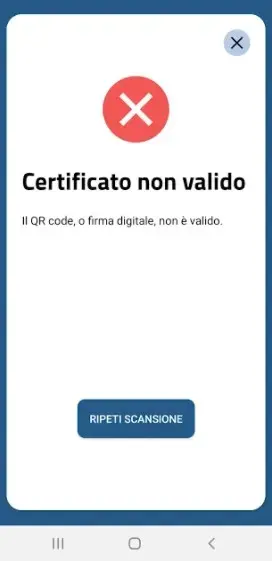
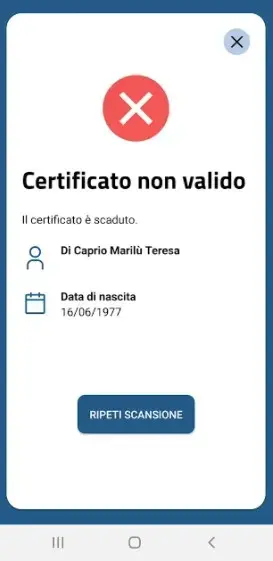
The app scans the QR code printed or displayed on the certificate. It then checks the digital signature against the European verification rules and informs the operator whether the certificate is valid, expired, or not compliant with the configured rules.
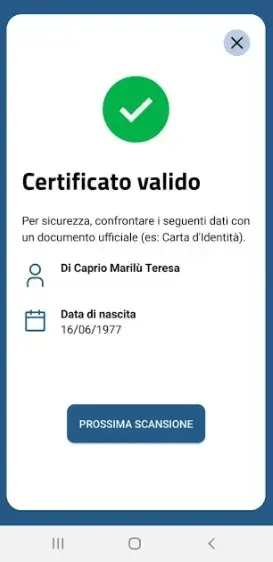
VerificaC19 focuses on privacy-friendly checks. It shows only essential data such as certificate validity, the holder’s name, and date of birth, while avoiding unnecessary data storage. The app works without creating user profiles and has been used widely in Italy during the COVID-19 containment measures.
Why download VerificaC19 APK from our website
Downloading VerificaC19 APK from our website lets you keep a compatible installer for devices that need manual installation. This is useful when the app is not easily accessible through standard stores on certain Android phones or in specific environments.
By getting the APK directly from our site, you can:
Install the app on work devices that do not use Google services.
Deploy the same version across multiple terminals for certificate checks.
Keep an offline copy of the file for later installation when needed.
The app itself remains free to use and focuses on doing one job well: scanning and validating EU Digital COVID Certificates according to the Italian configuration and rules valid for the version you install.
If you want to get more similar services from other countries, then you should try Sikep Mahkamah Agung and Hayat Eve Sığar. These are quite popular apps, which offer similar services for other countries. These listed Apps are also free to download from here.
How VerificaC19 is useful in real situations
VerificaC19 is especially useful for operators who must check access requirements in places such as events, hospitality venues, workplaces, and transportation.
Instead of manually interpreting certificates, staff can:
Scan the QR code with the camera and get an immediate response.
Reduce errors when reading names, dates, or certificate types.
Speed up lines at entrances by using a simple traffic-light style validation.
Because the app is designed to work without an active internet connection after the configuration data is updated, it can be used in locations with limited connectivity, such as indoor venues or temporary checkpoints.
How to download and install VerificaC19 APK
You can download the original VerificaC19 APK file directly from our website and then install it manually on your Android device. Make sure your phone meets the minimum Android version specified for this release.
Follow these steps:
Scroll to the download section on this page.
Tap the available VerificaC19 APK download button.
Wait until the APK file is fully saved on your device.
Open your device settings and allow installation from unknown sources for your browser or file manager if required.
Locate the downloaded APK in your Downloads folder and tap it.
Review the installation prompts and confirm to install.
Once installed, open VerificaC19, grant camera permissions, and start scanning certificates.
If you later download a newer version from our website, you can install it over the existing one to update the app while keeping your settings.
Features
Official verification app
Developed on behalf of the Italian Ministry of Health to verify EU Digital COVID Certificates.
QR code scanning
Uses the device camera to scan the QR code printed or displayed on digital certificates.
Instant validity check
Returns a quick result showing whether the certificate is valid, expired, or not compliant with rules.
Offline operation
Can perform verification even when the device is offline once rules and keys are updated.
Privacy focused
Shows only essential personal data and does not create user profiles or export certificate data.
Simple interface
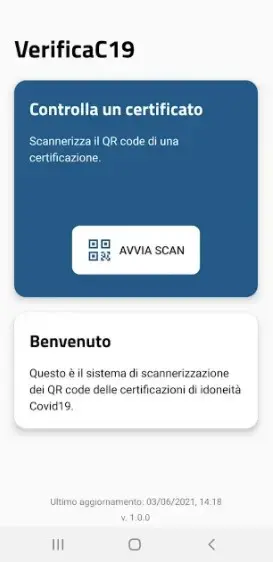
Clean layout with a straightforward scan button that non-technical staff can use easily.
Multiple certificate types
Supports vaccination, negative test, and recovery certificates within the EU Digital COVID framework.
Free to use
The app is available at no monetary cost for compatible Android devices.
Screenshots
App compatibility and system requirements
The VerificaC19 APK version available on our website targets modern Android devices. According to the information provided, it is designed for phones and tablets running Android 8.0 or higher. Before downloading, you should check your device version in the system settings.
For the best experience, you should also ensure that:
Your camera focuses correctly at close range so QR codes can be read clearly.
You allow the app to access the camera when prompted.
You keep the device time and date correctly configured for accurate certificate validation.
Privacy and data handling
VerificaC19 is structured to minimize the handling of personal data during certificate checks. When you scan a QR code, the app reads the information required to determine whether the certificate is valid under the defined rules. It then shows the outcome and limited personal details needed to match the certificate to the holder.
The app does not create user accounts or profiles. It is intended as an operational tool for verification staff rather than a personal health record app. For detailed health data or certificate generation, users must rely on their country’s official channels, not on VerificaC19.
Best practices for using VerificaC19 on-site
To use VerificaC19 effectively in real-world scenarios, operators can adopt a few simple practices:
Keep the device charged and, when possible, carry a backup device during busy events.
Perform a test scan before opening to the public to confirm everything works as expected.
Position staff so that people can present their QR code without blocking entrances.
Inform visitors clearly that only the QR code and basic identity details will be checked.
Following these steps helps keep checks quick, clear, and respectful of visitors while maintaining compliance with applicable rules.
FAQs
Pros
- Official tool developed for the Italian Ministry of Health context
- Simple interface that staff can learn in minutes
- Fast QR scanning and immediate certificate validation
- Works offline after configuration data is updated
- Does not rely on user registration or account creation
- Free to download and install from our website
Cons
- Usefulness is limited to EU Digital COVID Certificates and related rules
- App is mainly designed for Italian regulations and may not fit other countries perfectly
- Requires camera access, which some users may prefer to restrict
- Functionality depends on the current legal framework, which can change over time
Conclusion
VerificaC19 provides a focused and practical way to verify EU Digital COVID Certificates on Android. If you need a simple, official-style checker for vaccination and related certificates, you can download the VerificaC19 APK directly from our website and use it on supported devices for fast on-site validation.




Comments
No approved comments yet.