

VidMix
VidMix is an all-in-one Android streaming and video downloader app for movies, TV shows, live TV channels, and short clips. It packs several entertainment options into a single, lightweight tool.
With VidMix, you can stream content from multiple countries, download videos in different qualities, and even access IPTV-style live channels in one place. The official APK file is available to download directly from our website.
The app also includes social video downloading and casual online games, making it a multipurpose hub for users who want more than a basic movie app on their Android phone or tablet.
Rate this app
App details
- App name
- VidMix
- Category
- Video Players & Editors
- Version
- v2.3.0120
- Size
- 11.51 MB
- Requirements
- 5.0 and Above
- Package name
- com.vidmix.app
- Publisher
- VidMix Team
- Price
- Free
- Mod
- No
- Downloads
- 83,619
- Rating
- 4.8 / 5
- Rating count
- 27,491
- Play Store
- No
- Requires root
- No
- Offline support
- Yes
- Contains ads
- Yes
- In-app purchases
- No
- Updated
- May 9, 2026
- Age rating
- Rated for 3+
Table of contents
What is VidMix App
VidMix is an Android application that combines video streaming, live TV, and online video downloading in a single interface. It focuses on free access to movies, web series, TV dramas, and live channels from different regions.
The app offers several links for a single movie or channel, so if one source buffers or fails, you can quickly switch to another. Users can stream in resolutions that match their connection quality, and on a fast network, many titles can play in HD or higher quality.
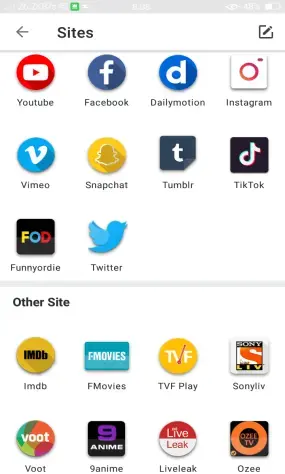
VidMix also works as a video downloader for popular social and video platforms. You can fetch clips from services such as YouTube, Facebook, Instagram, and TikTok directly inside the app and save them to your device for offline playback.
Alongside video content, VidMix provides IPTV-style channel lists and a small catalog of HTML5-based games divided into genres like action, racing, adventure, and puzzles. Adult content is present, but you can control it through a built-in restricted mode toggle.
The games are divided into categories like action games, racing, adventure, puzzles, and many more. If you like such apps and want to experience more, then do check out Vudu TV, and Bongngo TV.
Why Download VidMix APK from Our Website
Downloading the VidMix APK from our website gives you quick access to the official installation file without any extra steps or sign-ups. The current version information, package name, and compatibility details are clearly listed so you know exactly what you are installing on your Android device.
Because VidMix is not available on Google Play, installing the APK manually is the primary way to use the app. Our site hosts the APK file directly, so you can tap the download button and get the package to your phone or tablet with a single click.
Once installed, VidMix can become a central hub for your video needs: stream series and movies, follow live channels from multiple countries, and save online videos to watch later without network issues.
How VidMix is Useful for Android Users
VidMix is useful if you want one app that covers several entertainment scenarios instead of juggling separate tools. You can open it to browse movies and shows, switch to live TV for news or sports, then download a few social videos to watch on the go.
The ability to choose from multiple streaming links reduces frustration with broken or slow sources. Downloading in different qualities helps manage data usage and storage space, especially on devices with limited memory.
For viewers who follow content from various regions, having live channels from many countries in one place is convenient. Favorites and playlists make it easier to return to your most-watched items, while the casual games provide quick breaks between videos without needing extra installations.
How to Download and Install VidMix APK
You can download the official VidMix APK file directly from our website. Make sure your device runs Android 5.0 or higher before you start.
Follow these steps to download VidMix from our site:
Scroll to the download section on this page.
Tap the VidMix APK download button once.
Wait a few seconds while the APK file is prepared and starts downloading to your device.
After the file is saved, complete the installation with these steps:
Open your phone settings and go to the security or privacy section.
Enable the option that allows installation from unknown or external sources, if it is not already enabled.
Open your Downloads folder or file manager and tap the VidMix APK file.
Review the permissions and tap Install.
Wait for the setup to finish, then tap Open to start using VidMix.
You can disable installation from unknown sources again after VidMix is installed if you prefer tighter device security.
Features
All-in-one video hub
Watch movies, series, live TV channels, and short online videos from one Android app instead of switching between multiple tools.
Multiple streaming links
Get more than one link for the same movie or channel so you can change sources quickly if one is slow or not working.
Video download options
Download movies and online videos to your device in different resolutions to match your storage space and internet speed.
Social media video downloader
Fetch and save videos from platforms like YouTube, Facebook, Instagram, and TikTok directly through the VidMix interface.
Adaptive streaming quality
Stream content in qualities that depend on your internet connection, with HD playback possible on faster networks.
Live TV and IPTV-style channels
Access live TV channels from many countries and organize them easily, similar to an IPTV playlist experience.
Favorites and playlists
Add movies, shows, and channels to your favorites so you can reach them quickly without searching every time.
Built-in casual games
Play online games in genres such as action, racing, adventure, and puzzles from inside the app without separate downloads.
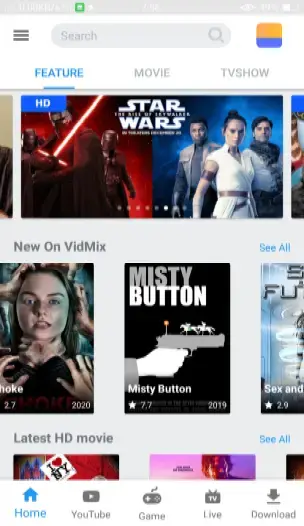
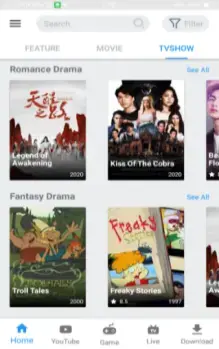
Screenshots
Legal and privacy considerations
VidMix focuses on free access to movies, series, and online videos, which often involves streaming content that may be protected by copyright. Availability and legality can vary widely between countries. Users are responsible for how they use the app and should always respect intellectual property and local regulations.
Because VidMix is not distributed through the official Google Play Store, it is important to pay attention to app permissions during installation. Only install the APK from sources you trust and review access to storage, network, and other sensitive areas before proceeding.
Tips for better streaming and downloads
To reduce buffering in VidMix, connect to a stable Wi-Fi network and select a video resolution that matches your connection speed. Lower resolutions load faster and consume less data.
When downloading, choose smaller file sizes if your device storage is limited. You can also clean up your downloads library regularly by deleting movies and clips you no longer need. Adding your favorite channels and shows to the favorites list makes it easier to resume watching without searching again.
FAQs
Pros
- Combines movies, series, live TV, and video downloads in one app
- Multiple streaming links help reduce buffering and dead links
- Supports saving videos in different qualities for offline viewing
- Downloads from popular social and video platforms
- Favorites and playlists make it easier to organize content
- Includes extra entertainment with simple in-app games
Cons
- Provides access to copyrighted streams that may not be legal in all regions
- Contains adult content unless restricted mode is enabled
- Shows in-app advertising during use
- Not available on Google Play and must be sideloaded as an APK
Conclusion
VidMix is a multipurpose Android app that blends streaming, live TV, and social video downloading into a single package. If you want one place to discover, watch, and save online videos on your phone, you can download the official VidMix APK directly from our website and start exploring its catalog in minutes.




Comments
No approved comments yet.