

Wo Mic Pro
Wo Mic Pro turns your Android phone into a practical microphone for your PC or laptop. You can send your voice from mobile to desktop in real time for calls, meetings, and recordings.
The app works with a companion client and driver on your computer, so you can use your phone as an audio input in Zoom, Teams, Discord, OBS, and many other tools. It helps you avoid buying a separate mic when you already have a phone in your pocket.
You can download the Wo Mic Pro APK directly from our website and start using your Android device as a portable, wireless microphone in just a few minutes.
Rate this app
App details
- App name
- Wo Mic Pro
- Category
- Tools
- Version
- v4.8
- Size
- 6.2 MB
- Requirements
- 4.0 and Above
- Package name
- com.wo.voice2
- Publisher
- Wolicheng Tech
- Price
- Free
- Mod
- No
- Downloads
- 66,516
- Rating
- 4.7 / 5
- Rating count
- 27,302
- Play Store
- Yes
- Requires root
- No
- Offline support
- No
- Contains ads
- Yes
- In-app purchases
- Yes
- Updated
- Jun 2, 2026
- Age rating
- Rated for 7+
Table of contents
What is Wo Mic Pro for Android
Wo Mic Pro is an Android microphone app that lets you use your phone as a mic for your Windows, macOS, or Linux computer. After installing the app on your mobile device and the official client and driver on your PC, your phone appears as a standard audio input that you can select in any program.
The app supports multiple transport options, including USB, Wi-Fi, Wi-Fi Direct, and Bluetooth, depending on your system. This flexibility makes it suitable for online classes, voice chats, video calls, game streaming, and basic audio recording.
The Pro edition focuses on a cleaner, more stable audio stream, advanced configuration options, and fewer limitations compared to the basic version. It gives you more control over how your microphone behaves while still keeping the setup process simple for everyday users.
Why download Wo Mic Pro APK from our website
Downloading the Wo Mic Pro APK from our website lets you get the app quickly and start using your phone as a computer microphone without any complicated steps. The installation file is available directly on our download page, so you can save it to your device and install it whenever you need.
With Wo Mic Pro, you can avoid carrying or buying a separate USB microphone. Your phone becomes a portable mic that you can place where it captures your voice best. It works well for students attending online classes, professionals joining remote meetings, and creators who want a simple solution for streaming or recording.
The app offers multiple connection modes, adjustable audio quality, and options to tune volume and microphone behavior, which makes it more flexible than many basic voice recorder apps. Also, you can keep visiting Apkoll for the future updates.
How Wo Mic Pro is useful in daily use
Wo Mic Pro is useful whenever you need clear voice input on your PC but do not have a dedicated microphone. You can rely on the microphone already built into your phone, which is usually good enough for calls, conferences, and casual content creation.
For remote work and online learning, the app helps you join video meetings with better positioning. You can keep your phone closer to your mouth while the laptop stays on the desk, which often improves clarity. Streamers and gamers can connect Wo Mic Pro to tools like OBS or Discord and talk with teammates or audiences without extra hardware.
Because it supports several transport options, you can pick the one that matches your environment. USB can provide low latency and stability, while Wi-Fi and Bluetooth are convenient if you want to move around the room. Basic settings for sampling rate, volume, and audio mode help you balance quality and performance according to your network and device.
How to download and install Wo Mic Pro APK
You can download the Wo Mic Pro APK file directly from our website and then install it on your Android device. After that, you only need to set up the official client and driver on your computer.
Follow these basic steps to get started:
Scroll to the download section on this page.
Tap the Wo Mic Pro APK download button on our website.
Wait until the APK file finishes downloading to your phone.
Open your device settings and allow installation from unknown sources if required.
Locate the downloaded APK in your downloads folder and tap it.
Confirm the installation and wait for the process to complete.
Install the Wo Mic client and driver on your PC from the official project site.
Open Wo Mic Pro on your phone and the client on your computer, choose the same transport type, and connect.
Once connected, select Wo Mic as the microphone in your video calling, streaming, or recording software and start speaking through your phone.
Features
Use phone as PC microphone
Turn your Android device into a microphone that your computer recognizes as a standard audio input device.
Multiple connection methods
Connect to your PC using USB, Wi-Fi, Wi-Fi Direct, or Bluetooth, depending on your platform and preferences.
Configurable audio quality
Adjust audio settings such as sampling rate and codec to balance clarity, latency, and performance.
Volume and gain control
Change microphone volume and sensitivity directly from the app interface for better sound levels.
Background noise reduction
Use app-side processing and phone hardware to help reduce some background noise during voice transmission.
Works with many apps
Use the mic in video conferencing, online classes, game chat, live streaming, and recording software.
Simple pairing process
Follow clear steps on both phone and PC client to establish a connection in a few minutes.
Automatic reconnection options
In supported modes, the client can attempt to restore the audio link if the network briefly drops.
Screenshots
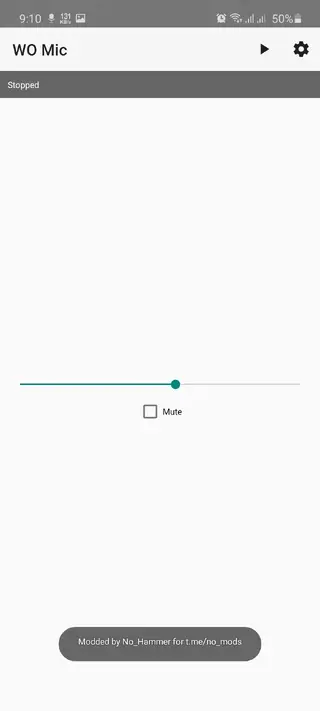
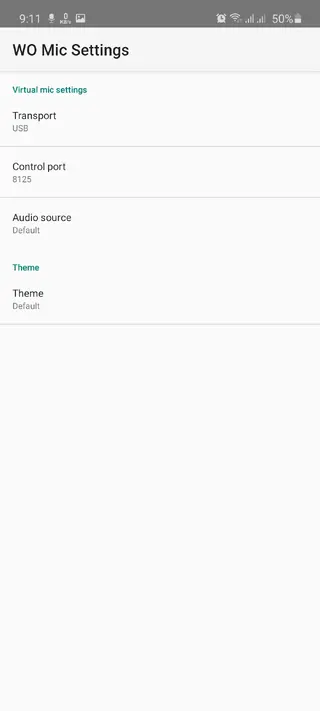
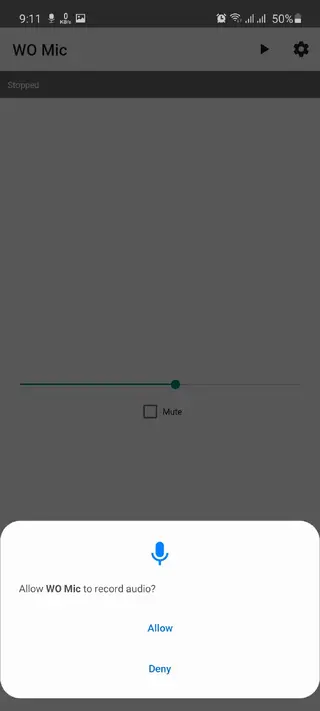
Connection modes and setup basics
Wo Mic Pro supports multiple connection methods so you can match the setup to your environment. USB typically offers lower latency and more stable audio, which is helpful for gaming and live streaming. Wi-Fi and Wi-Fi Direct allow you to move around more freely, while Bluetooth is handy when you prefer a simple short-range wireless link.
To set up, you install the official Wo Mic client and driver on your computer, select the same transport type on both devices, and then start the service from the phone app. Once the link is active, the client exposes a virtual microphone that your operating system and applications can use just like a regular input device.
Best practices for clearer audio
To get clearer sound from Wo Mic Pro, hold or place your phone at a consistent distance from your mouth, usually 15 to 30 centimeters. Avoid covering the microphone hole with your hand or a case. If you are in a noisy room, try to face away from loud sources and speak directly toward the mic.
Inside the app and client, you can experiment with sampling rate and volume controls. Lower rates can reduce bandwidth usage on weak networks, while higher rates may provide more detail in quiet environments. Adjusting gain so your loudest speech does not clip will also help keep the sound pleasant for listeners.
Typical use cases for Wo Mic Pro
Wo Mic Pro fits many everyday scenarios. Students can join online classes with clearer voice input than some built-in laptop microphones. Remote workers can join video conferences from laptops that have weak or broken mics. Content creators can use the app as an entry-level solution for streaming, commentary, or quick voiceovers.
Gamers can connect Wo Mic Pro to voice chat tools like Discord or in-game chat systems without buying a dedicated headset. The app also works for casual podcast experiments or basic music sketches, as long as you do not expect studio-quality capture.
FAQs
Pros
- Lets you use your phone as a full PC microphone
- Supports USB, Wi-Fi, Wi-Fi Direct, and Bluetooth connections
- Works with popular conferencing, chat, and streaming apps
- Gives adjustable audio quality and microphone volume
- Avoids the cost of buying a separate hardware microphone
Cons
- Requires a companion client and driver on the computer
- Depends on network stability when using wireless modes
- Not ideal for professional studio-grade audio recording
Conclusion
Wo Mic Pro is a practical Android tool that turns your phone into a flexible microphone for your computer. If you want a simple way to join calls, classes, or streams without buying extra hardware, downloading the APK from our website is a convenient place to start.




Comments
No approved comments yet.