

AOS TV
AOS TV is an Android IPTV application that lets you stream a wide range of live TV channels from different countries on your phone or tablet. It focuses on sports, news, entertainment and more in one simple interface.
With this app you can explore national and international TV channels, including many popular sports and movie networks, without signing up or creating an account. Everything plays through the built-in IPTV player, so you do not need any extra media app.
You can download the official AOS TV APK file directly from our website and install it on compatible Android devices to start watching live TV within minutes.
Rate this app
App details
- App name
- AOS TV
- Category
- Entertainment
- Version
- v24.0.0
- Size
- 25.51 MB
- Requirements
- 4.1 and Above
- Package name
- com.premium.aostv
- Publisher
- TVs
- Price
- Free
- Mod
- No
- Downloads
- 235,830
- Rating
- 4.0 / 5
- Rating count
- 11,452
- Play Store
- No
- Requires root
- No
- Offline support
- No
- Contains ads
- Yes
- In-app purchases
- No
- Updated
- Jun 1, 2026
- Age rating
- Rated for 7+
Table of contents
What is AOS TV APK
AOS TV APK is an Android entertainment and IPTV app that aggregates live TV channels from multiple regions into a single, easy-to-use platform. It is a third-party application, not listed on Google Play, designed for users who want to watch live TV on their mobile devices.
The app organizes channels into categories such as sports, news, movies, kids and general entertainment. It focuses on providing access to both national and international TV networks, so you can explore content from dozens of countries in one place.
AOS TV uses internet protocol television (IPTV) streaming, so channels play over your data or Wi-Fi connection instead of traditional cable or satellite. The app includes its own built-in IPTV player, which means you can open a channel and start streaming immediately without installing a separate player.
No registration or login is required to start using AOS TV. After installation, you can browse categories, pick a country or genre and start streaming any available channel directly from the main interface.
Why download AOS TV for Android
People download AOS TV because it offers a large catalog of live channels in one lightweight app. Instead of switching between different services or searching for working streams, you can open AOS TV, choose your country or category and start watching right away.
Sports fans benefit from access to many sports-focused channels where major tournaments and league matches are often broadcast. News watchers can follow 24/7 news channels from different regions, while entertainment lovers can browse drama, movie and series channels.
The app is also attractive for users who prefer a straightforward experience. The interface is simple, with channels grouped into clear sections, and the integrated player supports useful options like picture-in-picture and casting to larger screens on compatible devices.
Although, this is not an official app. But, this App Apk provides the best and largest collection of TV Channels globally. Therefore, watching premium and free channels on this Apk is possible. Apart from this, more exciting features are available. Also, try Panorama TV Pro and BestHub Pro to get similar services.
Because the official APK file is available on our website, you can download AOS TV directly, keep a backup of the installer and reinstall it whenever you need without relying on app stores.
How AOS TV can be useful
AOS TV can be useful if you like to watch live television on the go. As long as you have a stable internet connection, you can tune into many TV channels without needing a cable box or traditional TV setup.
For users who travel or live away from home, AOS TV can help you follow channels from different regions, including Africa, Europe, Asia and more, all from a single app. You can switch between languages and countries quickly, which makes it easier to keep up with sports events, news or entertainment from various places.
The presence of a built-in IPTV player also adds convenience. Features such as picture-in-picture mode let you keep a small video window on the screen while doing other tasks, and cast options (where available) allow you to send streams to compatible TVs or casting devices.
Since no registration process is required, AOS TV can be a quick solution when you just want to install an app and start streaming without managing user accounts, passwords or subscriptions.
How to download and install AOS TV APK
You can get the official AOS TV APK file directly from our website and install it manually on your Android device. Follow these basic steps to complete the process.
Scroll to the download section on this page and tap the APK download button for the latest version.
Wait for the APK file to finish downloading to your Android phone or tablet.
Open your device Settings, go to Security or Apps, and allow installation from unknown sources for your browser or file manager if needed.
Locate the downloaded AOS TV APK in your Downloads folder using a file manager.
Tap the APK file, review the permissions and then tap Install to begin the installation.
Once the installation completes, open AOS TV from your app drawer and start browsing channels.
After installation, you can keep the APK file on your device or storage as a backup, so you can reinstall the app later without downloading it again.
Features
Wide selection of IPTV channels
Offers access to a large number of live TV channels from different countries and regions around the world.
Multiple country categories
Channels are organized by country groups such as Africa, Albania, Arabic, Armenia, Australia, Bangladesh, Belgium, Brazil and many more.
Live sports coverage
Includes many sports channels where users can watch live tournaments, leagues and events when they are broadcast.
24 7 news channels
Provides a variety of news networks that stream live updates and breaking news throughout the day.
Entertainment focused sections
Contains dedicated sections for dramas, TV shows, series, movies and other general entertainment content.
Built in IPTV media player
Features an internal IPTV player so channels play directly in the app without needing another video player.
Picture in picture mode
Supports picture in picture so users can keep watching in a small window while using other apps on supported devices.
Cast to screen support
Includes an option to cast streams to compatible TVs or casting devices when available on the network.
Screenshots

Channel categories and regions
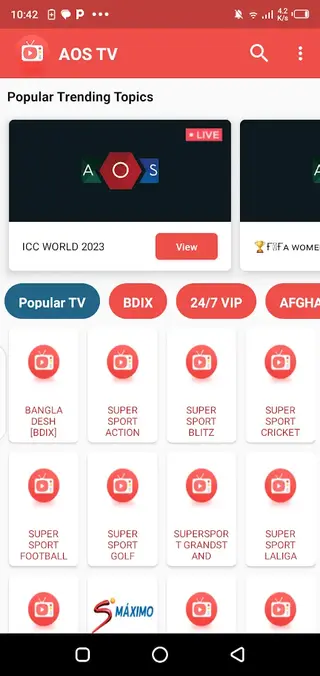
AOS TV organizes its content into multiple channel categories so users can quickly find the type of programming they want. You can browse by region, for example Africa, Albania, Arabic, Armenia, Australia, Bangladesh, Belgium, Brazil and many other locations. Each region groups a set of local and international channels that broadcast in different languages.
In addition to regional grouping, there are topic based sections such as sports, news, movies, kids and general entertainment. This structure helps users move from one type of content to another without manually searching each channel name.
Sports and live events
Sports is one of the most visited sections inside AOS TV. Depending on what channels are currently available, you may find coverage of football leagues, international tournaments, cricket events, combat sports and other popular competitions. Users often open this section during big events to look for channels where live matches are being aired.
Availability can vary by time and by region, so the exact list of sports channels is not fixed. It is a good idea to explore multiple categories or countries when you are searching for a specific match or league.
News and information channels
AOS TV includes a range of 24 7 news channels from different territories. These networks provide live coverage of current affairs, politics, business, weather and other topics. Having several news channels in a single app makes it easier to compare coverage and follow breaking stories from different perspectives.
Users who like to keep up with global events can move between local and international news feeds without installing multiple separate applications.
Entertainment and series streaming
Beyond sports and news, AOS TV places strong emphasis on general entertainment. The app offers channels dedicated to movies, dramas, serials and variety shows. Some channels focus on specific genres, while others mix films, reality programs and TV series throughout the day.
Because the content arrives as live TV streams, programming changes according to each channel schedule. This can be appealing to users who prefer a traditional TV style experience instead of on demand libraries.
Built in player and controls
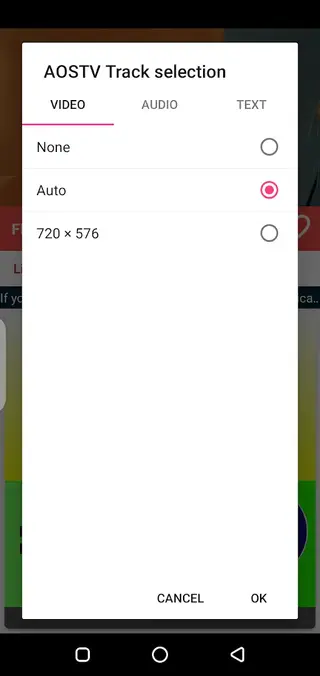
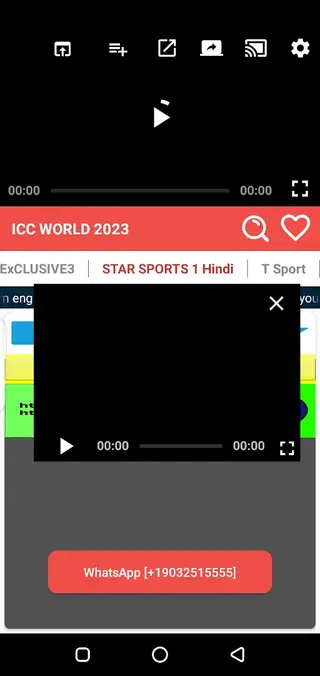
The built in IPTV player is one of the core strengths of AOS TV. When you select a channel, the stream opens directly in this player, which supports common playback functions. On supported devices and Android versions, users can enable picture in picture mode to keep a small viewing window visible while browsing other apps.
Where compatible, cast features let you send content to larger screens or casting devices on the same network, allowing a more comfortable viewing experience for groups or family use.
FAQs
Pros
- Large catalog of international IPTV channels in one app
- No registration or account required to start streaming
- Built in IPTV player with picture in picture and cast support
- Simple interface that is easy to navigate for most users
- Sports, news and entertainment channels grouped in clear categories
Cons
- Requires a stable internet connection and does not work offline
- Not available on the official Google Play Store
- Streams and channels can change or become unavailable over time
- Contains third party advertising within the app
Conclusion
AOS TV is a straightforward IPTV app for Android users who want quick access to a wide range of live TV channels from different regions. You can download the official APK from our website, install it on compatible devices and start exploring sports, news and entertainment content through the built in player with minimal setup.




Comments
No approved comments yet.