
APK CONFIG FF
APK CONFIG FF is an Android configuration tool created for Garena Free Fire players who want more control over sensitivity, lag reduction, and basic performance tweaks. It focuses on changing local settings on your device instead of modifying the game files directly.
With this tool, players can experiment with different sensi presets, RAM-based optimization options, and simple gameplay tweaks that aim to make aiming and movement feel smoother on low to mid-range devices.
The official APK file for APK CONFIG FF is available on our website, so you can download the latest version directly and install it on your Android phone or tablet. Tools such as Sensibilidade FF and Tool Skin are also useful for FF players.
Rate this app
App details
- App name
- APK CONFIG FF
- Category
- Tools
- Version
- v1.0
- Size
- 5.58 MB
- Requirements
- 5.0 and Above
- Package name
- com.sensif
- Publisher
- BABIG VICTORY
- Price
- Free
- Mod
- No
- Downloads
- 71,947
- Rating
- 4.7 / 5
- Rating count
- 29,471
- Play Store
- No
- Requires root
- No
- Offline support
- Yes
- Contains ads
- No
- In-app purchases
- No
- Updated
- Jun 3, 2026
- Age rating
- Rated for 3+
Table of contents
What is APK CONFIG FF
APK CONFIG FF is a third-party Android tool designed for Garena Free Fire players. It focuses on adjusting device-side options such as sensitivity, basic graphics preferences, and simple performance parameters to try to make matches feel smoother on different types of hardware.
The app groups its options into clear categories, so you can quickly choose presets that match the RAM and capability of your phone. Many players use this type of tool when they struggle with stutters, delayed response, or uncomfortable aiming speed in standard game settings.
Although some users treat it as a cheat-style utility, it is better understood as a configuration helper that attempts to optimize how the game feels on your device. As with any unofficial tool that interacts with an online game, use is at your own risk and may go against the game's terms of service.
Why download APK CONFIG FF from our website
Players download APK CONFIG FF to test different sensitivity and lag-reduction setups without manually changing dozens of values inside the game. Instead of guessing which in-game slider to move, you can apply a preset tuned for your device and then fine-tune from there.
By getting the APK directly from our website, you access the version described here, along with clear information about the package name, version, and basic requirements. You do not need to search multiple places or rely on random mirrors to find the installer.
This makes it easier to reinstall, share settings with friends, and keep using the same configuration tool whenever you change or reset your phone.
How APK CONFIG FF can be useful
APK CONFIG FF can be useful if you experience lag spikes, sluggish controls, or inconsistent sensitivity while playing Free Fire on your Android device. The app offers a set of predefined options that aim to balance performance and responsiveness, especially on devices with limited RAM.
Instead of changing each setting manually, you can switch between a few profiles and see which one feels better during actual matches. For players who are still learning how different sensitivity levels affect aim, this can speed up the process of finding a comfortable configuration.
However, keep in mind that the app is unofficial. Competitive players should always consider the potential risks related to game policies before relying on any external tool that interacts with online gameplay.
How to download and install APK CONFIG FF
You can download the official APK CONFIG FF file directly from our website. Follow these simple steps to get started on your Android device.
Scroll to the download section on this page.
Tap the download button for APK CONFIG FF to start fetching the APK file from our server.
Wait until the download completes in your browser or download manager.
On your phone, open Settings and enable installation from unknown sources for your browser or file manager if needed.
Locate the downloaded APK CONFIG FF file in your Downloads folder.
Tap the file, review the installation prompt, and press Install.
Once installation finishes, open the app, grant the requested permissions, and configure your preferred settings.
The file available on this page matches the version information listed above, so you can always return here to re-download and reinstall it when required.
Features
Sensitivity presets
Offers various sensitivity configurations so players can quickly test and pick a setup that feels comfortable for aiming and movement.
Lag reduction options
Includes basic options aimed at reducing in-game lag by matching settings with the RAM capacity and performance of the device.
Auto configuration by RAM
Lets you choose your device RAM range and then applies corresponding configuration values intended to stabilize gameplay.
Rush movement optimization
Provides tweaks that try to keep performance more stable during fast rushes and close-range fights where many actions happen at once.
Simple, categorized interface
Groups all options into clear sections, making it easier for new users to navigate and adjust settings step by step.
Free to use
All available options in the app can be accessed without any subscription fee or in-app purchase requirements.
No ESP overlays
Does not rely on visual ESP overlays, so the screen remains free from extra graphics that might distract during matches.
Lightweight configuration tool
The app is relatively small in size and focuses on configuration functions instead of heavy additional features.
Screenshots
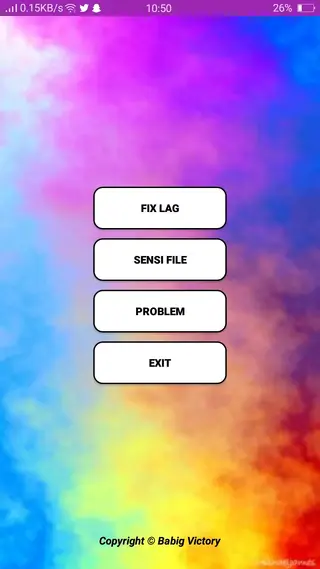
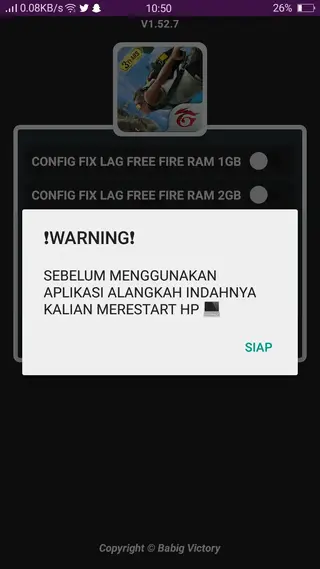
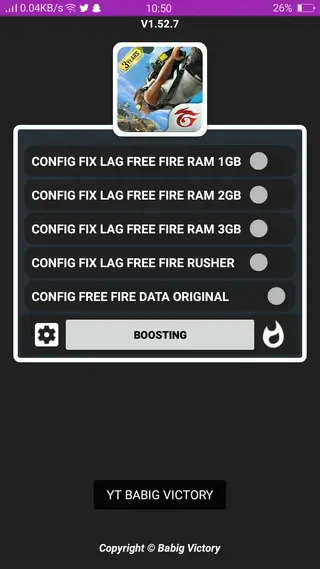
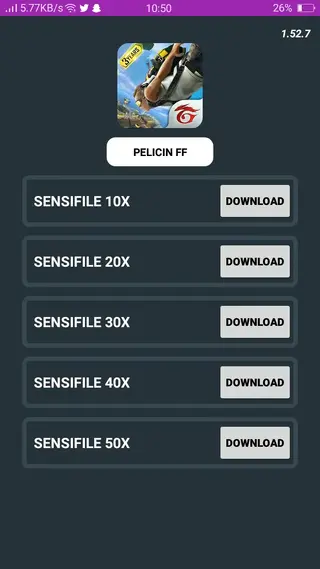
Device requirements and compatibility
APK CONFIG FF targets Android devices running version 5.0 or higher. It is primarily aimed at players using low to mid-range phones where performance problems and input delay are more common.
To get the best results, make sure you have enough free internal storage for both the app and the game, close background applications before playing, and keep your operating system reasonably up to date. The tool does not replace good device maintenance, but it can complement it by providing additional tuning options.
Usage tips for better results
When you first open APK CONFIG FF, start with conservative changes and test them in training or casual modes instead of jumping directly into ranked matches. This approach helps you understand how each configuration affects your aim and movement.
Try one preset at a time and play several matches before switching to another. If you find a setup that feels comfortable, avoid constantly changing small values, as that can make muscle memory harder to build. Combining a stable sensitivity configuration with regular practice usually brings better results than aggressive adjustments every match.
FAQs
Pros
- Offers ready-made sensitivity presets that can save time for players
- Includes options that aim to reduce lag on lower-end and mid-range devices
- Simple categorized interface makes it easier for beginners to use
- Small file size compared to many game utilities
- Available to download directly from our website at no cost
Cons
- Unofficial tool that may conflict with Garena Free Fire terms of service
- Use may involve risk of account restrictions or bans over time
- No guarantee that lag or performance issues will be fully resolved on every device
- Not available on the official Google Play Store at the time of writing
Conclusion
APK CONFIG FF is a niche tool aimed at Free Fire players who want to experiment with sensitivity and performance settings beyond the standard in-game options. If you understand the risks of using third-party utilities with online games and still wish to explore different configurations, you can download the APK directly from our website and test which presets work best on your device.




Comments
No approved comments yet.