

Awake Picture
Awake Picture is a Chinese beauty and photo retouch app that focuses on face and body enhancement with simple controls. It helps you refine portraits, adjust skin, and reshape features in a few taps.
With AI-assisted tools, filters, and fine-tuning options, the app is designed for users who want social media ready selfies without complicated editing skills. You can download the official Awake Picture APK directly from our website and start editing right away.
The app runs on most modern Android phones and supports offline photo editing, so you can retouch and enhance your images even without an internet connection.
Rate this app
App details
- App name
- Awake Picture
- Category
- Video Players & Editors
- Version
- v14.6.0
- Size
- 282.31 MB
- Requirements
- 5.0 and Above
- Package name
- com.xt.retouch
- Publisher
- RETOUCH
- Price
- Free
- Mod
- No
- Downloads
- 628,592
- Rating
- 4.1 / 5
- Rating count
- 71,621
- Play Store
- No
- Requires root
- No
- Offline support
- Yes
- Contains ads
- Yes
- In-app purchases
- Yes
- Updated
- May 12, 2026
- Age rating
- Rated for 3+
Table of contents
What is Awake Picture App?
Awake Picture is a photography and beauty retouch application for Android devices, identified on devices as 醒图. It focuses on portrait enhancement, giving you AI-powered tools to modify body shape, facial structure, and overall image tone in a fast and controlled way.
The app detects key body and face landmarks automatically, so you can adjust features like waist, legs, jawline, eyes, and nose with sliders instead of complex manual masking. It also includes skin smoothing, blemish removal, and lighting controls to polish selfies and full-body photos.
Awake Picture is mainly available in Chinese, but the interface is visually driven, so most users can understand the icons and sliders with a bit of practice. All core editing takes place locally on your device, and you can load photos from your gallery, apply adjustments, and save the final image in high quality.
If you want to get more similar apps, then try Montage Pro and Apk Editor Berkelas. These are some of the best applications, which provide advanced-level picture editing services. The more you explore our website, you can find similar apps.
Why Download Awake Picture APK from Our Website?
Downloading the Awake Picture APK from our website gives you quick access to the official installation file without needing any extra stores or registrations. You can get the latest available version and install it on any compatible Android device that meets the system requirements.
Our download page keeps the key details in one place, such as package name, version, Android requirement, and basic feature overview. This makes it easier to confirm you are installing the correct app and helps you understand what it does before you put it on your phone.
If Awake Picture is not available in your local store or you prefer to install apps by APK, getting it directly from our website is a convenient option. Once downloaded and installed, you can use the photo editor offline and explore all the tools at your own pace.
How Awake Picture App Can Be Useful?
Awake Picture is useful for anyone who regularly shares selfies or full-body photos and wants more control over how they look. Instead of relying only on basic camera filters, you can fine-tune face and body proportions, adjust lighting, and apply targeted retouching.
Content creators, influencers, and casual social media users can use the app to prepare cleaner, more polished images before posting. Smoother skin, balanced colors, and subtle reshaping can make a strong difference while still keeping the result natural if you avoid extreme settings.
Because the app supports offline editing, it also suits users who travel often or have limited connectivity. You can edit photos anytime, then upload them later when you go back online.
How to Download and Install Awake Picture APK?
You can download the official Awake Picture APK file directly from our website and install it manually on your Android device. Follow these steps to get started:
Scroll to the download section on this page and tap the APK download button.
Wait for your browser to finish downloading the Awake Picture APK file to your device.
If prompted, enable installation from unknown sources in your Android security or apps settings.
Open your file manager, find the downloaded APK, and tap it to start the installation process.
Confirm the permissions and complete the installation, then launch Awake Picture from your app drawer.
After installing, you can import photos from your gallery, try the editing tools, and save the final images back to your device.
Features
AI face and body detection
Automatically detects face and body parts so you can reshape and refine them with simple sliders instead of manual selections.
Body reshaping tools
Adjust waist, legs, shoulders, and overall body proportions to create a more balanced or stylized look in full-body photos.
Facial feature editing
Modify facial structure such as jawline, chin, eyes, nose, and lips while trying to keep results natural when used gently.
Skin smoothing and retouching
Reduce blemishes, soften skin, and even out tone to create cleaner portraits for social media or personal use.
Light and color adjustment
Control brightness, contrast, saturation, and other image parameters to correct poor lighting and enhance overall mood.
Filters and effects library
Apply a variety of filters and visual effects to quickly change the style of your photos and match different platforms.
High quality export
Save edited images with strong detail retention so your photos remain clear when you share or print them.
User friendly interface
Icon-based controls and simple sliders make it easier to use the app even though it is mainly in Chinese.
Screenshots
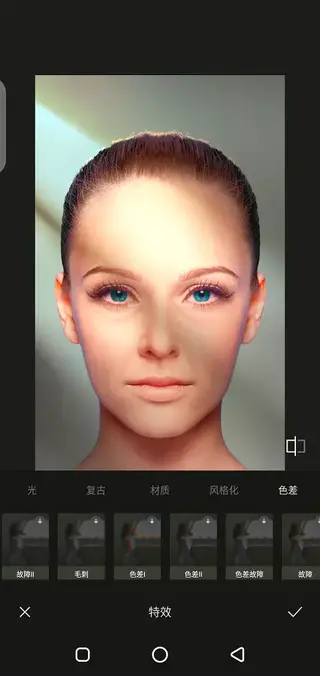
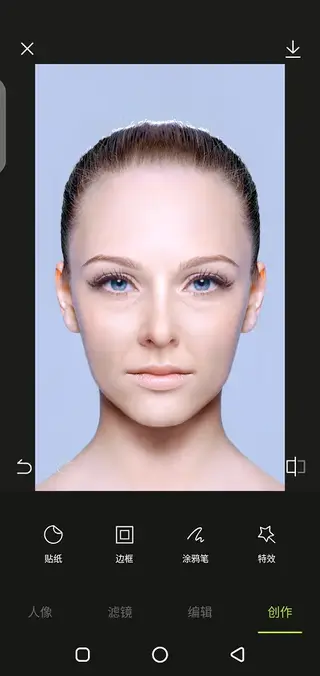
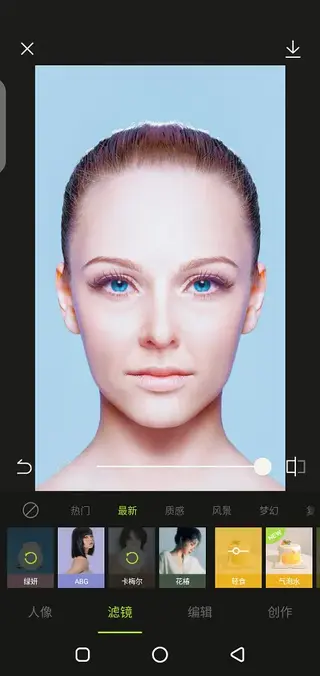
Editing Tools and Workflow
Awake Picture follows a straightforward workflow: you open a photo, let the app detect the face and body, then apply adjustments through dedicated panels. Body reshape tools help you refine curves and height perception, while facial tools target eyes, nose, lips, and jawline.
After structural changes, you can apply skin smoothing, blemish fixes, and makeup-style effects, followed by light and color corrections. Filters can be stacked with other edits, and you can preview the before and after result by toggling comparison views.
Device Compatibility and Requirements
The Awake Picture APK package name is com.xt.retouch, and the version referenced here supports Android 5.0 and above. This makes it compatible with many mid-range and high-end devices released in recent years.
For the best experience, it is recommended to have enough free storage for both the app and edited photos, as well as sufficient RAM to handle high-resolution images. Performance may vary depending on your device hardware.
Tips for Natural Looking Edits
While Awake Picture offers strong reshaping capabilities, subtlety usually leads to better results. Try keeping sliders at moderate levels so that face and body proportions still resemble the original person. Combine light skin smoothing with careful color adjustments instead of pushing every effect to the maximum.
It is also helpful to zoom in when editing detailed areas like eyes and lips. After finishing your edits, compare the original and final images to ensure the changes still look natural and recognizable.
FAQs
Pros
- Powerful AI-based face and body retouch tools
- Wide range of filters, effects, and color adjustments
- Offline photo editing once installed
- Exports images in relatively high visual quality
- Simple and intuitive interface despite language limitation
Cons
- Interface and text are mainly in Chinese
- May contain in-app purchases for certain content or tools
- Likely shows ads during use
- Heavy reshaping tools can lead to unrealistic results if overused
Conclusion
Awake Picture is a capable beauty and photo retouch app for Android users who want more control over portraits and body edits. If you are comfortable using a Chinese interface and want AI-assisted reshaping, filters, and lighting tools in one place, downloading the Awake Picture APK from our website is a practical way to start using it on your device.




Comments
No approved comments yet.