
Editor Berkelas
Apk Editor Berkelas is a lightweight Android video editor focused on stylish Garena Free Fire presets. It helps you turn raw gameplay clips into eye-catching short videos in just a few taps.
The app provides categorized presets, simple controls, and visual previews, so even beginners can create polished content for social media. You can download the latest Apk Editor Berkelas APK directly from our website and start editing right away.
If you play Free Fire and want fast, ready-made edits without learning complex software, this tool offers a practical way to level up your highlights and profile videos on Android.
Rate this app
App details
- App name
- Editor Berkelas
- Category
- Video Players & Editors
- Version
- v1.0.0
- Size
- 5.89 MB
- Requirements
- 4.2 and Above
- Package name
- com.application.editorberkelas
- Publisher
- Radika Corp.
- Price
- Free
- Mod
- No
- Downloads
- 9,283
- Rating
- 4.4 / 5
- Rating count
- 842
- Play Store
- No
- Requires root
- No
- Offline support
- Yes
- Contains ads
- No
- In-app purchases
- Yes
- Updated
- May 9, 2026
- Age rating
- Rated for 3+
Table of contents
What is Apk Editor Berkelas app?
Apk Editor Berkelas is a preset-based video editor for Android created mainly for Garena Free Fire fans. Instead of giving you a complex timeline and dozens of tools, it focuses on ready-made editing presets that you can apply to your clips or screenshots.
The app organizes these presets into different sections such as Trending, Lobby, Profile, Guild and FFEC ID. Each section shows preview videos, so you can see the final look before you decide which style you want to use.
After choosing a preset, you import your own media and adjust basic options as guided by the app. This makes it easier for new editors and mobile gamers to produce attractive highlight clips, lobby screens, or profile edits without deep editing knowledge.
Apk Editor Berkelas currently supports the Indonesian language and runs on Android 4.2 and above, so it works on many budget and mid-range devices.
Soloop and Premoment are quite people video editors, which you can also use to create videos. So, if you are having a problem with using this app, then you can try these too.
Why download Apk Editor Berkelas APK from our website?
Downloading Apk Editor Berkelas APK from our website gives you quick access to the latest available version without searching across multiple pages. The installation file is provided directly, so you can save it to your device and install it whenever you want.
The app itself is designed for Free Fire content creators who need fast results. With curated presets, preview videos and clear instructions, you can create engaging edits for platforms like YouTube, TikTok, Instagram Reels or Facebook in less time.
If you like experimenting with different looks for your gameplay, lobby, or profile visuals, having the APK stored locally also lets you reinstall or move it between devices easily whenever required.
How Apk Editor Berkelas is useful for creators?
Apk Editor Berkelas is especially useful for players who want to start making content but feel overwhelmed by complex editors. Instead of building every effect from scratch, you start from a finished preset and make small adjustments.
The preview system lets you quickly compare styles before committing your time to a specific look. This helps you understand how certain transitions, colors or overlays work in a finished video, which is helpful if you are still learning editing basics.
For Free Fire guild owners, streamers or montage creators, the app can become a reference library of styles. You can reuse presets to maintain a consistent identity across your thumbnails, intro clips, or profile videos while still customizing each new upload.
How to download and install Apk Editor Berkelas APK?
You can get the latest Apk Editor Berkelas APK file directly from our website. Follow these steps on your Android device to download and install it safely.
Scroll to the download area on this page and tap the APK download button.
Confirm the download in your browser and wait until the APK file is fully saved.
Open your phone’s Downloads folder and tap the Apk Editor Berkelas APK file.
If asked, enable installation from unknown sources in your Android settings.
Tap Install and wait until the process finishes, then open the app from your app drawer.
After installation, you can start browsing presets, preview example videos and apply styles to your own clips.
Features
Preset-based video editing
Use ready-made presets to style your gameplay or profile videos instead of editing everything manually.
Focused on Free Fire content
Presets and categories are tailored around Garena Free Fire themes such as lobby, profile, guild and FFEC ID.
Preview before applying
Watch example videos for each preset so you can see the final look and choose the style you like most.
Multiple preset categories
Browse sections like Trending, Lobby, Profile and more to quickly find a suitable effect or layout.
Lightweight Android app
Runs on Android 4.2 and above and works on many low and mid-range phones without heavy resource usage.
Simple interface
User-friendly layout helps beginners follow the steps and apply presets with minimal learning curve.
Creator contact details
View information about the preset creator and find their social media accounts inside the app.
Free basic access
Core features and many presets are available to use for free, with some premium options mentioned.
Screenshots
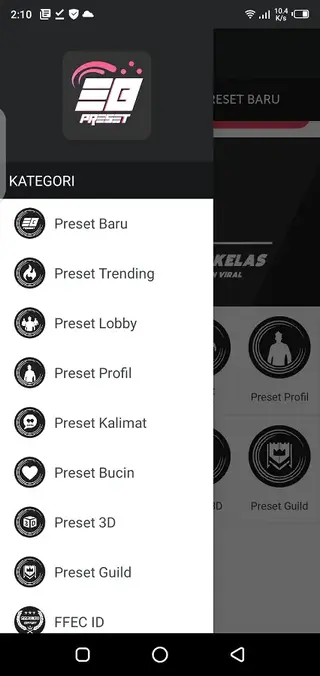
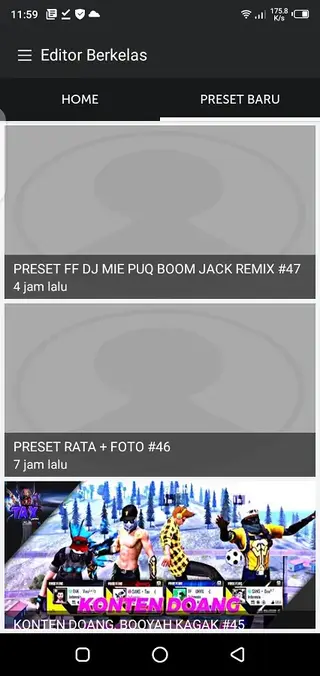
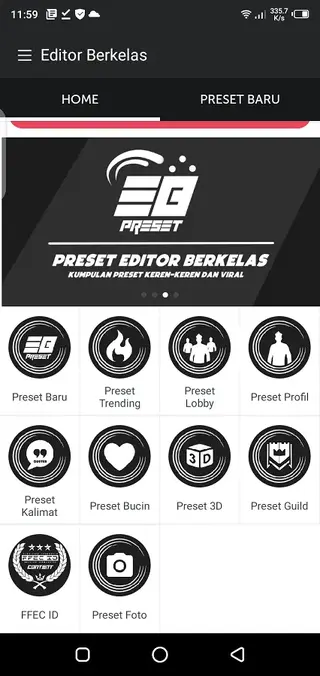
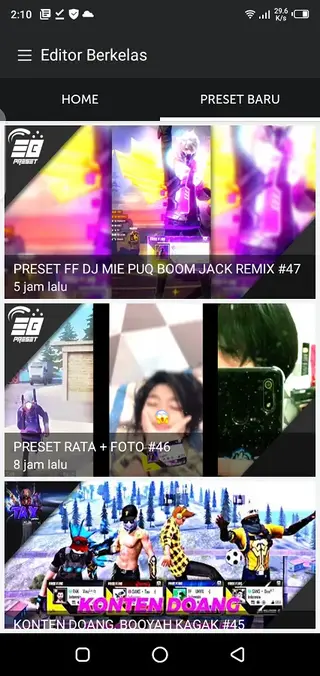
Editing workflow and preset categories
The workflow inside Apk Editor Berkelas is built around categories of presets. After launching the app, you choose a section such as Trending, Lobby, Profile, Guild or FFEC ID. Each section contains example videos demonstrating how the final edit will look once applied.
When you tap a preview, the app shows details and gives you access to the relevant preset. You then import your own gameplay footage, screenshots or images and follow the on-screen guidance to match timing, frame positions or recommended settings.
This step-by-step structure helps new editors understand which parts of a clip are important for the effect, such as kill moments, transitions or logo placement. Over time, it can also teach you basic editing logic that you can apply in other tools.
Device compatibility and performance
Apk Editor Berkelas is designed for Android 4.2 and above, which covers a wide range of smartphones and tablets. Because the app focuses on presets rather than heavy real-time effects, it aims to work smoothly on devices with limited RAM and older processors.
For best performance, it is still recommended to keep enough storage available for video files and to close unused apps while rendering or exporting edited clips. Shorter highlight videos usually process faster and are easier to share on social platforms.
FAQs
Pros
- Preset-based workflow makes editing faster for beginners
- Specially oriented toward Garena Free Fire content and themes
- Lightweight app works on older Android versions starting from 4.2
- Preview videos help you choose styles before editing
- Free to download with many presets available at no cost
- Simple, clean interface that is easy to navigate
Cons
- Interface is available only in Indonesian, which can limit accessibility
- Focused mainly on Free Fire, so it suits fewer other games or niches
- Some features and presets may require premium access
- Lacks advanced timeline tools compared to full professional editors
Conclusion
Apk Editor Berkelas gives Free Fire players and new creators a simple way to turn gameplay and profile visuals into polished videos using ready-made presets. If you want quick, stylish edits without deep editing skills, you can download the latest Apk Editor Berkelas APK directly from our website and start experimenting with different looks on your Android device.




Comments
No approved comments yet.