

Codashop Pro
Codashop Pro is an Android app that helps players buy game credits and diamonds for popular titles in a quick and simple way. It focuses on fast online top-up for multiple mobile games.
With this tool, you can add diamonds, UC, coins and other in-game items to supported accounts without opening separate stores for every title. The app connects your player ID with different payment methods available in your region.
You can download the Codashop Pro APK directly from our website and start using it on compatible Android phones and tablets that meet the minimum system requirements.
Rate this app
App details
- App name
- Codashop Pro
- Category
- Shopping
- Version
- v4.0
- Size
- 5.57 MB
- Requirements
- 4.4 and Above
- Package name
- com.codaashop.pro
- Publisher
- AXSe Solutions
- Price
- Free
- Mod
- No
- Downloads
- 398,752
- Rating
- 4.4 / 5
- Rating count
- 4,182
- Play Store
- No
- Requires root
- No
- Offline support
- No
- Contains ads
- No
- In-app purchases
- No
- Updated
- May 21, 2026
- Age rating
- Rated for 3+
Table of contents
What is Codashop Pro APK
Codashop Pro is a third-party Android application designed to offer online top-up services for various mobile games. Instead of using the built-in store inside each game, players can use this app to purchase currencies like diamonds, coins, and UC for supported titles.
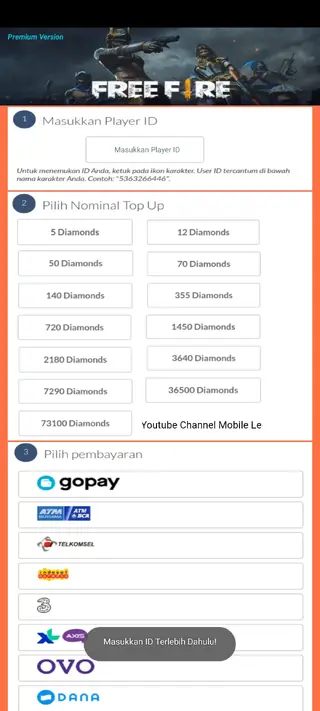
The app works by asking for your player ID or in-game profile number, then linking that ID with a selected game and payment method. Once you confirm the purchase, the top-up is delivered to your game account if the process completes successfully.
Codashop Pro is mainly aimed at players of popular online games such as Garena Free Fire, Mobile Legends, PUBG Mobile, Clash of Clans, Fortnite and other titles that use virtual currencies and premium items.
Why download Codashop Pro for Android
Many mobile games rely on virtual currencies to unlock skins, characters, weapons and other premium content. Official in-game stores or top-up pages can sometimes be slow, busy or unavailable. Codashop Pro tries to simplify this by offering a single place where you can start a top-up for multiple games.
The app groups different game titles, top-up packages and local payment methods in one interface. Instead of searching for separate top-up websites, you can open Codashop Pro, choose your game, enter your player ID and pick a package.
From there, you can complete the payment using supported options in your region, such as GoPay, TELKOMSEL, AXIS, OVO, DANA and other services where available. The app aims to make the overall process more convenient for regular players who top up often.
How Codashop Pro can be useful
Codashop Pro can be useful for players who frequently purchase in-game currencies and want a central place to manage these top-ups. By supporting several well-known titles in a single app, it reduces the need to jump between different game stores or browser tabs.
The app also presents different package sizes, so users can select small or large bundles of diamonds, UC or coins depending on their budget. When players choose larger bundles, they may receive higher value packages compared with buying multiple small ones, depending on how each game structures its offers.
Another practical benefit is the regional payment support. Many players in Southeast Asia and other regions rely on local e-wallets and carrier billing. Codashop Pro lists several of these payment methods, which can make the process easier for users who do not use international bank cards.
How to download and install Codashop Pro APK
You can get the latest available Codashop Pro APK file directly from our website. Follow these steps to download and install it on your Android device:
Scroll to the download section on this page and tap the Codashop Pro APK link or button.
Confirm the download in your browser and wait until the APK file is saved on your device.
On Android 8.0 or later, allow app installs from your browser or file manager when prompted.
Open your file manager, locate the downloaded Codashop Pro APK and tap it to start installation.
Read the on-screen permissions and tap Install to complete the setup.
Once installed, open Codashop Pro, select your game, enter your player ID and follow the steps to start a top-up.
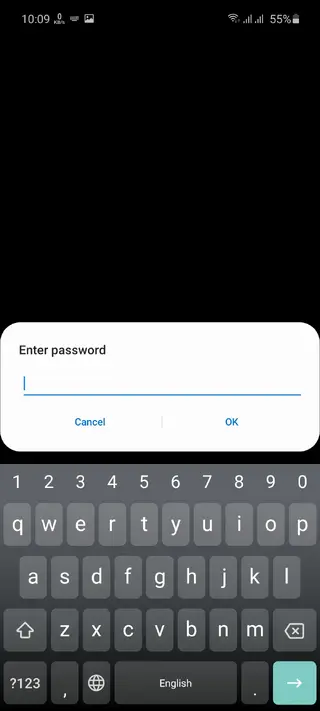
If the APK is password-protected, enter the password provided in the download section on our website to extract or open the file before installing.
Features
Multi-game top-up support
Use one app to start top-ups for several popular mobile games instead of separate stores for each title.
Player ID based delivery
Link your purchases directly to your in-game account by entering the correct player ID or profile number.
Different virtual currencies
Buy diamonds, UC, coins, hearts or other in-game currencies depending on what each supported game uses.
Tiered top-up packages
Choose from multiple package sizes, from smaller bundles to higher value options for heavy players.
Regional payment methods
Pay with methods commonly used in some regions, such as GoPay, TELKOMSEL, AXIS, OVO, DANA and others where available.
24 hour availability
Start a top-up request at any time of day as long as your internet connection and payment method are working.
Simple user interface
Navigate a straightforward layout that focuses on picking a game, entering your ID and selecting a package.
No registration requirement mentioned
Use the top-up flow directly without complex sign-up steps, based on the information available.
Screenshots
Supported games and currencies
Codashop Pro groups several popular multiplayer and battle royale titles in one place. Typical examples include Garena Free Fire, Mobile Legends, PUBG Mobile, Clash of Clans and Fortnite, along with other online games that rely on virtual currencies.
Each game uses its own premium currency, such as diamonds for Free Fire or Mobile Legends, UC for PUBG Mobile and gems or coins in strategy titles. Inside Codashop Pro, you pick the game, then select from different bundles of the relevant currency.
The app does not change how the games themselves work. It only aims to provide an external way to purchase the same in-game credits that are usually available through official stores.
Payment options and regional coverage
One of the main selling points of Codashop Pro is its focus on regional payment methods. Many players in emerging markets rely on local wallets and carrier billing instead of international cards.
Within the app, users may see payment options such as GoPay, TELKOMSEL, AXIS, OVO and DANA, among others, where these services operate. Availability can vary by country, and some methods might not appear in every region.
Before confirming a transaction, always check that the payment amount, currency and selected method match what you expect, and that your balance is sufficient to cover the purchase.
Safety and responsible use
Codashop Pro is a third-party top-up tool and is not the same as the official in-game store or Google Play billing. Because of this, it is important to use it carefully and understand the possible risks of using external payment flows for game credits.
Always make sure you enter the correct player ID, since wrong numbers can cause the top-up to reach another account. Double-check game selection, server or region options and package size before paying.
It is also wise to limit spending to amounts you are comfortable with and to keep track of your purchase history. If you notice missing credits or issues, contact the payment provider or relevant support channel with your transaction details.
FAQs
Pros
- Supports top-up for multiple popular mobile games in one place
- Simple interface that focuses on game selection and player ID entry
- Offers different package sizes for in-game currencies
- Includes several regional payment methods for some countries
- Available as an APK download for devices without store access
- Can be used at any time with an active internet connection
Cons
- Not available on Google Play Store at the time of writing
- Requires constant internet access to work
- Top-up success depends on correct player ID and payment details
- Service coverage and payment options can vary by region
- Third-party nature may not be supported or endorsed by game publishers
Conclusion
Codashop Pro gives regular mobile gamers a central place to start top-ups for several popular titles, with regional payment support and simple steps. If your device meets the requirements and you understand how third-party top-up tools work, you can download the APK from our website and try it for your preferred games.




Comments
No approved comments yet.