

elMubashir
elMubashir IPTV is an Android streaming app that focuses on live TV channels, movies and series from different regions and languages. It gathers a large catalog of content inside a simple interface so you can jump straight into watching.
With categorized lists for live channels, VOD movies and TV shows, the app helps you quickly find something to watch based on country, language or genre. You can adjust video quality to match your internet speed and pair the app with external players like VLC or MX Player.
You can download the official elMubashir IPTV APK directly from our website and install it on compatible Android phones and tablets running Android 4.1 or higher.
Rate this app
App details
- App name
- elMubashir
- Category
- Entertainment
- Version
- v6.6.8
- Size
- 16.84 MB
- Requirements
- 5.0 and Up
- Package name
- com.elmubashir.v6
- Publisher
- ELMUBASHIR
- Price
- Free
- Mod
- No
- Downloads
- 58,004
- Rating
- 4.7 / 5
- Rating count
- 24,000
- Play Store
- No
- Requires root
- No
- Offline support
- No
- Contains ads
- Yes
- In-app purchases
- No
- Updated
- May 6, 2026
- Age rating
- Rated for 12+
Table of contents
What is elMubashir IPTV?
elMubashir IPTV is a free IPTV and VOD application for Android that aggregates live TV channels, movies, series and other video content into one place. It works as a content hub where you can browse channels by country, language and category, and access on-demand titles from multiple lists.
The app does not include its own built-in video player. Instead, it connects to popular external players such as VLC or MX Player, which handle the actual playback. This keeps the interface light and focused on content discovery.
The IPTV App has the best category step-up, for films and television channels like Bongngo TV & Thop TV. You can find a movie by its Nationality, Language, and many more. You can find channels on their Nationality too. It has channels in almost every country in the world.
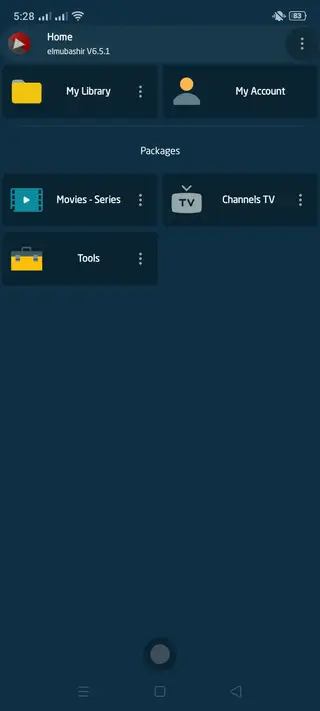
Within the app you will find dedicated sections for Hindi, English, Arabic and other language content, plus genre-based lists like action, adventure, animation and comedy. There are also IPTV lists like AIO Stream, IPTV Generator and TV247, which group different live channel sources under one menu.
elMubashir IPTV regularly updates its content lists, so new channels and movies can appear over time. The interface is in English and uses clear categories, which makes it relatively easy to navigate even for first-time IPTV users.
Why download elMubashir IPTV APK from our website
Downloading the elMubashir IPTV APK from our website gives you direct access to the official installation file for the latest available version. You do not need to search multiple sites or stores; the APK is already hosted here and ready to install on your Android device.
Because elMubashir IPTV focuses on live channels and on-demand movies from many regions, having the APK saved on your device means you can reinstall or update it easily without relying on an app store listing. Our download page also lists the current version number, package name and Android requirements so you know exactly what you are installing.
If you use external media players like VLC or MX Player, elMubashir IPTV can fit neatly into your existing setup, acting as a channel and movie browser while your preferred player handles playback quality and controls.
How elMubashir IPTV can be useful
elMubashir IPTV can be useful for users who want a simple way to explore many live TV and movie sources from one Android app. Instead of manually configuring playlists and links, you browse through ready-made categories grouped by nationality, language and genre.
Sports fans can use the live TV sections to look for channels that show matches and events, while movie and series fans can explore extensive VOD lists. Families can switch to kids and cartoon content when needed, and language learners may benefit from channels and films in different languages.
The ability to lower or raise video quality based on your connection helps when you move between Wi-Fi and mobile networks. Since the app integrates with external players, you can continue to use familiar playback controls, subtitles and audio options from your chosen player.
How to download and install elMubashir IPTV APK
You can get the official elMubashir IPTV APK file directly from our website. Make sure your device runs Android 4.1 or higher before starting. Then follow these steps to download and install:
Scroll to the download section on this page and tap the elMubashir IPTV APK download button.
Confirm the download in your browser and wait until the APK file finishes downloading to your device.
Open your phone settings, go to the security or privacy section, and enable installation from unknown sources for your browser or file manager.
Open your file manager, navigate to the Downloads folder, and locate the elMubashir IPTV APK file.
Tap the APK file, choose Install, and wait for the installation process to complete.
Once installed, open elMubashir IPTV, connect it to an external player like VLC or MX Player if prompted, and start browsing channels and movies.
You can revisit our website whenever you need to download the APK again or check for a newer version.
Features
Live IPTV channel lists
Access multiple live TV lists, including sections like AIO Stream, IPTV Generator and TV247, to watch channels from different countries.
Movies and series on demand
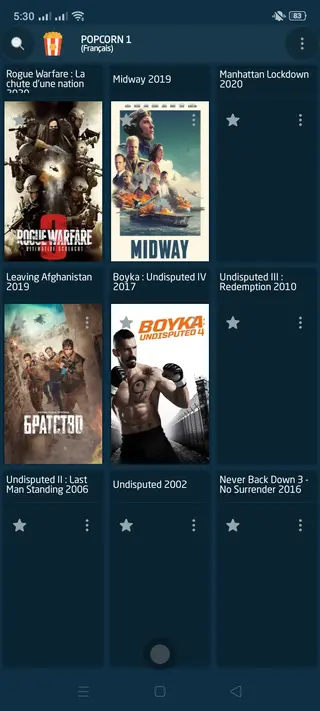
Browse large collections of films and TV shows sorted by language, country and genre for quick on-demand streaming.
Multi-language libraries
Explore content categories for Hindi, English, Arabic and more, with separate sections to quickly find titles in your preferred language.
Genre based navigation
Filter movies and shows by genres such as action, adventure, animation, comedy and others to match your mood.
Multiple streaming links
Many channels and videos provide several working links so you can switch if one stream becomes unstable or unavailable.
External player support
Connect the app to external players like VLC or MX Player instead of relying on a built-in player, giving you more playback control.
Quality control options
Adjust video resolution from lower quality to HD+ depending on your internet speed to reduce buffering and improve stability.
Favorites management
Mark your liked movies and shows so you can return to them quickly without searching again through long lists.
Screenshots


Safety and legal considerations
elMubashir IPTV is a third-party IPTV application. It aggregates links and playlists that may provide access to TV channels, movies and other copyrighted material. Availability and legality of specific streams can vary by region and by content owner.
You should review the laws in your country and ensure that your use of IPTV apps respects local regulations and content rights. Our website provides the original APK file for installation, but we do not control which third-party streams or playlists are active inside the app at any given time.
Tips for better streaming performance
To get smoother playback in elMubashir IPTV, consider the following tips when you use the app:
Connect to a stable Wi-Fi network when possible, especially for HD or HD+ streams.
Lower the video resolution inside the app or in your external player if you experience buffering.
Try alternative links provided for a channel or movie when one stream fails or becomes unstable.
Keep your external player, such as VLC or MX Player, updated to the latest version for better codec support.
Close other bandwidth-heavy apps on your device while streaming to free up network capacity.
Device compatibility and requirements
elMubashir IPTV is designed for Android phones and tablets running Android 4.1 and above. Performance will generally be better on devices with more RAM and a stable network connection.
If you use an Android TV box or a TV stick, you may also be able to install the APK, but navigation can vary depending on your remote and launcher. In such cases, pairing the app with a remote-friendly external player can improve the overall experience.
FAQs
Pros
- Free to download and use on compatible Android devices
- Large selection of live TV channels and movie lists
- Content categorized by country, language and genre
- Supports external media players like VLC and MX Player
- Allows quality adjustment to reduce buffering on slow networks
- Option to mark favorite movies and shows for quick access
Cons
- Requires constant internet connection for streaming
- Not available on the official Google Play Store
- Uses third-party content sources that may change or go offline
- Contains in-app advertising that can interrupt viewing
- Initial setup with external players may confuse some users
Conclusion
elMubashir IPTV offers a straightforward way to explore live TV channels and on-demand movies from many regions on Android. If you are comfortable installing APK files and using external media players, you can download the app directly from our website and start streaming through its organized channel and movie lists.




Comments
No approved comments yet.