

Enlight Quickshot Pro
Enlight Quickshot Pro is a powerful camera and photo editor app from Lightricks that helps you transform everyday shots into creative, polished images. It combines smart shooting modes with fast editing tools in one place.
From dramatic skies and cinematic filters to strobe effects and precise adjustments, the app focuses on quick workflows that still look professional. You can capture, enhance, and share your photos directly from your Android phone.
So, taking a picture always matters. It is the way you present yourself, which should be unique and attractive. So, Android devices are used these days to capture photos, there are also tons of photo editors InstaMark, Galaxy Enhance X, and more. So, why are we here with this app?
You can download the Enlight Quickshot Pro APK latest version directly from our website and start exploring its premium-grade tools on your Android device.
Rate this app
App details
- App name
- Enlight Quickshot Pro
- Category
- Photography
- Version
- v1.6.1
- Size
- 98.78 MB
- Requirements
- 8.0 and Above
- Package name
- com.lightricks.quickshot
- Publisher
- Lightricks Ltd
- Price
- Free
- Mod
- No
- Downloads
- 80,878
- Rating
- 4.7 / 5
- Rating count
- 38,019
- Play Store
- Yes
- Requires root
- No
- Offline support
- Yes
- Contains ads
- Yes
- In-app purchases
- Yes
- Updated
- Jun 2, 2026
- Age rating
- Rated for 7+
Table of contents
What is Enlight Quickshot Pro?
Enlight Quickshot Pro is an advanced camera and photo editing app for Android developed by Lightricks. It gives you a built-in camera with multiple shooting modes and a full editor for enhancing your images after capture. The aim is to make creative editing fast and accessible, even if you are not a professional photographer.
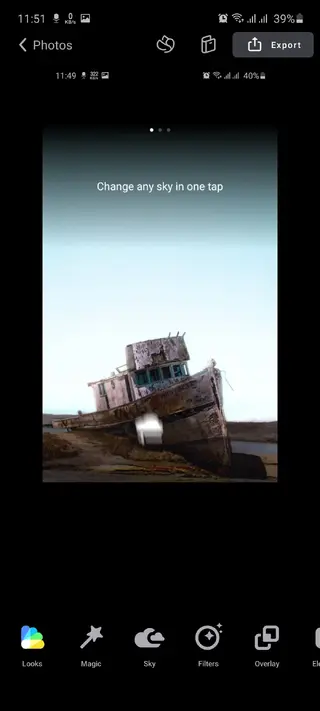
The app offers HDR camera controls, automatic correction options, and a wide collection of filters, effects, and overlays. You can fine-tune brightness, contrast, shadows, and color or apply presets when you want a one-tap result. It also supports creative tools like sky replacement and strobe effects for motion-style photos.
Enlight Quickshot Pro is available on Google Play, and you can also get the APK directly from our website to install it manually on compatible Android phones and tablets.
Why download Enlight Quickshot Pro APK?
Downloading the Enlight Quickshot Pro APK from our website lets you install the app quickly on any compatible Android device, even if the Play Store option is not convenient for you. You get the same core camera and editing experience that focuses on speed, creativity, and ease of use.
The app helps you capture better photos with smart camera modes and then refine them with precise editing controls. Features like sky replacement, lens flares, and strobe capture are especially useful if you like creating eye-catching social media content without spending a lot of time on complex software.
Because the camera and editor are integrated, you can move from shooting to editing and sharing in a single workflow. This makes Enlight Quickshot Pro a practical choice for travelers, influencers, and anyone who wants polished images straight from their phone.
How is Enlight Quickshot Pro useful?
Enlight Quickshot Pro is useful because it reduces the gap between casual mobile photography and more advanced editing. Instead of sending images to multiple apps, you can shoot, adjust, and stylize everything in one place.
The HDR and manual camera options help you handle difficult lighting, while the auto modes support quick snapshots. After capture, you can use filters, effects, and manual sliders to match your preferred style. Tools like sky replacement, light leaks, and lens flares add a creative layer without needing complex desktop software.
The app also supports fast social media sharing, so you can prepare posts directly after editing. This combination of camera control, creative effects, and simple interface makes Enlight Quickshot Pro a practical editor for everyday use and content creation.
How to download and install Enlight Quickshot Pro APK
You can download the Enlight Quickshot Pro APK directly from our website and install it on your Android device. Make sure your phone meets the minimum Android version requirement before you begin.
Follow these steps to get started:
Scroll to the download section on this page.
Tap the download button for the Enlight Quickshot Pro APK file available on our website.
Wait for the APK file to finish downloading on your device.
Open your phone settings and enable installation from unknown sources if it is disabled.
Locate the downloaded APK file in your Downloads folder and tap it.
Follow the on-screen prompts to complete the installation.
Once installed, open Enlight Quickshot Pro, grant the required permissions, and start capturing and editing photos.
Features
Built-in camera with HDR support
Shoot photos directly inside the app with high dynamic range and both auto and manual controls for better exposure and detail.
Professional and automatic shooting modes
Switch between advanced camera settings for experienced users and automatic modes for quick point-and-shoot results.
Integrated photo editor
Edit images with tools for brightness, contrast, shadows, highlights, vibrance, and more without leaving the app.
Creative filters and effects library
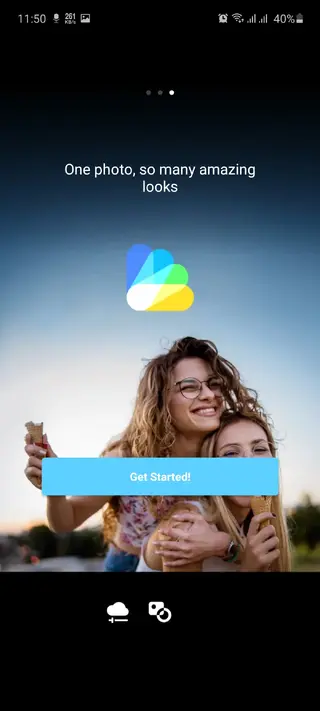
Apply modern filters, textures, light leaks, and stylistic effects to give your photos a unique and consistent look.
Sky replacement and fantasy skies
Swap dull skies for dramatic or fantasy options and adjust lighting for a more cinematic atmosphere.
Strobe motion capture
Use the strobe feature to capture moving subjects and create motion-style images with multiple exposures in one frame.
Lens flares and light leaks
Add realistic flares and light leaks to enhance mood and create vintage or cinematic styles.
Healing and retouch tools
Use heal and correction tools to remove small imperfections and refine details in your photos.
Screenshots
System requirements and compatibility
Enlight Quickshot Pro is designed for modern Android devices. The version available on our website is listed for Android 8.0 and above. Running the app on newer hardware with more RAM and a stronger processor will improve performance, especially when you apply heavy effects such as sky replacement, HDR processing, or multiple strobe layers.
For the best experience, keep your system software updated, ensure you have enough free storage for edited photos, and close background apps when working on large images.
Tips for getting better results with Quickshot
To get the most out of Enlight Quickshot Pro, start with the camera. Use HDR mode in scenes with strong contrast, such as bright skies and dark foregrounds. When light is low, hold your phone steady or use a support to avoid motion blur.
During editing, make small adjustments to exposure, contrast, and color before applying strong filters. If you use sky replacement or light leaks, balance them with basic corrections so the final photo still looks natural or matches your intended style. Save your favorite looks so you can apply a consistent style to future shots quickly.
FAQs
Pros
- Combines camera and photo editor in a single app
- Offers HDR and manual camera controls for better shooting
- Includes creative tools like sky replacement and strobe effects
- User-friendly interface suitable for beginners and advanced users
- Supports quick sharing to social media platforms
Cons
- Some advanced features may require in-app purchases
- Contains ads in certain regions or builds
- Full feature set can feel complex for complete beginners
- Works best on newer devices due to heavier processing needs
Conclusion
Enlight Quickshot Pro brings a capable camera and creative editor together in one Android app, making it easier to capture, enhance, and share polished photos. If you want more control over your mobile images along with eye-catching effects like sky replacement and strobe capture, downloading the APK from our website is a straightforward way to start using it on your device.




Comments
No approved comments yet.