

Google Gemini
Google Gemini is Google’s official AI assistant app built on the Gemini family of multimodal models. It lets you chat, ask questions, and generate content directly from your Android phone or tablet.
With support for text, images, and voice, the app helps you research topics, draft emails, summarize documents, plan events, and get explanations in a conversational way. You can download the original Google Gemini APK directly from our website and install it on compatible Android devices.
The app connects to Google’s cloud-based Gemini models, so you always work with up-to-date information and evolving capabilities, from simple daily tasks to more complex creative or coding requests.
Rate this app
App details
- App name
- Google Gemini
- Category
- Productivity
- Version
- v1.0.913571982
- Size
- 2.81 MB
- Requirements
- 5.0 and Up
- Package name
- com.google.android.apps.bard
- Publisher
- Google LLC
- Price
- Free
- Mod
- No
- Downloads
- 140,001
- Rating
- 4.5 / 5
- Rating count
- 40,000
- Play Store
- Yes
- Requires root
- No
- Offline support
- No
- Contains ads
- No
- In-app purchases
- Yes
- Updated
- Jun 3, 2026
- Age rating
- Rated for 3+
Table of contents
What is Google Gemini APK?
Google Gemini APK is the Android application package for Google’s dedicated Gemini AI assistant. It brings Google’s multimodal large language models to your mobile device so you can interact through text, images, and voice.
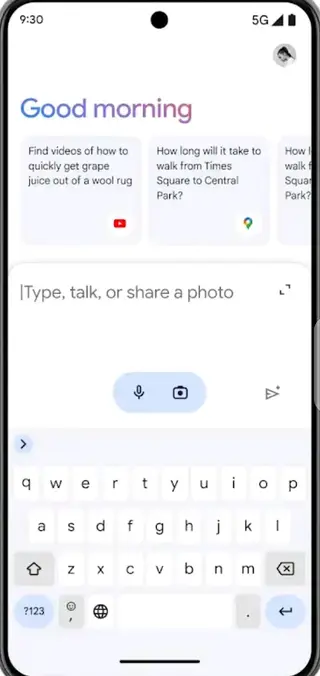
Inside the app, you can start a conversation, describe what you need, or attach images and documents. Gemini then analyzes your input in the cloud and replies with useful answers, explanations, or creative ideas. You can refine your prompts, ask follow-up questions, and keep a history of your chats.
The app focuses on productivity and everyday assistance. You can use it to draft and rewrite content, summarize long articles, explore complex topics, get learning support, or brainstorm plans. Gemini also integrates with your Google Account, so you can sign in once and access your chats across devices.
Why download Google Gemini for Android?
Installing the Google Gemini APK on your Android phone or tablet gives you a powerful AI assistant that is always within reach. Instead of switching between multiple tools for writing, researching, and planning, you can handle most tasks in one place.
You can download the original Google Gemini APK directly from our website and install it like any other app. After a quick sign-in with your Google Account, you are ready to ask questions, upload images, and speak to the assistant in natural language.
This makes it useful for students, professionals, creators, and anyone who wants quick help with writing, learning, coding snippets, or understanding real-world information in a conversational way.
How is Google Gemini useful in daily life?
Google Gemini can support many parts of your day. For study and learning, it can explain concepts, generate examples, and summarize long readings. For work, it helps you draft emails, polish documents, create outlines, and turn rough ideas into clear text.
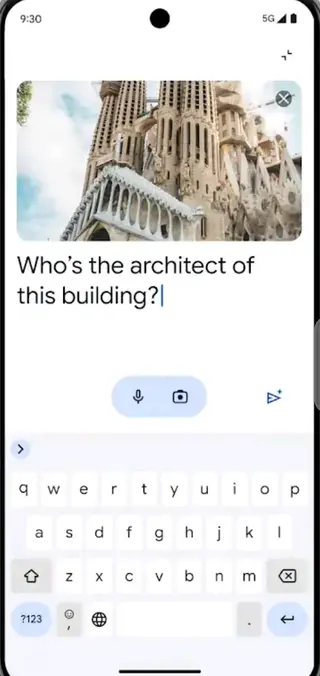
It also helps with planning and organization. You can ask Gemini to create itineraries, meal plans, checklists, or event schedules based on your preferences. By attaching images or screenshots, you can get descriptions, suggestions, and clarifications that go beyond plain text.
Because the app supports multiple languages and natural voice input, you can interact in a way that feels comfortable, whether you are typing or speaking. This flexibility makes Gemini a practical, general-purpose assistant rather than a single-purpose tool.
How to download and install Google Gemini APK
You can get the official Google Gemini APK directly from our website and install it on your Android device. Follow these steps to complete the process safely and correctly.
Scroll to the download area on this page.
Tap the download button to start downloading the current Google Gemini APK file from our server.
Wait until the APK file finishes downloading to your device.
Open your device settings and allow installation from your browser or file manager if prompted.
Locate the downloaded APK in your Downloads folder and tap it.
Confirm the installation and wait for the process to complete.
Open Google Gemini, sign in with your Google Account, and start your first conversation.
Make sure your device meets the minimum Android version requirement before installing and keep the app updated whenever a new APK version is available on our website.
Features
Multimodal AI assistant
Interact with the Gemini model using text, images, and voice to get tailored responses and ideas.
Real-time web-connected answers
Get up-to-date information for many queries by connecting to Google’s online knowledge sources.
Productivity and writing help
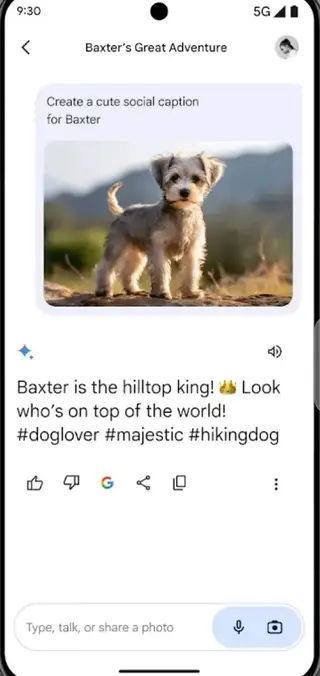
Draft, rewrite, summarize, and expand emails, documents, notes, and social posts in seconds.
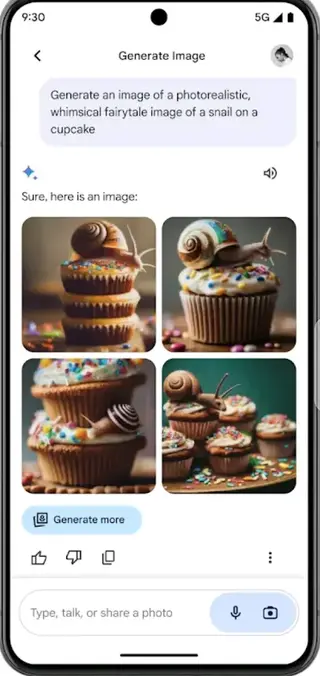
Image understanding and generation support
Upload images for descriptions or analysis and receive text-based explanations or related ideas.
Voice-based conversations
Talk to Gemini using your microphone and listen to spoken replies for hands-free use.
Chat history and continuity
Review previous conversations and continue where you left off with context-aware follow-ups.
Support for multiple languages
Ask questions and receive answers in many languages, including English and other widely used languages.
Access to advanced Gemini tiers
Upgrade within your Google Account to access higher-end Gemini models and extra capabilities if available in your region.
Screenshots

Device compatibility and requirements
Google Gemini is designed for modern Android smartphones and tablets. The APK provided on this page targets devices running Android 5.0 or higher, although newer versions of the app may work best on more recent Android releases.
For a smooth experience, it is recommended to have a stable internet connection, enough free storage for the app and its updates, and the latest security patches installed on your device. Because Gemini runs its AI models in the cloud, processing does not depend heavily on your device hardware, but network quality still affects response speed.
Tips for getting better results from Gemini
You can improve the quality of Gemini’s answers with clear and specific prompts. Try to describe your goal rather than only asking for a short output. For example, ask it to write an outline, then refine that outline into a full article or email.
When working with images or documents, add a text description of what you want Gemini to notice or explain. Use follow-up questions to narrow the result, and do not hesitate to ask for alternative versions, shorter summaries, or more detailed explanations.
Privacy and data considerations
Google Gemini processes your prompts, images, and voice input on Google’s servers to generate responses. Your usage is generally governed by Google’s privacy policy and the specific terms for Gemini services.
Before using the app, review the in-app privacy information and your Google Account settings. Avoid sharing highly sensitive personal, financial, or confidential business data in your prompts, and regularly clear chat history if you prefer not to keep previous conversations.
FAQs
Pros
- Official AI assistant app from Google
- Supports text, image, and voice input in one interface
- Helps with writing, research, and everyday planning
- Cloud-based models provide evolving capabilities
- Clean, simple, and familiar Google-style interface
- Chat history lets you revisit earlier answers
Cons
- Requires an active internet connection for almost all features
- Some advanced capabilities may require a paid Google plan
- Availability and features can vary by country and region
- Performance depends on server load and network quality
Conclusion
Google Gemini APK brings Google’s multimodal AI assistant to Android as a focused productivity and learning tool. By downloading the official APK from our website, you can quickly install the app, sign in with your Google Account, and start using Gemini to research topics, write better content, understand complex ideas, and plan daily tasks in a conversational way.
Google Gemini Apk is the best available productivity tool providing high-quality content. If you are looking for other artificial intelligence-based tools then Candy AI and QuillBot are some other options to try. So, get this application to collect various information, problem-solving, suggestions, event planning, and much more. This simple app can easily perform various tasks. Hence, download this new mobile App and enjoy accessing available services.




Comments
No approved comments yet.