
New Epoch
New Epoch is a GO Launcher theme pack that gives your Android phone a fresh, futuristic look with robot-inspired icons, wallpapers, and interface details.
This lightweight theme focuses on stylized app icons, high resolution artwork, and a custom home screen feel without slowing down older devices.
You can download the original New Epoch APK directly from our website and apply it through GO Launcher to instantly change how your device looks and feels.
Rate this app
App details
- App name
- New Epoch
- Category
- Personalization
- Version
- v1.5
- Size
- 5.13 MB
- Requirements
- 2.3 and Above
- Package name
- com.gau.go.launcherex.theme.fd.newepoch.fourinone
- Publisher
- GO Launcher
- Price
- Free
- Mod
- No
- Downloads
- 369,875
- Rating
- 4.5 / 5
- Rating count
- 6,285
- Play Store
- No
- Requires root
- No
- Offline support
- Yes
- Contains ads
- Yes
- In-app purchases
- Yes
- Updated
- May 23, 2026
- Age rating
- Rated for 3+
Table of contents
What is New Epoch APK
New Epoch is a dedicated theme for GO Launcher that personalizes the visual style of your Android home screen. It replaces the default icons, wallpapers, and some interface elements with a robot and post-apocalyptic inspired design.
The theme targets users who want something more distinctive than stock Android visuals, especially on older phones that still run GO Launcher smoothly. Once installed and applied, New Epoch updates supported app icons, adds matching wallpapers, and gives your device a coherent sci-fi look.
The app is small in size, works on older Android versions (from 2.3 and above), and focuses purely on visual customization rather than system tweaks, so it does not require root access.
Why download New Epoch for Android
New Epoch is suitable for anyone who wants to refresh their home screen with a themed experience instead of using basic wallpapers only. The robot-style design, matching icons, and special effects make the interface stand out without complex configuration.
Because it is built for GO Launcher, you can apply it in a few taps and switch back anytime. This makes it a low-risk way to experiment with a different style on both phones and tablets. Users who enjoy sci-fi, post-apocalyptic or mechanical aesthetics will especially appreciate the icon shapes, color palette, and themed details.
You can get the New Epoch APK directly from our website and keep a local copy, which is helpful now that it is not actively listed on major stores in many regions.
How New Epoch is useful
New Epoch focuses on visual customization, which can make everyday phone use feel more personal and engaging. Instead of a generic grid of apps, you see a consistent set of themed icons, wallpapers, and transition effects that match each other.
The theme can also help older devices feel less dated by replacing plain system graphics with sharper artwork. Since it is lightweight and designed for GO Launcher, it generally works well even on devices with limited hardware compared with many heavy modern launchers.
For users who like to adjust their home screen regularly, New Epoch offers an additional style option alongside other GO Launcher themes, without requiring any complicated setup or technical knowledge.
If you want to know more about it, then we recommend you download New Epoch Android. There are lots more, which you can discover in it. You can also try Among Us Lockscreen, Tech Nukti and more personalization apps Apk files.
How to download and install New Epoch APK
You can download the New Epoch APK file directly from our website and then apply it through GO Launcher. Make sure GO Launcher is installed first, because New Epoch is a theme that runs on top of it.
Follow these steps to get started:
Download the New Epoch APK from the download button available on our page.
Open your phone settings and enable installation from unknown sources if it is not already allowed.
Locate the downloaded APK file in your downloads folder and tap it to start installation.
Complete the installation process by following the on screen prompts.
Open GO Launcher, go to the theme section, and select New Epoch from the available themes.
Apply the theme to update icons, wallpapers, and interface visuals.
After applying the theme, you can switch back to any other GO Launcher theme at any time from the same theme menu.
Features
Robot themed GO Launcher pack
Applies a cohesive robot and sci-fi style across the home screen, icons, and wallpapers when used with GO Launcher.
Custom app icons
Replaces many default app icons with specially designed themed versions to give your app drawer a uniform look.
High resolution graphics
Uses sharp, detailed artwork so icons and wallpapers look clear on a wide range of screen sizes and densities.
Futuristic wallpapers
Includes matching wallpapers that align with the robotic and post-apocalyptic concept of the theme.
Designed for older Android versions
Supports Android 2.3 and above, making it suitable for legacy devices that still run GO Launcher smoothly.
Lightweight installation
Small APK size helps minimize storage usage and keeps the theme practical for low-space devices.
Instant apply via GO Launcher
Once installed, the theme can be activated instantly from the GO Launcher theme settings without complex steps.
User friendly interface
Simple theme controls inside GO Launcher make it easy to apply, change, or revert without technical skills.
Screenshots
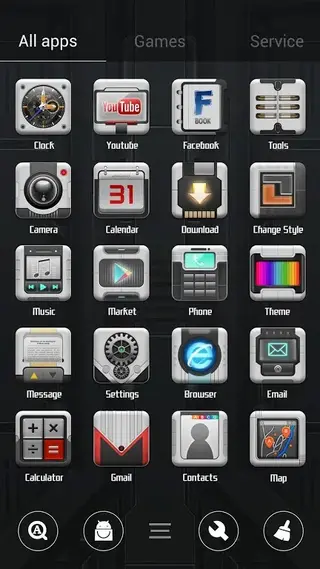
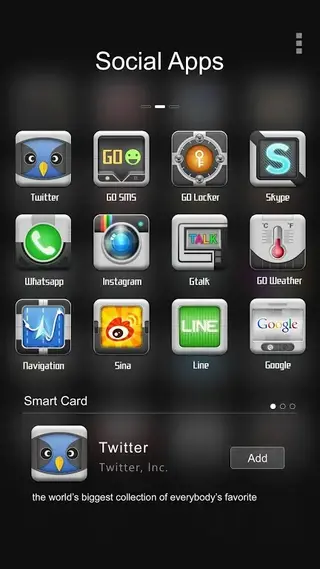
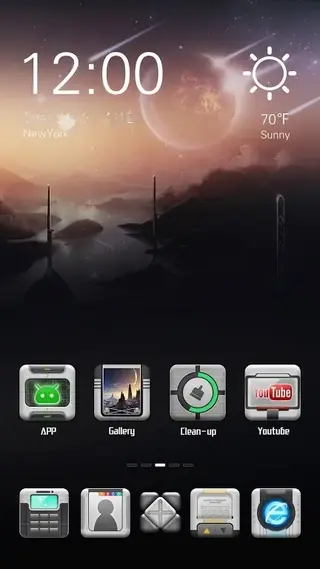
Compatibility and requirements
New Epoch was originally created for GO Launcher on older Android devices. The listed minimum requirement is Android 2.3 and above, which covers a wide range of legacy phones and tablets. To use the theme you must have GO Launcher installed and set as your default launcher.
Because it is a visual theme only, New Epoch does not change system files and does not need root permissions. You can install and uninstall it like any normal app, and you can switch between New Epoch and other GO Launcher themes whenever you like.
Using New Epoch with GO Launcher
After installing the APK, you manage New Epoch entirely inside GO Launcher. Open GO Launcher, access the themes or appearance section, and you should see New Epoch listed among your installed themes.
From there you can preview how the icons and wallpapers look together, apply the theme, or revert back to another one. You can also mix and match by using New Epoch icons with a different wallpaper if GO Launcher options allow that on your device.
FAQs
Pros
- Cohesive robot themed design for icons and wallpapers
- Works with older Android versions from 2.3 and above
- Lightweight APK suitable for low storage devices
- Applies quickly through GO Launcher with simple steps
- Does not require root access to customize visuals
Cons
- Requires GO Launcher to be installed to work
- Theme is older and may not match modern UI standards
- Likely contains advertising or promotional elements
- Limited customization beyond what the theme provides
- May not receive updates or new content anymore
Conclusion
New Epoch is a focused GO Launcher theme that gives Android devices a robot inspired, post apocalyptic visual style with custom icons and wallpapers. If you still use GO Launcher and want a distinctive, lightweight theme that runs on older Android versions, you can download the New Epoch APK directly from our website and apply it in a few taps.


Comments
No approved comments yet.