
Razer Gold
Razer Gold is Razer’s official virtual credit and payment app for gamers who want a simple way to top up their favorite games and online content. You can buy game credits, vouchers, and digital items for hundreds of supported titles directly from your Android phone.
With one unified Razer ID and wallet, you manage balances, redeem Razer Gold PINs, and complete payments in just a few steps. The app focuses on quick checkout, localized payment options, and loyalty rewards so regular top‑ups become easier and more rewarding.
You can download the official Razer Gold APK directly from our website and install it on compatible Android devices to start topping up supported games and services in minutes.
Rate this app
App details
- App name
- Razer Gold
- Category
- Shopping
- Version
- v4.5
- Size
- 9.56 MB
- Requirements
- 4.1 and Above
- Package name
- razer.gold
- Publisher
- RAZER
- Price
- Free
- Mod
- No
- Downloads
- 714,216
- Rating
- 4.3 / 5
- Rating count
- 9,168
- Play Store
- No
- Requires root
- No
- Offline support
- No
- Contains ads
- No
- In-app purchases
- Yes
- Updated
- May 22, 2026
- Age rating
- Rated for 3+
Table of contents
What is Razer Gold?
Razer Gold is a virtual credit system and payment app created by Razer for gamers worldwide. Instead of buying in‑game items separately for every title, you load funds into your Razer Gold wallet and use that balance to purchase game currencies, vouchers, and premium content.
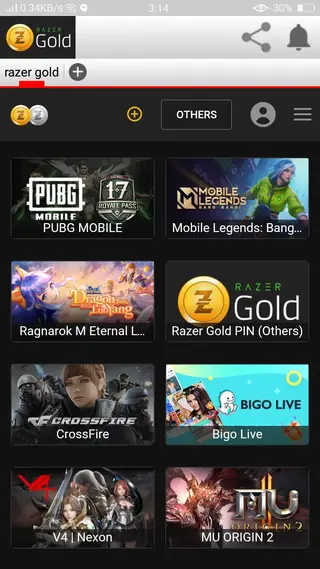
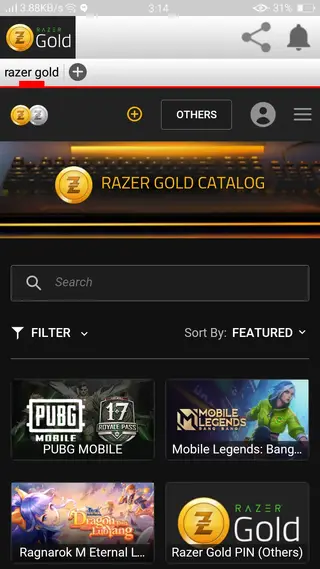
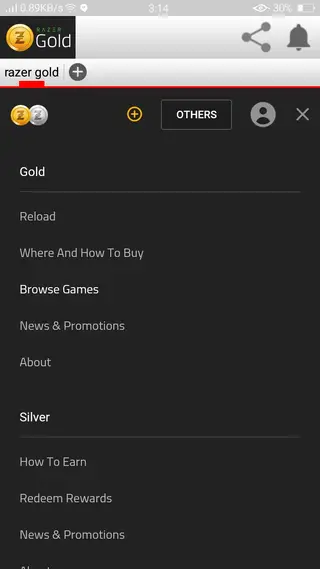
The Android app works as a mobile companion to the Razer Gold web platform. After signing in with your Razer ID, you can view your balance, add funds, redeem Razer Gold PINs, and spend credits on supported games and services. Popular titles include PUBG Mobile, Mobile Legends, CrossFire, Free Fire, and many more regional and global games.
Each eligible purchase made with Razer Gold earns Razer Silver, Razer’s loyalty points. These points can later be exchanged for rewards such as gaming accessories, digital vouchers, and exclusive partner deals, which makes the app attractive for players who top up regularly.
Top-up PUBG with Razer Gold PUBG and enjoy the latest season 17 with it. There are tons of more amazing features available in this app, which you can explore in it. If you want to get another store, then you can visit Codashop Pro. It also provides similar features and offers for you.
Why download the Razer Gold APK from our website?
Installing the Razer Gold APK on your Android device lets you manage game top‑ups without opening a browser every time. The mobile interface is optimized for quick logins and repeat purchases, which is useful if you play multiple online titles or buy in‑game currency often.
By downloading the APK directly from our website, you can get the version that matches the details shown on this page and install it manually on any compatible Android phone or tablet. This is especially helpful for users who cannot access the app through standard app stores or prefer to keep a backup installer.
Once installed, you can explore supported games, choose a top‑up amount, pick a local payment method, and confirm your purchase in a few taps. If you participate in Razer’s loyalty ecosystem, you also collect Razer Silver on qualifying transactions, which can later be redeemed for rewards.
How Razer Gold is useful for gamers?
Razer Gold centralizes game spending into a single wallet, which simplifies how you pay across different publishers and platforms. Instead of storing card details on every game account, you use your Razer ID and available balance for multiple titles.
The app also focuses on localized payment coverage. Depending on your region, you may find options such as bank transfers, e‑wallets, cash vouchers, and card payments. This flexibility is helpful in markets where traditional card usage is low but alternative payment channels are popular.
For regular players, the combination of Razer Gold balance and Razer Silver rewards brings additional value. Over time, points from everyday top‑ups can be converted into digital rewards or discounts on Razer gear, making the app a practical choice if you frequently purchase game currencies.
How to download and install Razer Gold APK?
You can get the official Razer Gold APK directly from our website and install it manually on your Android device. Follow these steps to complete the process safely.
Download the APK file from the download button provided on this page and wait for the file to finish saving on your device.
Open your device settings, go to the security or apps section, and allow installation from unknown sources if it is not already enabled.
Locate the downloaded APK in your Downloads folder or file manager and tap the file to start the installation.
Review the requested permissions on the install screen, then tap Install and wait for the process to complete.
Once installed, open Razer Gold, sign in with your Razer ID or create a new account, and start topping up your favorite games.
Features
Unified gaming wallet
Store and manage your Razer Gold balance in one place and use it across a wide range of supported games and services.
Support for many popular games
Top up credits for titles like PUBG Mobile, Mobile Legends, CrossFire, Free Fire, and other regional and global games.
Multiple payment methods
Pay with locally available methods including cards, online banking, e‑wallets, cash vouchers, and more depending on your country.
Razer Gold PIN redemption
Redeem physical or digital Razer Gold PINs directly in the app to instantly add funds to your wallet.
Earn Razer Silver rewards
Collect Razer Silver points on qualifying purchases and later redeem them for digital rewards and selected Razer products.
Quick mobile checkout
Complete repeat top‑ups in a few taps using saved details and a mobile‑friendly layout designed for fast payments.
Account and balance overview
Check your current Razer Gold balance, recent transactions, and purchase history from your phone.
Global and regional coverage
Access localized catalogs and payment options tailored to your region where Razer Gold officially operates.
Screenshots
Getting started with Razer Gold on Android
After installing Razer Gold, the first step is to log in with your Razer ID. If you do not have one, you can create it directly in the app using an email address. Once signed in, the home screen shows your Razer Gold balance, shortcuts to top up, and highlighted partner offers.
When you choose a game or service to top up, the app guides you through selecting the denomination and payment method. After confirming the payment, you receive a transaction summary, and the credits are applied according to the publisher’s delivery process.
Payments and regional availability
Razer Gold works with many regional partners, banks, telecoms, and e‑wallet providers to offer local payment methods. Availability depends on your country, so you may see different options and supported titles compared to users in other regions.
If you travel or move to another country, the app may update its catalog and payment list automatically based on your location and account settings. Always review the payment channels and fees shown on the checkout screen before confirming a purchase.
Razer Silver rewards and redemptions
Every eligible purchase with Razer Gold can earn you Razer Silver, which functions as a separate loyalty currency. Over time, your Silver balance can be exchanged for rewards like discount vouchers, game keys, or selected Razer peripherals through the official Razer Silver catalog.
Within the app, you can track your Silver earnings from purchases made with Razer Gold and keep an eye on your progress toward specific rewards. This makes regular top ups more rewarding compared to paying directly with other methods that do not include a loyalty program.
FAQs
Pros
- Centralized wallet to pay across many supported games
- Wide range of localized payment methods in supported regions
- Earn Razer Silver loyalty points on eligible purchases
- Official ecosystem app that connects with Razer ID
- Fast mobile checkout for frequent top ups
Cons
- Needs a stable internet connection for all main functions
- Service coverage and game catalog vary by country
- Requires account creation and sign in with Razer ID
- Cannot be fully used in regions where Razer Gold is not supported
Conclusion
Razer Gold offers a convenient way to manage game top ups, payments, and loyalty rewards from a single Android app. If you regularly purchase in game currencies, installing the APK from our website gives you quick access to your wallet and supported payment options on any compatible device.




Comments
No approved comments yet.