
ReVanced Extended
ReVanced Extended is a popular YouTube mod for Android that unlocks many premium-style features, including background play and extra playback controls, without a subscription.
This modified client is based on the official YouTube app but adds powerful options like ad skipping, sponsor segment controls, video downloads, and interface tweaks.
You can download the latest ReVanced Extended APK and the required MicroG package directly from our website and install them on compatible Android phones and tablets.
Most Android applications provide in-app purchases. Although, paid features offer high-quality services. However, not all users are willing to buy YouTube’s premium features. YT Mods such as YouTube Azul & YouTube Blue are popular. However, try the new modified edition with free premium features.
Rate this app
App details
- App name
- ReVanced Extended
- Category
- Video Players & Editors
- Version
- v20.51.39
- Size
- 173.82 MB
- Requirements
- 5.0 and Above
- Package name
- app.rvx.android.youtube
- Publisher
- Inotia00
- Price
- Free
- Mod
- Yes
- Downloads
- 71,949
- Rating
- 4.7 / 5
- Rating count
- 28,479
- Play Store
- No
- Requires root
- No
- Offline support
- No
- Contains ads
- No
- In-app purchases
- No
- Updated
- Jun 2, 2026
- Age rating
- Rated for 3+
Table of contents
What is ReVanced Extended APK
ReVanced Extended is an Android-modified version of the official YouTube app created by independent developer Inotia00. It builds on the open-source ReVanced project and adds extra patches and customization options on top of the standard YouTube experience.
With this app, you can watch videos with fewer interruptions, control sponsor segments, enable background playback, and access additional layout and player options that are not available in the regular free YouTube client.
The package name used by this build is app.rvx.android.youtube. To sign in with a Google account, ReVanced Extended typically works together with a separate MicroG APK, which acts as a replacement for Google Play Services on modded clients.
This app targets Android 5.0 and above and is distributed as an APK file that you can download directly from our website and install manually on your device.
Why Download ReVanced Extended for Android
Many users like YouTube Premium features but do not want a recurring subscription. ReVanced Extended offers a modified YouTube experience with additional options that aim to reduce interruptions and give more control over how videos play.
Compared with the stock app, it provides background playback, better gesture controls, optional ad and sponsor skipping, and built-in tools for downloading videos in high resolutions where supported. These changes can make everyday watching and listening more convenient on mobile.
If you enjoy long-form videos, music mixes, or podcasts on YouTube, ReVanced Extended can help you keep playback running while using other apps, turning off the screen, or putting the phone in your pocket.
How ReVanced Extended Can Be Useful
ReVanced Extended focuses on improving daily usability for people who spend a lot of time on YouTube. Background play allows you to treat long videos as audio, which is helpful for tutorials, interviews, and music content.
Gesture-based controls for brightness and volume remove the need to open system menus or player settings every time you want to adjust the screen or sound. Extra layout options let you tailor the interface to your preferences, while dislike counts and additional stats give more context before you watch.
The download tools and high-quality playback support can also be handy when you want to keep content on your device for offline viewing or when your network is unstable. All of these features are bundled in a familiar YouTube-style interface, so there is very little learning curve.
How to Download and Install ReVanced Extended
You can get the official ReVanced Extended APK file and the required MicroG package directly from our website. Follow these steps on your Android device to complete the installation.
Download the latest ReVanced Extended APK file from the download section on our page.
Download the matching ReVanced MicroG APK from the same section so you can sign in with your account.
Open your phone settings and enable installation from unknown sources for your browser or file manager if it is not already allowed.
Locate the MicroG APK in your downloads folder and install it first by tapping the file and confirming the prompts.
Next, install the ReVanced Extended APK in the same way and wait for the installation to finish.
Open ReVanced Extended, sign in through MicroG if you wish, and configure the playback and layout settings to your liking.
Once installed, you can update to newer versions in the future by downloading the latest APKs from our website and installing them over your existing setup.
Features
Background playback
Keep videos and music playing while using other apps or when the screen is locked, similar to YouTube Premium background play.
Sponsor and ad controls
Use patches that can skip or control sponsor segments and reduce standard ad interruptions during video playback.
Video downloading support
Download supported videos directly to your device in multiple resolutions, including up to 4K where available.
Swipe and gesture controls
Adjust brightness and volume with simple swipe gestures on the player screen for quicker control.
Playback customization
Change default playback speed, resolution, and other player settings to match your preferences.
Dislike count visibility
Restore visibility of public dislike counts on videos where data is supported, helping you judge content quality faster.
Multiple layouts and UI tweaks
Switch between different home feed and player layouts and refine the interface with extra visual options.
Advanced media player options
Access extended player settings such as codec preferences, auto-repeat, and other playback-related tweaks.
Screenshots
Version and compatibility details
The version provided on our page is labeled as 19.16.39 with a stated requirement of Android 5.0 and above. This places it in line with many modern Android devices, including budget phones and older tablets.
Because this is a modded client, behavior can vary depending on the base YouTube version, device manufacturer skin, and installed Google components. If you experience issues, checking for a more recent ReVanced Extended build that matches your device and Android version is often helpful.
Using MicroG with ReVanced Extended
ReVanced Extended relies on a separate MicroG component to replace certain Google Play Services functions. Without MicroG installed, you can usually still open and browse the app, but signing in to your Google account or syncing subscriptions may not work properly.
Install the MicroG APK from our download section before installing ReVanced Extended. After both files are installed, open ReVanced Extended, go to the account section, and follow the prompts to sign in. This setup helps keep the modded client functional while staying independent from the main YouTube app.
Customization and patch options
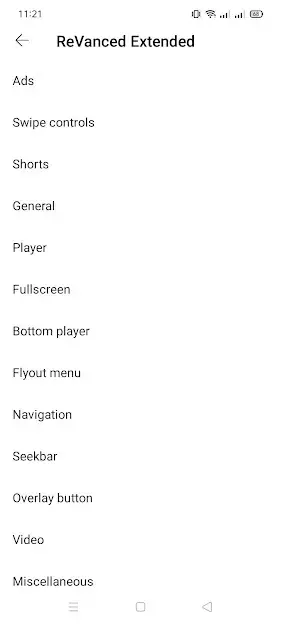
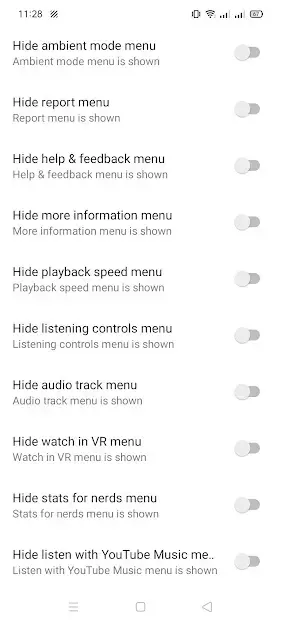
One of the main strengths of ReVanced Extended is its flexible patch system. The app includes various toggles that control behavior such as ad handling, sponsor skipping, layout adjustments, and codec preferences.
You can experiment with these options in the settings menu to find a balance that fits your viewing style. For example, you might enable background play, adjust default resolution, change the position of controls, or fine-tune how the app treats sponsor segments.
FAQs
Pros
- Background playback works without a paid subscription
- Gesture-based controls make volume and brightness changes faster
- Built-in tools can help reduce ads and sponsor segments
- Support for higher resolutions and video downloading on many clips
- Multiple layout and interface customization options
- Shows dislike counts again on supported videos
Cons
- Requires separate MicroG installation for account sign-in
- Not available on Google Play Store and must be sideloaded
- Functionality may break when YouTube updates its backend
- Some features may behave differently across devices and versions
Conclusion
ReVanced Extended is a powerful YouTube mod for Android users who want more control over playback, fewer interruptions, and advanced customization options. If your device meets the Android 5.0 or higher requirement, you can download the latest APK and its companion MicroG file directly from our website and explore its extended feature set at your own pace.




Comments
No approved comments yet.