

Shoora VPN
Shoora VPN is a lightweight Android VPN app that helps you browse the web with an encrypted connection and change your virtual location in a few taps. It focuses on simple one-tap protection so anyone can get started quickly.
With global servers and support for many blocked sites and apps, Shoora VPN is designed for users who want an easy way to bypass regional restrictions on mobile. You can connect to different countries, hide your real IP address, and keep your traffic routed through a secure tunnel.
The side-effect of the internet is a risk. Surfing the internet is the risk of fetching important data, personal information, and many other important factories. The other problem is country restrictions, different countries, banned different websites, and apps in the country. The reasons can be different, but users of that website and application always suffer. Thus they rely on tools like VPN SAKTI and Ha Tunnel Pro.
You can download the Shoora VPN APK directly from our website and install the latest available version on compatible Android phones and tablets without any complicated setup.
Rate this app
App details
- App name
- Shoora VPN
- Category
- Tools
- Version
- v7.1
- Size
- 16.38 MB
- Requirements
- 5.0 and Above
- Package name
- com.free.vpn.shoora
- Publisher
- Shoora VPN Team
- Price
- Free
- Mod
- No
- Downloads
- 50,000
- Rating
- 4.0 / 5
- Rating count
- 19,970
- Play Store
- No
- Requires root
- No
- Offline support
- No
- Contains ads
- Yes
- In-app purchases
- No
- Updated
- May 11, 2026
- Age rating
- Rated for 3+
Table of contents
What is Shoora VPN Android App
Shoora VPN is a Virtual Private Network app for Android developed by the Shoora VPN Team. It creates an encrypted tunnel between your device and remote servers so your real IP address stays hidden while you browse, stream, or use online apps.
The app focuses on simple, fast connections. You open Shoora VPN, pick a server location, tap connect, and the app routes your mobile data or Wi-Fi traffic through that server. This helps you access websites and apps that might be blocked or restricted in your country while keeping your online activity less exposed on public or shared networks.
Shoora VPN works on Android 5.0 and above and is suitable for many everyday tasks such as browsing, using social media, or playing online games through a VPN tunnel. The APK file is available on our website so you can install it even if it is not visible in your local Play Store region.
Why Download Shoora VPN APK from Our Website
Downloading the Shoora VPN APK directly from our website lets you get the listed version without waiting for staged rollouts or regional availability limits. You can keep a backup of the installer, share it across your own devices, and reinstall it anytime you need.
Many users prefer the APK to ensure they can access the same build even if it is temporarily unavailable in their country. With the package available on our download page, you can:
Install Shoora VPN on devices that do not have Play Store.
Use the same APK on multiple phones and tablets you own.
Manually update from an older version to the version we provide.
The download process is straightforward: visit our Shoora VPN page, use the download button, save the APK file, and complete installation through the standard Android package installer.
How Shoora VPN is Useful for Android Users
Shoora VPN can be useful for anyone who wants more control over their connection and regional access on Android. By routing traffic through its remote servers, it can help reduce exposure of your real IP address on public networks such as coffee shops, hostels, and other shared hotspots.
The app also helps users reach content that may be restricted by geography. If a streaming site, game, or social platform is blocked in your region, switching to a different server location in the app may allow access, depending on local rules and the service you use.
Because it offers multiple servers and straightforward controls, Shoora VPN can also be convenient for mobile gamers or frequent travelers who want to adjust their virtual location quickly, without dealing with complex settings or heavy configuration screens.
How to Download and Install Shoora VPN APK
You can get the Shoora VPN APK file directly from our website. Follow these steps on your Android phone or tablet to download and install it.
Open your browser and go to our Shoora VPN download page.
Tap the download button for the Shoora VPN APK file.
Wait for the APK file to finish downloading to your device.
If prompted, allow installation from unknown apps in your Android settings for your browser or file manager.
Open your Downloads folder or notification shade and tap the Shoora VPN APK file.
Confirm the installation prompts and wait until the app is installed.
Launch Shoora VPN from your app drawer, select a server, and tap connect to start using the VPN.
After installation, you can keep the APK stored on your device or external storage if you want a local backup for later reinstallations.
Features
One-tap VPN connection
Connect or disconnect the VPN with a single tap, making it easy for beginners to use without complex settings.
Multiple global server locations
Choose from a range of country servers to change your virtual location and attempt to access geo-restricted websites or apps.
IP masking for privacy
Masks your real IP address by routing traffic through remote servers, which can help reduce direct exposure of your device on public networks.
Support for blocked websites
Helps users reach websites that may be restricted or unavailable in their country when connected to a different region.
Access to region-locked apps
Allows many apps and online services that are blocked in certain areas to load when you connect through another country, where permitted.
Optimized for online gaming
Provides high-speed connections on many servers so mobile games can run with more stable latency when the route is favorable.
Traffic spread over many servers
Uses multiple servers to distribute user load, which can help keep connections smoother during busy periods.
Works on low-end Android devices
Designed to remain lightweight so it can run on older or low-spec Android phones without heavy resource usage.
Screenshots
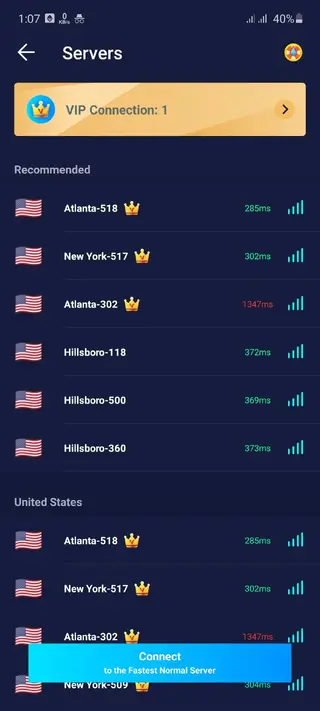
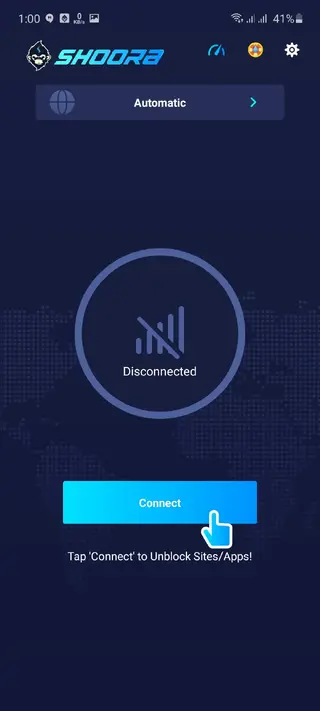

Shoora VPN Performance and Speed
Performance is one of the key points for any VPN user, especially on mobile networks. Shoora VPN focuses on providing fast connections by offering many servers so user traffic is shared across different locations. This can help reduce congestion, although real-world speed still depends on your distance from the server and the quality of your mobile or Wi-Fi network.
For regular web browsing and social apps, most users should find the speed acceptable. When streaming or gaming, choosing a server that is geographically closer often delivers better stability and lower latency than distant servers.
Compatibility and Device Requirements
Shoora VPN supports Android 5.0 and above, so it works on a wide range of smartphones and tablets. Because the app is relatively small and light, it can run on low-end devices with limited RAM and storage space, making it suitable for older phones.
It operates over both Wi-Fi and mobile data connections. You do not need root access or advanced configuration; once installed, you can start a connection with just a tap on the main screen.
Tips for Using Shoora VPN Safely
While a VPN can improve privacy and help you change your virtual location, it does not replace safe browsing habits. Use strong passwords, keep your apps updated, and avoid sharing sensitive information on suspicious websites even when connected through Shoora VPN.
When choosing a server, select one that suits your goal. Nearby servers usually give better speed, while distant servers might help test content available in other regions. If a particular site or app does not work well on one server, you can try switching to another location within the app.
FAQs
Pros
- Simple one-tap interface that is easy for new users to understand
- Multiple server locations to help bypass many regional restrictions
- Lightweight app that works on low-end and older Android devices
- Can improve privacy by masking the user’s real IP address
- Supports browsing, streaming, and gaming through a VPN tunnel
- APK is available on our website for manual installation
Cons
- Contains in-app advertising that can interrupt the experience outside active streaming or gaming
- Actual speed and stability depend heavily on server load and user’s own network
- Not all region-locked services will work reliably with a VPN due to their own restrictions
- Free server options can be slower at busy times compared to premium VPN services
Conclusion
Shoora VPN is a straightforward Android VPN app for users who want quick IP masking and access to different regions without complex setup. With multiple servers, a simple interface, and a small footprint, it suits everyday browsing and basic unblocking needs. You can download the current Shoora VPN APK directly from our website and install it on compatible Android devices in just a few steps.




Comments
No approved comments yet.