

Ha Tunnel Pro
Ha Tunnel Pro is an Android VPN client that helps you encrypt your mobile traffic and tunnel it through secure servers using SSH and custom configurations. It is designed for users who want more control over how their connection works.
With support for custom payloads, multiple ports, and different connection modes, the app can help you bypass many local restrictions and access blocked apps or sites. You can download the official Ha Tunnel Pro APK directly from our website and start configuring your own secure tunnel.
The interface focuses on simplicity, so even if you are new to tunneling apps, you can quickly use ready-made settings or import configuration files shared by advanced users. Power users, on the other hand, get deep control over headers, SNI, and protocol behavior.
Rate this app
App details
- App name
- Ha Tunnel Pro
- Category
- Tools
- Version
- v1.6.2
- Size
- 23.11 MB
- Requirements
- 5.0 and Above
- Package name
- com.hatunnel.pro
- Publisher
- Art Of Tunnel
- Price
- Free
- Mod
- No
- Downloads
- 71,434
- Rating
- 4.1 / 5
- Rating count
- 6,172
- Play Store
- No
- Requires root
- No
- Offline support
- No
- Contains ads
- Yes
- In-app purchases
- No
- Updated
- May 18, 2026
- Age rating
- Rated for 3+
Table of contents
What is Ha Tunnel Pro for Android?
Ha Tunnel Pro is a VPN and tunneling application for Android developed by Art Of Tunnel. It uses SSH and custom TCP tunneling techniques to wrap your mobile internet traffic and route it through remote servers. This process hides your real IP address, changes your apparent location, and applies encryption between your device and the tunnel endpoint.
The app targets users who want more than a one-tap VPN. It lets you create or import configuration files that define payloads, hosts, ports, and connection modes. Many users rely on these configs to optimize speed, stabilize mobile data connections, or work around local network restrictions imposed by ISPs, workplaces, or schools.
Ha Tunnel Pro runs on Android 5.0 and above and works over both mobile data and Wi-Fi. You install the APK, choose or import a configuration, tap connect, and the app builds a secure tunnel that other apps can use for their internet traffic.
This virtual private network has a lot of features to offer without a paid cost. However, many users would be interested in exploring tools with even better services. There are numerous VPN tools on this website, some instant suggestions for users to try would be Argo VPN and Swing VPN Lite.
Why download Ha Tunnel Pro APK from our website?
Downloading the Ha Tunnel Pro APK from our website gives you direct access to the official installation file for your Android phone or tablet. You do not need to search around different sites or stores, and you can keep a copy of the APK for offline installation whenever you reset or change your device.
The APK version allows you to install and update the app even if it is not listed in your regional app store. Once installed, you can immediately apply ready configurations or import custom ones to start tunneling your traffic. This makes the download from our website especially useful if you rely on specific configs shared in your community or country.
Because the APK is hosted on our site, you can return here whenever a newer version is available and manually update the app without waiting for store rollouts. This is helpful for users who want quick access to new bug fixes, protocol changes, or server updates.
How Ha Tunnel Pro is useful?
Ha Tunnel Pro is useful for Android users who want a flexible VPN-style tunnel rather than a simple one-button solution. By letting you define ports, protocols, and payloads, the app makes it possible to fine-tune your connection for speed or stability depending on your network and ISP.
Many people use Ha Tunnel Pro to access region-restricted services, keep their browsing private on public Wi-Fi, or keep messaging apps working when networks apply throttling or filtering. The app also supports importing and exporting configuration files as encrypted text, which allows communities to share working settings without exposing all the technical details.
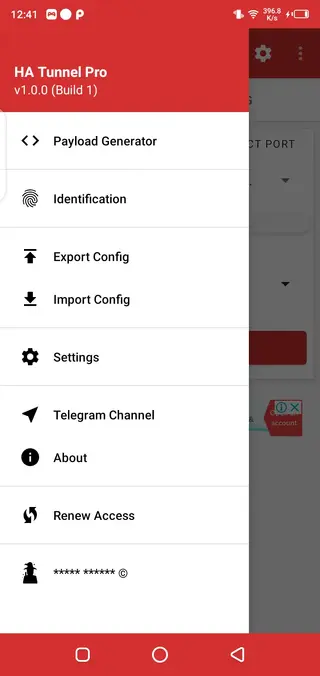
The ability to adjust notification behavior, choose different themes, and switch between several connection modes gives you both control and comfort in everyday use. Whether you are a casual user who only wants a stable secure connection or a power user who experiments with headers and SNI, Ha Tunnel Pro provides the necessary tools.
How to download and install Ha Tunnel Pro APK?
You can get the Ha Tunnel Pro APK directly from our website and install it on any compatible Android device. Follow these simple steps to complete the process safely and correctly.
Scroll to the download section on this page and tap the Ha Tunnel Pro APK download button.
Wait for the APK file to finish downloading to your Android device.
On your phone, open Settings and enable the option to install apps from unknown sources, if it is not already allowed.
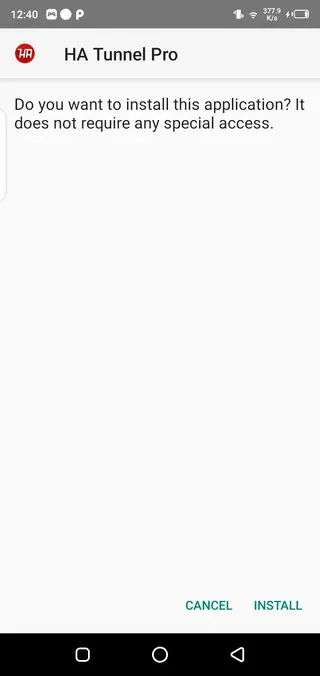
Open your file manager, locate the downloaded Ha Tunnel Pro APK, and tap it to start the installation.
Follow the on screen prompts and confirm the installation request.
Once installed, open Ha Tunnel Pro, grant the required VPN permissions, choose or import a configuration, and tap Connect.
Whenever a new version is released, return to this page and download the updated APK, then install it over your existing version to keep your tunnel client up to date.
Features
Configurable VPN tunnel
Create or import custom SSH-based tunnel configurations with control over hosts, ports, and connection parameters.
Multiple global servers
Connect through different servers located in various regions to change your apparent location and route traffic more efficiently.
Different ports per server
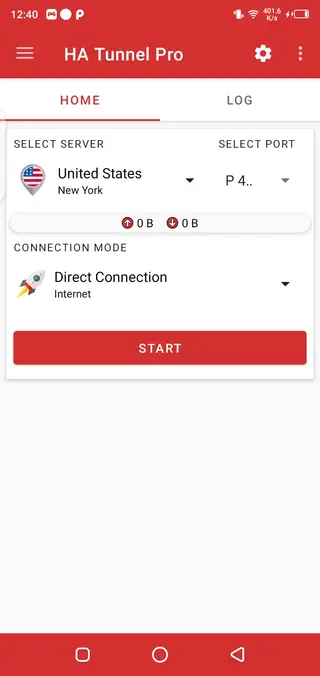
Use several ports offered for each server so you can switch when a specific port is congested or blocked by your network.
Connection modes
Select from different connection modes such as direct connection or custom payload modes to match your ISP behavior and improve stability.
Import and export configuration files
Save, share, and restore tunnel settings as configuration or encrypted text files for easy reuse across devices and users.
User friendly interface
Operate the app through a simple dashboard that focuses on quick connect, server selection, and easy access to advanced settings.
Encrypted text for providers
Store connection details in encrypted text format so configuration authors can protect sensitive parameters while sharing working setups.
Custom connection method settings
Fine tune protocol options, timeouts, and reconnection behavior to adapt the tunnel to different mobile networks.
Screenshots
Getting started with configurations
After installing Ha Tunnel Pro, the most important step is choosing a working configuration. Many users rely on ready-made config files created for specific networks or countries. These configs typically include information such as server address, port, SNI or host header, and connection mode.
You can import such a configuration from a file or from encrypted text. Once imported, select it from the list, tap Start, and wait for the VPN permission prompt. When the VPN icon appears in the status bar, your other apps will start using the tunnel automatically.
Tips to improve connection stability
Connection quality in Ha Tunnel Pro can vary depending on your ISP, location, and the server you choose. If the tunnel disconnects frequently, try switching to another server or port in the same region. Some mobile networks block specific ports, so experimenting can significantly improve results.
You can also adjust reconnection and timeout settings inside the app. Choosing a lighter configuration with fewer extra headers can help if your connection is slow or unstable. Regularly updating your configs from trusted communities is another way to maintain a more reliable tunnel.
Privacy and security considerations
Ha Tunnel Pro encrypts your connection between your device and the tunnel endpoint, which helps protect your data from local eavesdropping on public Wi-Fi or shared networks. However, as with any tunneling application, overall privacy also depends on how the exit server and the destination services handle your data.
Use the app responsibly, follow local laws, and avoid sharing personal information on untrusted sites even when connected through a tunnel. Keeping the app updated through the APK on our website helps ensure you benefit from the latest security improvements and bug fixes.
FAQs
Pros
- Advanced tunneling options with custom configurations
- Multiple servers and ports to improve chances of connection
- Supports importing and exporting encrypted configuration files
- User friendly interface with straightforward connection control
- Available as an APK for manual installation on many Android devices
Cons
- Configuration system can be confusing for new users
- Performance and speed depend heavily on server load and ISP
- Contains advertising inside the app
- Requires an active internet connection to work
Conclusion
Ha Tunnel Pro is a capable tunneling and VPN app for Android users who want more control over how their mobile data is routed and protected. By downloading the official APK from our website, you can install it on compatible devices, apply shared configs or create your own, and build a secure, customizable tunnel that fits your everyday browsing and messaging needs.




Comments
No approved comments yet.