

Woo Live
Woo Live is a social live-streaming and video chat app where you can join real-time shows, talk with hosts, and meet new people from different countries. It focuses on interactive rooms, face-to-face calls, and engaging community events.
There are millions of people all over the globe, who are looking for a simple way to spend their free time. So, if you are also getting bored, then don’t need to worry about it. We are here with the best application similar to TokTik & Litmatch, which can help you to socialize with people.
Users can follow their favorite streamers, send virtual gifts, and join group chats or one-on-one conversations. The app supports both viewers and creators, so you can either relax and watch shows or go live and build your own fan base.
You can download the Woo Live APK directly from our website, install it on your Android phone or tablet, and start exploring global live rooms, private chats, and earning opportunities inside the app.
Rate this app
App details
- App name
- Woo Live
- Category
- Social
- Version
- v1.26.2
- Size
- 122.85 MB
- Requirements
- 5.0 and Above
- Package name
- tv.woolive.live
- Publisher
- Star Rising LTD
- Price
- Free
- Mod
- No
- Downloads
- 76,843
- Rating
- 4.7 / 5
- Rating count
- 23,989
- Play Store
- Yes
- Requires root
- No
- Offline support
- No
- Contains ads
- Yes
- In-app purchases
- Yes
- Updated
- May 18, 2026
- Age rating
- Rated for 3+
Table of contents
What is Woo Live?
Woo Live is a social networking and live-streaming app for Android that combines video chat, live shows, and dating-style interactions in one platform. It connects you with people across the world through public live rooms, private calls, and interactive chat tools.
After a quick sign-up using your mobile number, email, or a supported account, you can access a range of live rooms hosted by streamers. You can join as a viewer to watch singing, chatting, gaming, or casual hangout shows, or you can go live as a host and build your own community.
The app includes text chat, voice calls, and video calls, along with virtual gifts and coins that support creators. Many users treat Woo Live as a mix of live entertainment and casual social discovery, making it suitable for people who want both conversation and content in the same place.
Why download Woo Live APK from our website
Downloading the Woo Live APK from our website lets you get the latest available Android version without waiting for staged rollouts. You can save the installer file on your device and reinstall it whenever you need, even if you switch phones or reset your system.
Our download page provides the package name, version information, and basic app details in one place, so you clearly know what you are installing. Once you download the APK from our website, you can install it manually and start using live streaming, chat, and earning features right away with no extra tools required.
This is especially useful if Woo Live is not yet visible in your local Play Store region or if you prefer managing APK files yourself for easier backup and offline installation.
How Woo Live can be useful for you
Woo Live can be useful if you want a simple way to meet new people, fight boredom, or practice social skills in real-time conversations. The mix of live rooms, private messaging, and direct calls gives you different levels of interaction, from casual watching to deep one-on-one talks.
For content creators, Woo Live offers a basic creator ecosystem with gifts and rewards. Hosts can grow followers, receive virtual gifts from fans, and potentially convert those rewards into income according to the app’s policies. This makes the platform attractive to aspiring streamers looking for more exposure.
Because the app runs on most modern Android phones, it is also a portable entertainment hub. Whether you prefer watching public shows, joining themed rooms, or starting your own live sessions, Woo Live offers flexible ways to spend your free time in a social environment.
How to download and install Woo Live APK
You can get the Woo Live APK file directly from our website and install it on your Android device in a few simple steps. Make sure your device runs Android 5.0 or higher.
Follow these steps to download and install:
Scroll to the download section on this page.
Tap the download button for the Woo Live APK file.
Wait until the APK finishes downloading to your device.
Open your phone settings and enable installation from unknown sources if needed.
Locate the downloaded APK in your downloads folder.
Tap the file and confirm the installation prompt.
Once installed, open Woo Live, sign up or log in, and start exploring live rooms.
Whenever a newer version is added, you can return to our website, download the updated APK, and install it over the existing app to keep your features current.
Features
Global live streaming rooms
Join public live rooms from different regions and watch hosts chat, sing, play games, or interact with their audience in real time.
Private video and voice chat
Start one-on-one video or audio calls with other users for more personal conversations beyond the public live rooms.
Real-time text messaging
Use in-room chat or direct messages to talk with streamers and viewers, send reactions, and stay engaged during shows.
Become a live streamer
Go live as a host, start your own shows, attract viewers, and build a base of followers and regular fans.
Virtual gifts and earning system
Send or receive virtual gifts during streams; hosts can collect in-app rewards and may convert them based on platform rules.
User profiles and following
Create a profile, share basic info, and follow people you like so you can easily find their next live session.
Social discovery and matching
Discover new friends through recommended rooms, trending shows, and random entry into active live sessions.
Account login options
Register quickly with your phone or supported accounts to sync your profile, history, and wallet across devices.
Screenshots

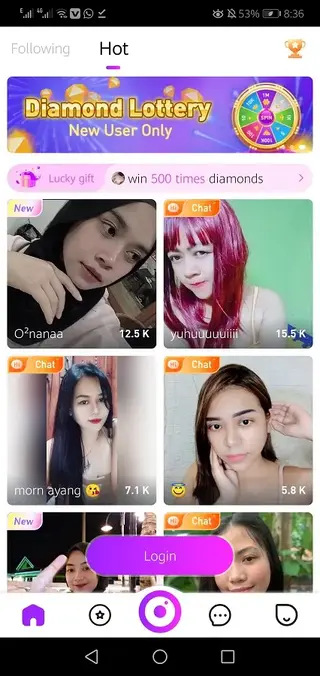
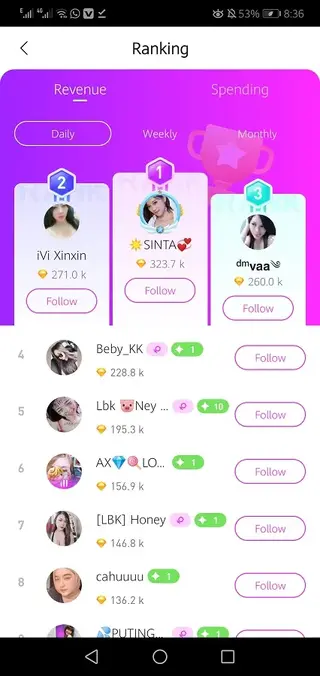
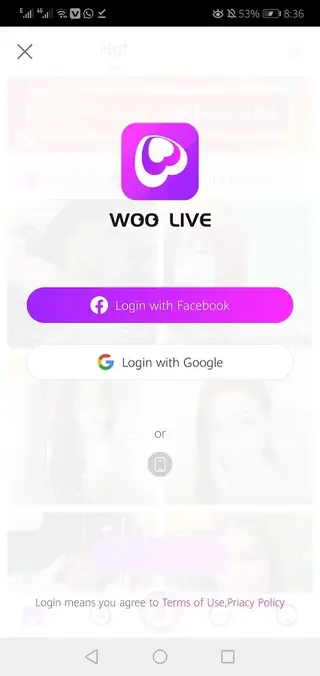
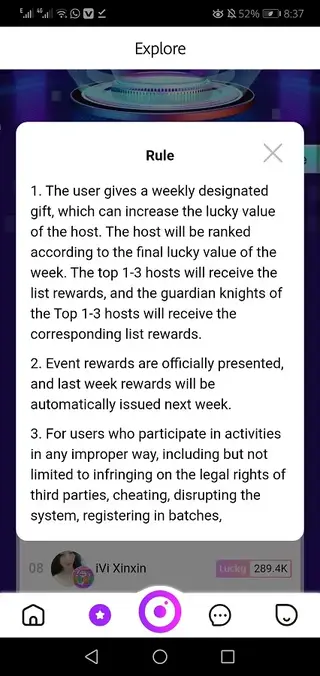
Account setup and profile customization
After installing Woo Live, you can create an account with your phone number, email, or a supported login method. Once registered, you can add a profile picture, nickname, and a short bio so other users understand who you are before joining your live sessions or chats.
Completing your profile increases your visibility in recommendations and can help you gain more followers. Streamers with clear, appealing profiles often receive more visitors and interaction in their rooms.
Tips for new streamers on Woo Live
If you want to stream on Woo Live, it helps to plan a theme for your show, such as chatting, music, games, or casual Q&A. A quiet background, good lighting, and a stable internet connection improve the viewing experience for your audience.
Interact actively with viewers by responding to comments, welcoming new users, and thanking people for gifts. Consistent streaming schedules also help you build loyal followers who return regularly to your room.
Safety and privacy considerations
Woo Live offers social and dating-style communication, so it is important to manage your privacy carefully. Avoid sharing sensitive personal information like home address, financial data, or private contact details during chats or live shows.
You can block or report users who behave inappropriately, and you should review the app’s community guidelines and privacy settings. Using these tools helps you maintain a safer and more comfortable experience while enjoying live streaming and conversations.
FAQs
Pros
- Offers global live streaming and video chat in one app
- Allows users to become streamers and build a fan base
- Includes virtual gifts and earning opportunities for hosts
- Supports private video, voice, and text chat options
- Simple registration and relatively easy-to-use interface
Cons
- Requires a stable internet connection to work properly
- Contains in-app purchases for gifts and other features
- May include ads that interrupt the user experience
- Social and dating style content may not suit all age groups
- Data usage can be high during long video calls and streams
Conclusion
Woo Live is a flexible live streaming and video chat platform for Android that blends entertainment and social interaction. If you enjoy real-time shows, direct conversations, and the chance to host your own live sessions, downloading the Woo Live APK from our website is a straightforward way to start exploring its community and features.




Comments
No approved comments yet.