

Litmatch
Litmatch is a social app that helps you meet new people, share honest thoughts, and build meaningful connections through short chats, voice calls, and party rooms.
With features like Soul Game, group chats, and virtual gifts, the app focuses on emotional bonding instead of superficial swiping. You can explore real users’ stories, express yourself freely, and find friends who match your vibe.
You can download the latest Litmatch APK directly from our website, install it on your Android phone or tablet, and start discovering a warm and supportive online community within minutes.
Rate this app
App details
- App name
- Litmatch
- Category
- Dating
- Version
- v7.65.0
- Size
- 140.2 MB
- Requirements
- 5.0 and Above
- Package name
- com.litatom.app
- Publisher
- CONSTRUCT TECHNOLOGY PTE. LTD.
- Price
- Free
- Mod
- No
- Downloads
- 86,232
- Rating
- 4.7 / 5
- Rating count
- 40,662
- Play Store
- Yes
- Requires root
- No
- Offline support
- No
- Contains ads
- Yes
- In-app purchases
- Yes
- Updated
- May 22, 2026
- Age rating
- Rated for 12+
Table of contents
What is Litmatch APK
Litmatch is a social and dating-style community app for Android that focuses on emotional connection and safe interaction rather than fast, anonymous swiping. It connects you with real people around the world through short, time-limited sessions like the Soul Game, brief voice calls, and themed chat rooms.
After creating a profile, you can customize your avatar, add photos, write about yourself, and share life highlights. The app suggests people based on your preferences and age range, then lets you interact through text, voice, and group spaces.
Litmatch is free to download and use with optional premium features and in-app currency. The APK available on our website lets you install the official Android version and access the core features without needing root access.
Until then, you can try the official application and find some friends. You can also use Zeetok and CareFast Dating, which provide a wide range of online chatting users for free. So, you can spend your time on these platforms, until the mod is available.
Why Download Litmatch for Android
Many users look for a space where they can talk openly, share feelings, and meet people who actually listen. Litmatch is built around that idea, combining social discovery with short, focused interactions that reduce pressure and awkwardness.
Instead of endless profiles, you get curated moments: a three-minute Soul Game chat, a brief voice call, or a party room session. These formats make it easier to break the ice, understand someone’s personality, and decide whether you want to stay connected.
Downloading Litmatch APK directly from our website gives you quick access to the latest available Android version, so you can start building your friend circle, exploring diverse stories, and joining supportive communities right away.
How Litmatch Can Be Useful
Litmatch can be helpful if you feel lonely, want to practice social skills, or simply enjoy talking to people from different cultures. The app’s short interaction formats lower anxiety for shy users, while the community rules encourage respect and kindness.
You can use it to:
Discover new friends and potential matches based on shared interests.
Share emotions and daily moments in a supportive space.
Join group chats and party rooms to avoid feeling isolated.
Explore other people’s stories to widen your perspective.
Because Litmatch supports both text and voice, it fits different comfort levels. Whether you just want to send a few messages or dive into deeper conversations, you can choose the interaction style that works best for you.
How to Download and Install Litmatch APK
You can get the Litmatch APK directly from our website and install it on any compatible Android device. Follow these steps to start using the app:
Scroll to the download section on this page and tap the Litmatch APK download button.
Wait for the APK file to finish downloading to your Android phone or tablet.
Open your device settings and enable installation from unknown sources if it is not already allowed.
Locate the downloaded APK file in your Downloads folder and tap it to start installation.
Follow the on-screen prompts to complete the setup.
Open Litmatch, sign up with your email or social account, set your age preferences, and create your profile.
Once installed, you can immediately join chats, try the Soul Game, and explore rooms without needing root access.
Features
Soul Game matching
Get matched with another user for a short, three-minute chat to discover shared likes and dislikes.
Brief voice call sessions
Join short voice calls that help you hear the other person and build a more natural connection.
Party room and group chat
Enter themed party rooms and group chats to meet multiple people at once and share fun moments.
Profile and avatar customization
Create a profile with photos, about text, and a cool or cute avatar to express your personality.
Real users and social discovery
Explore real users’ lives, timelines, and highlights instead of anonymous or purely swipe-based profiles.
Text and voice messaging
Chat through instant messages or switch to voice to communicate in the way that feels most comfortable.
Virtual gifts and Litmatch currency
Send interesting gifts using in-app currency to show support, appreciation, or affection in chats and rooms.
Emotional support community
Share your emotions, thoughts, and struggles and receive warm support from people who relate to you.
Screenshots
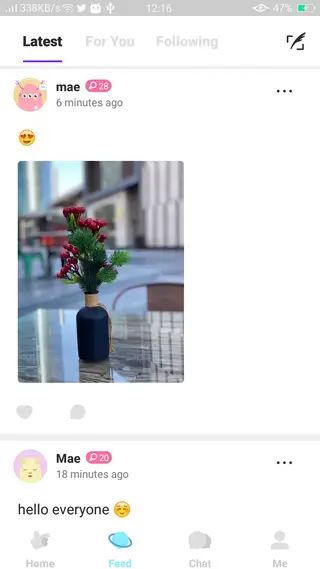

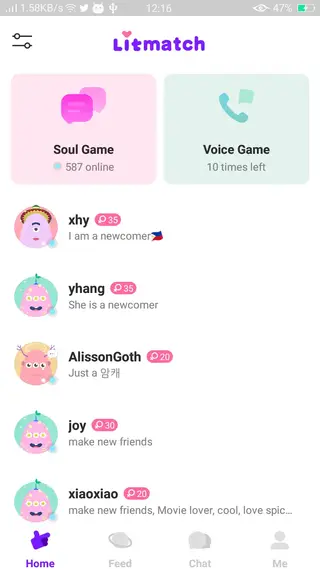
Account Setup and Profile Creation
Getting started with Litmatch is straightforward. After installing the APK and opening the app, you create an account using your email address or a supported social login. You then choose your age range preferences so the app can recommend more relevant people.
Next, you build your profile. You can upload a profile picture, add additional photos, write a short bio, and choose an avatar style that suits you. A complete and honest profile usually attracts more quality interactions and helps others understand who you are before they connect.
Interaction Modes Inside Litmatch
Litmatch offers several ways to interact so you can choose what feels most comfortable:
Soul Game: A three-minute anonymous chat where you discover whether you emotionally connect with someone. If both of you feel a spark, you can continue as friends.
Brief voice calls: Short voice sessions allow you to hear the other person and build a more natural impression.
Party rooms: Multi-user spaces where people chat, share music, or simply hang out with others who share similar interests.
Direct chats: Private conversations where you can text, send stickers, and use virtual gifts to interact more playfully.
These modes help keep conversations dynamic and reduce the usual awkwardness of starting a new chat.
Safety and Community Guidelines
Litmatch promotes a warm and respectful community. The app encourages users to respect diversity, avoid harassment, and follow community guidelines when interacting with others.
You can report or block users who behave inappropriately, and you control what you share on your profile and in chats. As with any online social platform, you should avoid sharing sensitive personal information and take your time before trusting new people fully.
By using the available reporting tools and following basic online safety practices, you can create a more positive and secure experience for yourself and others in the Litmatch community.
FAQs
Pros
- Focus on emotional connection instead of pure swiping
- Short interactions like Soul Game and brief voice calls reduce pressure
- Customizable profile and avatar for better self-expression
- Party rooms and group chats make meeting multiple people easy
- Available as a free download with optional premium features
Cons
- Requires a stable internet connection to use most features
- Some features and gifts require in-app purchases
- Not ideal for users who prefer offline communication apps
- Match quality and experience depend on regional user activity
Conclusion
Litmatch offers a friendly space to meet new people, express emotions, and build meaningful online connections through focused chats and voice sessions. Download the APK from our website to explore its community and features on your Android device.




Comments
No approved comments yet.