

Yogurt TV
Yogurt TV is an Android streaming app focused on Indonesian and international entertainment. It brings live TV channels, movies, dramas, and anime into one simple interface on your phone or tablet.
With this app, you can browse IPTV channels by category, explore updated movie and series libraries, and watch anime without creating an account. Everything streams online, so you only need a stable internet connection.
You can download the official Yogurt TV APK file directly from our website and install it on compatible Android devices running Android 5.0 or higher.
Quality of entertainment is quite important. Thus, get the highest display quality in this application. Hence, enjoy full HD entertainment on mobile with this app. Additionally, more features are available in this App Apk. Hence, download this Apk to enjoy. More similar apps are available such as Stube TV and Apne TV are your other options.
Rate this app
App details
- App name
- Yogurt TV
- Category
- Entertainment
- Version
- v2.1.3
- Size
- 41.98 MB
- Requirements
- 5.0 and Above
- Package name
- com.svc.vlive.home.yid
- Publisher
- SVC
- Price
- Free
- Mod
- No
- Downloads
- 768,384
- Rating
- 4.0 / 5
- Rating count
- 4,189
- Play Store
- No
- Requires root
- No
- Offline support
- No
- Contains ads
- Yes
- In-app purchases
- No
- Updated
- May 21, 2026
- Age rating
- Rated for 12+
Table of contents
What is Yogurt TV APK?
Yogurt TV APK is an Android entertainment application designed mainly for Indonesian viewers but also includes international content. The app combines live IPTV channels, on-demand movies, serial TV, and anime in one place, so you do not need to install multiple streaming apps.
After installation, you can open Yogurt TV and start watching without registration or login. The content library includes Indonesian channels and programs alongside Hollywood, Bollywood, and regional titles. Videos typically stream in HD quality where available, which helps keep the viewing experience clear on modern phones and tablets.
The interface groups content into clear sections such as Live, Movies, Serial TV, and Anime. This structure makes it easy to jump straight to the type of entertainment you want instead of searching through long lists.
Why download Yogurt TV for Android?
Many streaming services require paid subscriptions or limit access behind accounts. Yogurt TV focuses on free access to a wide range of content, especially for Indonesian users who want local channels and shows alongside international options.
By downloading Yogurt TV APK from our website, you get the official file and can install it on any compatible Android device, even if it is not available in Google Play. Once installed, you can switch between live channels, movies, dramas, and anime from a single app with a relatively lightweight footprint compared to some mainstream streaming platforms.
The app also offers categorized IPTV sections such as news, kids, local TV, and movies, which helps users quickly find something suitable for the moment, whether that is live sports, a new film, or a trending drama episode.
How is Yogurt TV useful?
Yogurt TV is useful for users who want a central hub for Indonesian and global entertainment on Android. Instead of juggling separate apps for live TV, movies, and anime, you can use one interface to reach all of them.
The dedicated Live section provides access to IPTV channels organized by country and category, which is convenient if you enjoy channel surfing or following news and events from different regions. The Movies and Serial TV areas make it easier to track down the latest releases or catch up on episodes you missed on television.
Anime fans benefit from a separate anime section that focuses on Japanese, Chinese, Korean, and other animated titles. Combined with a built-in media player and multiple streaming servers, Yogurt TV aims to reduce buffering issues and keep playback straightforward without requiring separate video player apps.
How to download and install Yogurt TV APK
You can get the Yogurt TV APK file directly from our website and install it manually on your Android device. Follow the steps below to complete the process safely.
Scroll to the download area on this page and tap the Yogurt TV APK download button on our website.
Wait for the APK file to finish downloading to your device.
Open your phone settings, go to Security or Privacy, and enable installation from unknown sources if it is not already allowed.
Open your file manager, locate the downloaded Yogurt TV APK, and tap it to start installation.
Review the permissions shown on screen, then tap Install and wait for the process to complete.
Once installed, tap Open from the installer or find the Yogurt TV icon in your app drawer to start streaming.
Features
All-in-one entertainment hub
Access live TV, movies, serial TV, and anime from a single Android app focused on Indonesian and global content.
Live IPTV channel sections
Browse IPTV channels grouped into categories like news, movies, local TV, and kids, plus additional country-based lists.
Movie library with regular updates
Discover films from Hollywood, Bollywood, Indonesian cinema, and more with new titles added on a regular basis.
Dedicated serial TV and drama area
Watch Indonesian and international dramas and serial TV shows organized for easier episode tracking.
Anime-focused category
Find anime series and movies from Japan, China, Korea, and other regions in a dedicated anime section.
Built-in media player
Use the internal video player with playback controls optimized for both IPTV streams and on-demand videos.
Multiple streaming servers
Switch between available servers when watching content to help reduce buffering and improve stability.
Account-free access
Start watching content without mandatory registration or login, simplifying the first-time experience.
Screenshots

Live TV and IPTV channel experience
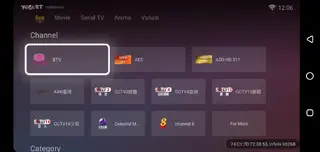
The Live section is one of the core parts of Yogurt TV. It includes a wide range of IPTV channels grouped into themed lists. Categories such as Indonesian news, local TV, movies, sports, kids, and international channels make it easier to find a suitable broadcast without scrolling through a long, mixed list.
Within each category, channels are usually labeled by name and sometimes by region, helping users identify local and foreign stations quickly. This layout is especially useful for viewers who regularly switch between news, entertainment, and kids content throughout the day.
Movies, serial TV, and drama catalog
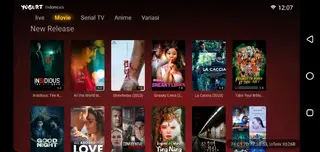
The Movies section focuses on feature films from multiple industries, including Indonesian cinema, Hollywood, and Bollywood. Users can browse new releases alongside older titles, with the library updated regularly to keep the lineup fresh.
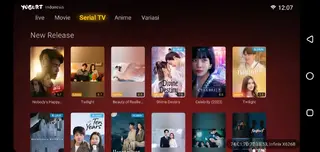
The Serial TV section targets drama fans, especially those who follow Indonesian series and popular international shows. Episodes are grouped under their respective titles, so you can continue from where you left off without searching for every part individually.
Anime streaming for mobile viewers
Anime fans get a dedicated category that highlights animated films and series from Japan, China, Korea, and other regions. This structure separates anime content from general movies and dramas, making it easier to focus on your preferred style of animation.
Because playback uses the same built-in player and server options as other sections, anime episodes generally open with familiar controls, which simplifies seeking, pausing, or switching streams while you watch on mobile networks or Wi-Fi.
Interface, player controls, and usability
Yogurt TV presents a straightforward interface built around clear tabs and categories. Even first-time users can usually find the main content sections quickly. The built-in video player includes basic playback controls such as play, pause, seeking, and volume adjustments, and it is optimized to work directly with the app’s IPTV and video links.
Multiple servers per video or channel can be available, giving you options if one route is slow or unstable. Combined with the simple layout and lack of mandatory registration, this design helps keep the overall experience accessible for users with varying levels of technical familiarity.
FAQs
Pros
- Combines live IPTV channels, movies, serial TV, and anime in one app
- Strong focus on Indonesian channels and entertainment with global options
- No mandatory user registration required to start watching
- Built-in media player removes the need for external video apps
- Multiple servers available for many streams to help reduce buffering
Cons
- Requires a stable internet connection because content is streamed online
- Not available on Google Play Store and must be installed via APK
- Channel and content availability can change over time
- Some streams may experience quality variations depending on server load
Conclusion
Yogurt TV offers a practical way to watch Indonesian and international live TV, movies, dramas, and anime on Android without subscriptions. If you want an all-in-one streaming app with a strong local focus and simple navigation, you can download the official Yogurt TV APK from our website and try it on your compatible device.




Comments
No approved comments yet.