

Asisten Klik
Asisten Klik is an auto clicker tool for Android that helps you automate taps, swipes, and gestures on the screen. It is useful for games, tasks, and apps that require the same actions again and again.
With its floating control panel and accessibility-based controls, you can record touch sequences or create custom scripts and let the app repeat them for you. This saves time, reduces manual effort, and keeps your actions consistent.
You know there are different kinds of services, which Android users can easily access through their devices. Usually, the processes of some apps are the same, which is why it isn’t fun to use. Auto Clicker Android tools such as Macrorify and Clickmate Pro. However, the new tool provides high-end services.
You can download the latest Asisten Klik APK directly from our website and install it on supported Android phones and tablets without needing root access.
Rate this app
App details
- App name
- Asisten Klik
- Category
- Tools
- Version
- v1.22.7
- Size
- 39.44 MB
- Requirements
- 7.0 and Above
- Package name
- com.rise.automatic.autoclicker.clicker
- Publisher
- Y.C. Studio
- Price
- Free
- Mod
- No
- Downloads
- 70,593
- Rating
- 4.8 / 5
- Rating count
- 29,670
- Play Store
- Yes
- Requires root
- No
- Offline support
- Yes
- Contains ads
- Yes
- In-app purchases
- Yes
- Updated
- Jun 2, 2026
- Age rating
- Rated for 12+
Table of contents
What is Asisten Klik App
Asisten Klik is an Android auto clicker and gesture automation app developed by Y.C. Studio. It uses the Accessibility Services API to simulate taps, swipes, long presses, and even multi-finger gestures on your screen.
The app is designed for users who repeat the same actions many times, such as gamers farming resources, users completing reward tasks, or people testing apps and interfaces. Instead of tapping manually, you set up click points, timing, and patterns, then let Asisten Klik handle the sequence.
You can either record your own gestures in real time or configure them manually with detailed parameters. Saved scripts can be reused, edited, and combined, so you build automation that fits your specific game, app, or workflow.
Why Download Asisten Klik APK from Our Website
Downloading the Asisten Klik APK directly from our website gives you quick access to the current release without searching around. The app package we list matches the official package name com.rise.automatic.autoclicker.clicker, so you can install it on compatible Android devices with confidence.
Once installed, you get a flexible auto clicker with recording, scripting, and curve swipe support, all without needing root. You stay in full control of which apps and screens it runs on, and you can pause or stop automation at any time using the floating control panel.
If you regularly grind in mobile games, complete incentive tasks, or test repetitive UI flows, having the APK on hand lets you reinstall easily and keep your preferred automation profiles ready to use.
How Asisten Klik Can Be Useful
Asisten Klik is useful whenever repetitive on-screen actions slow you down or tire your hands. In games, you can automate repeated attacks, farming cycles, or upgrade taps so you focus more on strategy and less on constant clicking.
On reward and money-making platforms, the app can help with simple, repetitive touch patterns such as next, claim, or scroll actions, as long as you follow the terms of service of each platform. It can also support basic UI testing, accessibility workflows, or any scenario where you need consistent, timed interactions.
Because it supports curve swipes, zoom gestures, and multi-point sequences, Asisten Klik goes beyond basic tapping. You can build complex macros that feel close to real use, then play them back with one tap from the floating panel.
How to Download and Install Asisten Klik APK
You can get the Asisten Klik APK directly from our website and install it on your Android device in a few steps. Make sure your device meets the minimum Android version requirement before starting.
Follow these steps to download and install:
Scroll to the download area on this page.
Tap the Asisten Klik APK download button to start downloading the file to your device.
On your phone, open Settings and enable installation from unknown sources or allow your browser/file manager to install apps.
Open your file manager, locate the downloaded APK or XAPK file, and tap it.
Confirm the installation prompts and wait for the process to complete.
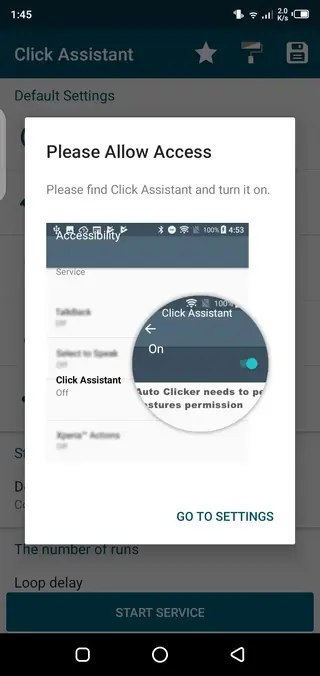
Launch Asisten Klik, grant the requested Accessibility and overlay permissions, and configure your first script.
After installation, you can update the app later by downloading the newer APK from our website and installing it over the existing version.
Features
Advanced auto clicker engine
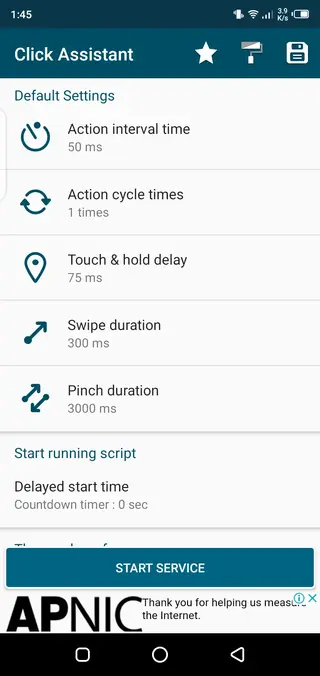
Simulate taps, long presses, and repeated clicks with precise timing controls and adjustable intervals.
Gesture recording
Record your actual taps, swipes, and zoom gestures on screen and save them as reusable scripts.
Curve swipe support
Create smooth curve swipes instead of only straight lines for more natural in-app movements.
Floating control panel
Start, pause, stop, or switch scripts from a movable on-screen panel without leaving your app or game.
Manual script editor
Add and edit click points, durations, delays, and swipe paths manually for full customization.
Multi-gesture capabilities
Support for gestures such as two-finger pinch and zoom to automate more complex interactions.
Script import and export
Load existing scripts and reuse or adjust them, so you do not need to rebuild action sequences from scratch.
Accessibility-based control
Uses Android Accessibility Services to run without root on supported devices and Android versions.
Screenshots

Permissions and Safety Considerations
Asisten Klik relies on the Accessibility Services API and draw-over-other-apps permission to function. This gives the app the ability to observe and interact with elements on your screen. You should only enable these permissions if you are comfortable with how the app works and you understand what it can access.
Avoid using auto clicker tools on screens that contain sensitive information such as passwords, banking details, or private messages. You can limit usage to specific games or apps and pause the service whenever you do not need automation.
Tips for Getting Better Results
To get the most from Asisten Klik, start with short, simple scripts and test them carefully before running long sessions. Adjust delays between clicks to match the speed of your device and the app you are automating.
Use curve swipes and pinch gestures when you need more natural movement, such as scrolling through feeds or zooming in maps. Save multiple variants of a script with different speeds, so you can quickly switch depending on network conditions or game responsiveness.
FAQs
Pros
- No root required on supported Android versions
- Flexible recording and manual script creation options
- Floating panel makes it easy to control automation in any app
- Supports taps, swipes, curve gestures, and multi-finger actions
- Useful for games, repetitive tasks, and simple testing workflows
Cons
- Requires Accessibility permissions, which some users may find sensitive
- Improper use may conflict with terms of service of certain apps or games
- Complex scripts can take time to configure correctly
- Performance can vary depending on device and Android version
Conclusion
Asisten Klik is a capable auto clicker app for Android that helps you automate taps and gestures, reduce repetitive work, and streamline routine tasks. If you often repeat the same on-screen actions, downloading the APK from our website gives you a powerful tool to customize and control your automation the way you want.




Comments
No approved comments yet.