

Macrorify
Macrorify is a powerful automation tool that records taps, swipes and actions on your Android screen, then replays them exactly as configured. It helps you handle repetitive tasks in games, apps and daily workflows with almost no manual effort.
With advanced features like image detection, text recognition and script-based control, you can build smart macros that react to what is on the screen. Everything runs directly on your device, so you stay in control of timing, frequency and behavior.
You can download the official Macrorify APK directly from our website and install it on compatible Android phones and tablets to start automating your routine actions within minutes.
If you are having any kind of difficulty using this tool, then try Asisten Klik and Clickmate Pro. These tools also provide similar services with simple usage. So, you can easily operate them and enjoy the services. Additionally, these tools are compatible with all Android smartphones.
Rate this app
App details
- App name
- Macrorify
- Category
- Tools
- Version
- v1.6.0.2
- Size
- 27.17 MB
- Requirements
- 4.4 and Above
- Package name
- com.kok_emm.mobile
- Publisher
- KoK-CODE
- Price
- Free
- Mod
- No
- Downloads
- 265,874
- Rating
- 4.4 / 5
- Rating count
- 3,654
- Play Store
- Yes
- Requires root
- No
- Offline support
- Yes
- Contains ads
- No
- In-app purchases
- Yes
- Updated
- May 12, 2026
- Age rating
- Rated for 3+
Table of contents
What is Macrorify App
Macrorify is an Android macro and auto clicker tool that lets you record and automate touch actions on your screen. You can capture taps, long presses, drags and swipes, then replay them with custom timing, loops and conditions. The goal is to save time on any task that requires the same steps again and again.
The app is useful for click-intensive mobile games, reward and earning apps, social media routines and any workflow where you repeatedly press the same buttons. Instead of manually tapping for minutes or hours, you create a macro once and let Macrorify repeat it for you.
Unlike many basic auto clickers, Macrorify also provides image detection and text recognition. These tools allow your macro to react to what appears on the screen, such as a specific button, icon or word, making the automation smarter and more reliable.
Why Download Macrorify APK from Our Website
Downloading the Macrorify APK from our website gives you direct access to the official installation file without searching across multiple pages. You get a ready-to-install package that works on supported Android versions and lets you start building macros immediately.
By installing the APK from here, you are not limited by regional restrictions or delayed updates. You can keep a backup of the installer, reinstall it whenever needed and use it on multiple compatible devices you own.
Once installed, you can explore both the free features and optional premium upgrades inside the app. This flexibility makes Macrorify a practical choice for gamers, power users and anyone who wants to automate repetitive touch actions on Android.
How Macrorify Is Useful for Android Users
Macrorify is especially helpful wherever repetitive tapping wastes your time. Idle games, gacha pulls, daily check-ins, farming sessions and in-app tasks often require hundreds of identical inputs. A well-configured macro can handle most of this work, so you can focus on more important actions.
The app also benefits users who rely on reward or earning applications that ask you to complete many similar steps. Instead of manually navigating menus and tapping through routine screens, you run a macro that performs the same safe and allowed actions on your behalf.
Image detection and text recognition increase the usefulness further. For example, you can set Macrorify to tap only when a certain icon appears, or to react after a specific word shows on the screen. This conditional behavior reduces errors and makes your automation sequences more robust in real-world scenarios.
How to Download and Install Macrorify APK
You can download the official Macrorify APK file directly from our website and install it manually on your Android device. Follow these steps to get started:
Scroll to the download section on this page.
Tap the available Macrorify APK download button.
Wait for the APK file to finish downloading to your device.
Open your device settings and allow installation from unknown or browser sources if prompted.
Locate the downloaded APK in your notifications or file manager and tap it.
Press Install and wait until the installation completes.
Launch Macrorify from your app drawer and grant the required accessibility and overlay permissions to start creating macros.
After installation, you can configure your first macro, test it on a non-critical app and then gradually apply it to your favorite games and workflows.
Features
Advanced auto clicker and macro recorder
Record taps, swipes and gestures on your screen and replay them with precise timing and control.
Customizable timing and loops
Adjust intervals, duration, delays and loop counts so each macro runs exactly as needed for your task or game.
Image detection support
Detect specific images or UI elements and trigger actions only when they appear on the screen.
Text recognition capabilities
Use OCR based text recognition to respond when particular words or phrases show up in apps or games.
Script-based automation
Create more complex behaviors using script-like controls and conditions for advanced users.
Floating control panel
Operate, pause and manage macros using an on-screen floating menu while you stay inside your apps.
Macro editing and management
Edit, copy, reorder or delete recorded steps so you can refine automation without starting from scratch.
No root required
Run powerful auto clicker and macro features on most supported Android devices without root access.
Screenshots
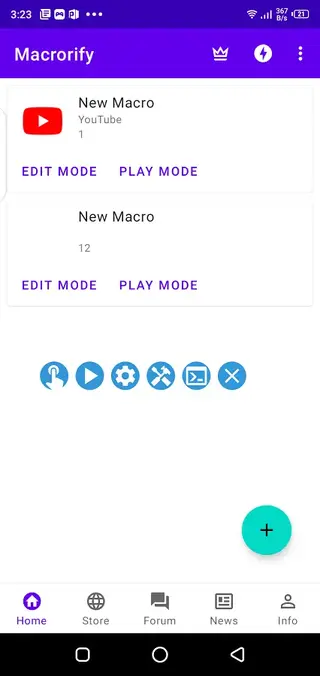
Getting Started With Your First Macro
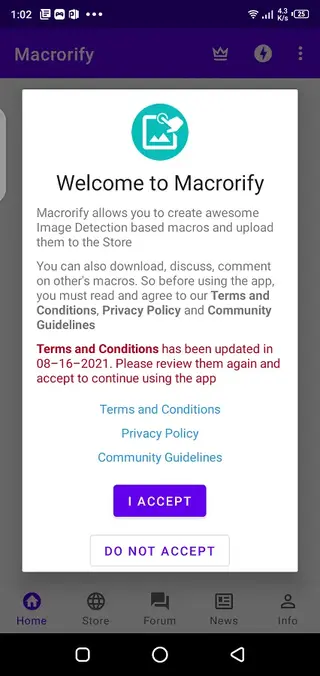
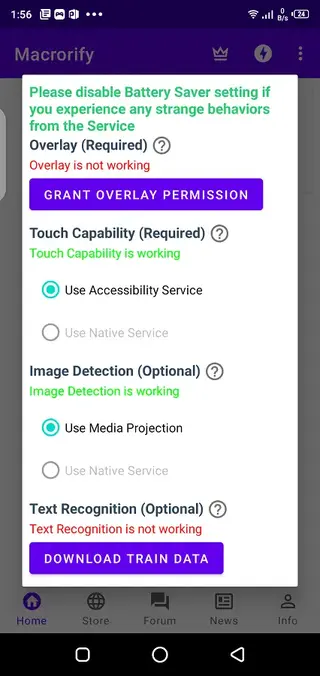
When you open Macrorify for the first time, the app will ask for accessibility and overlay permissions. These permissions are necessary so the tool can detect what is on the screen and simulate taps correctly. Once granted, you can begin recording your first macro.
Start by choosing the app or game you want to automate, open the floating panel and press the record button. Perform the sequence of taps, swipes or drags slowly and clearly. When you stop recording, Macrorify saves the macro and lets you edit delays, loop counts and other settings before you run it.
Best Practices and Safety Tips
To get consistent results, always test new macros in a safe environment before using them for long sessions. Small timing changes, loading delays or user interface updates can affect where taps land on the screen.
Avoid using any automation in ways that may break the terms of service of specific games or apps. Focus on improving comfort and productivity for allowed tasks, such as routine farming in casual titles or repetitive navigation in everyday applications.
Device Compatibility and Performance
Macrorify supports Android 4.4 and above according to the available information. Performance may vary depending on your device speed, screen resolution and system settings. On older or heavily loaded phones, you may need to increase delays between steps to keep macros stable.
If you notice missed taps or irregular behavior, adjust the timing options, reduce background apps and re-record key parts of the macro. Fine-tuning these parameters usually improves accuracy and makes your automation more reliable over time.
FAQs
Pros
- Powerful macro recording with taps and swipes
- Includes image detection and text recognition for smart automation
- No root access required on supported devices
- Highly configurable timing, loops and sequences
- Floating control panel makes it easy to start and stop macros
- Useful for many types of games and repetitive app tasks
Cons
- Learning curve for advanced scripting and conditions
- Some features are locked behind premium upgrades
- Automation behavior may vary between different apps or devices
- Requires accessibility and overlay permissions, which some users may find intrusive
Conclusion
Macrorify is a capable macro and auto clicker tool for Android users who want to reduce repetitive tapping and build smarter on-screen automation. By downloading the official APK from our website, you can install it quickly, explore the free features, and decide whether the advanced options and premium tools match your gaming habits and daily workflows.




Comments
No approved comments yet.