

BF Browser
BF Browser is a lightweight Android web browser that focuses on fast loading, multiple search engines, and simple tab management. It aims to make everyday browsing smooth even on entry-level phones.
The app combines a clean interface with built-in tools such as location switching and site unlocking, so you can reach content that may be restricted in your region. You can install the official BF Browser APK directly from our website on compatible Android devices.
If you want a straightforward browser that helps you open blocked websites, protect your IP address, and switch between several tabs easily, BF Browser offers these functions in a single free app.
There are multiple browsers, which allow users to connect with the web and share data. Each of the available browsers provides unique services for the users. Android Browsers such as Pure Browser Pro and Azka Browser are quite popular. Try all available Android Browsering mobile apps here.
Rate this app
App details
- App name
- BF Browser
- Category
- Communication
- Version
- v25.0.0
- Size
- 23.44 MB
- Requirements
- 4.0 and Above
- Package name
- com.bf.browser
- Publisher
- Panic Nitro Inc
- Price
- Free
- Mod
- No
- Downloads
- 485,328
- Rating
- 4.2 / 5
- Rating count
- 16,584
- Play Store
- Yes
- Requires root
- No
- Offline support
- No
- Contains ads
- Yes
- In-app purchases
- No
- Updated
- May 14, 2026
- Age rating
- Rated for 3+
Table of contents
What is BF Browser APK
BF Browser APK is an Android communication and web-browsing app designed to provide fast and relatively secure access to websites. It offers a familiar browser layout with a URL bar, tab switcher, and quick access menu, so new users can start browsing immediately.
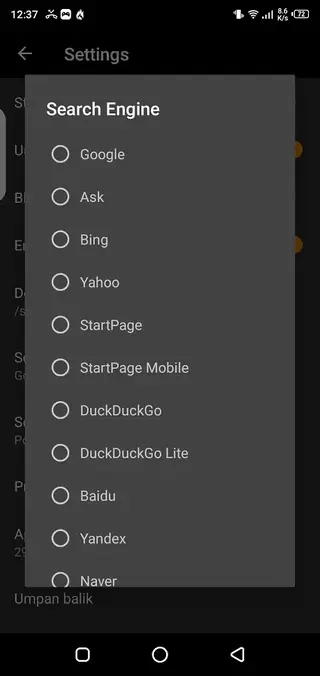
The application supports multiple search engines, lets you open several tabs at once, and includes an integrated VPN-style unlocking feature that helps you reach blocked or region-limited sites. Instead of relying on extra tools, you can handle normal browsing and simple unblocking inside the same app.
BF Browser works on Android 4.0 and above, which means it can run on many older phones and tablets. The APK available on our website matches the official package name com.bf.browser and can be installed manually if you prefer using APK files.
Why download BF Browser for Android
Many Android users want a browser that loads pages quickly, keeps the interface simple, and still offers some privacy-focused options. BF Browser targets exactly this need by combining a minimal design with built-in unlocking and IP masking features.
Instead of installing separate apps for browsing and VPN-style access, you can use BF Browser to visit regular sites and reach content that may not open in standard browsers. The tab manager and multi-engine search support make it convenient for both casual surfing and quick research.
You can download the latest BF Browser APK directly from our website, install it on your Android phone or tablet, and start using all of its tools without paying for premium upgrades.
How BF Browser is useful
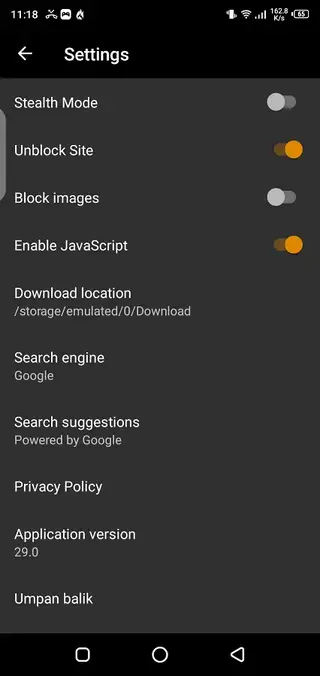
BF Browser is useful for users who often face connection errors, blocked domains, or slow loading times on their default browser. Its internal unlocking option helps you open websites that are restricted in certain locations by changing the apparent location and hiding your IP address.
The app also improves day-to-day browsing with a simple interface and efficient tab control. You can open multiple pages, move between them quickly, and close unnecessary tabs with minimal taps. This is especially handy on small screens where cluttered browsers become hard to manage.
Because it runs on older Android versions as well, BF Browser gives older devices a fresh browsing tool that feels modern but does not overload system resources.
How to download and install BF Browser APK
You can get the official BF Browser APK file directly from our website and install it on your Android device in a few simple steps.
Scroll to the download section on this page.
Tap the BF Browser APK download button provided on our website.
Wait for the APK file to finish downloading on your device.
Open your phone settings and enable installation from unknown sources if required.
Locate the downloaded APK file in your downloads folder.
Tap the file and follow the on screen prompts to complete installation.
Launch BF Browser from your app drawer and start browsing.
Whenever a newer version becomes available, you can return to our website, download the updated APK, and install it over the existing app.
Features
Fast web browsing
Loads websites quickly with a lightweight interface optimized for everyday surfing.
Multiple search engines
Includes 11 or more search engines so you can choose how you search the web.
Tab management
Lets you open, switch, and close multiple tabs using an easy tab controller.
Unlock blocked websites
Provides an unlock sites option that helps access content restricted in some regions.
Location changing tool
Offers a location change function to route traffic through different regions for access.
IP address masking
Helps hide or secure your IP address while browsing supported sites.
User friendly interface
Simple layout with clear buttons so new users can understand controls quickly.
Free to use
The app is free to download and use without mandatory premium subscriptions.
Screenshots
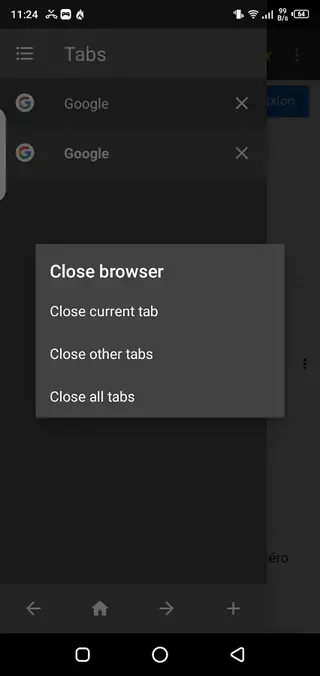
Interface and user experience
BF Browser focuses on a clean layout that keeps the screen free from unnecessary elements. The address bar sits at the top for quick URL entry, while the tab controller makes it clear how many pages you have open at any moment.
The menu button, typically shown as three dots, gives access to extra options such as site unlocking, location tools, and other settings. This structure helps users who are used to classic Android browsers switch without any learning curve.
Security and privacy considerations
BF Browser offers features such as IP masking and location change, which can improve privacy compared to very basic browsers. These tools can help obfuscate your real IP address and provide access to sites that are difficult to open from your region.
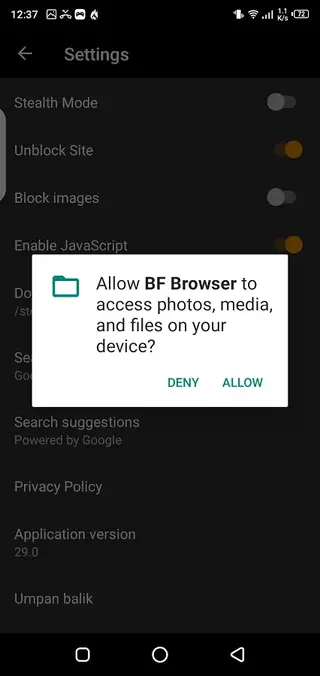
However, no browser or VPN style tool can guarantee complete protection on its own. Users should still avoid sharing sensitive data on unknown websites and review any permissions requested during installation.
Compatibility and performance
With support starting from Android 4.0 and above, BF Browser targets a wide range of phones and tablets. This includes many older devices that no longer receive updates but are still used for basic tasks.
The browsing engine is tuned for quick page loading and fluid tab switching, which can help reduce slowdowns on low memory devices. Actual performance will depend on your hardware and network connection quality.
FAQs
Pros
- Lightweight browser suitable for older Android devices
- Built in option to unlock and access blocked websites
- Supports multiple search engines for flexible searching
- Simple tab controller for managing several open pages
- Free to download and use from our website
Cons
- May display in app advertising during use
- Does not offer as many advanced settings as major browsers
- Always on VPN style use can impact speed depending on network
Conclusion
BF Browser offers a straightforward way to browse the web, open multiple tabs, and reach blocked sites from a single Android app. If you need a free, simple browser with built in unlocking tools, you can download the official BF Browser APK from our website and start using it within minutes.




Comments
No approved comments yet.