

Blue TV
Blue TV is an Android streaming app that combines live TV channels and on-demand movies in one simple interface. It focuses on IPTV-style channels alongside entertainment content.
With this app you can explore sports, news, kids, and general entertainment channels, plus a library of films and web series. The APK file for the latest version is available to download directly from our website.
Blue TV is designed for users who want a television-like experience on phones, tablets, or TV boxes without complicated setup. You install the APK, register an account, and start browsing channels and video sections right away.
Rate this app
App details
- App name
- Blue TV
- Category
- Entertainment
- Version
- v1.5.2
- Size
- 84.53 MB
- Requirements
- 5.0 and Above
- Package name
- com.bluetv.tvbox
- Publisher
- Randy NT
- Price
- Free
- Mod
- No
- Downloads
- 96,111
- Rating
- 4.7 / 5
- Rating count
- 33,701
- Play Store
- No
- Requires root
- No
- Offline support
- No
- Contains ads
- No
- In-app purchases
- No
- Updated
- May 15, 2026
- Age rating
- Rated for 12+
Table of contents
What is Blue TV APK
Blue TV APK is an IPTV and video streaming application for Android that offers live television channels, movies, series, and other programs through a single app. It is built for phones, tablets, and Android TV boxes, so you can create a TV-style experience on almost any Android device.
After installation and a short registration process, users can browse different sections that group content by type. Typical categories include sports, news, entertainment, kids, comedy, and dedicated areas for movies and web series. The aim is to make it easy to jump between live channels and on-demand titles without switching apps.
The application targets people who want quick access to a wide entertainment catalog with a simple interface. It focuses on streaming, so you watch content online instead of downloading large video files to your device.
Why download Blue TV for Android
Users download Blue TV because it brings multiple entertainment formats into one place. Instead of installing separate apps for live sports, news, movies, and series, you can access them through a unified interface that feels similar to a TV guide.
The app offers a broad mix of channels, including sports for live events, news updates, kids channels with cartoons, and general entertainment. On top of that, you get a movie and web series library, which helps cover both daily TV viewing and longer binge-watching sessions.
Another reason to choose Blue TV is its straightforward setup. You install the APK from our website, complete the built-in registration, and start streaming. The interface is clean and easy to navigate, which is especially helpful on TV boxes and for users who prefer simple menus.
How Blue TV is useful
Blue TV can be useful for anyone who relies on an Android device as a primary screen for entertainment. It turns a standard phone, tablet, or TV box into a small television with access to many channels and on-demand content.
Sports fans can follow live matches, highlights, and sports-related programs. Families can switch between children’s channels, cartoons, and comedy shows. Movie lovers can browse new releases and web series without leaving the app.
The app also supports favorites, so you can quickly open the channels and content you watch most often. This reduces time spent searching and helps create a more personal viewing experience. Combined with a simple layout and HD streaming support when available, Blue TV acts as a flexible entertainment hub on Android.
If you want to get more similar apps on your device, then we have some of the best suggestions available here. You guys can try Voir Film TV and Dark Play, both of these are quite popular movie apps for you.
How to download and install Blue TV APK
You can download the official Blue TV APK file directly from our website. We host the latest available version so you do not need to search on other platforms.
Follow these steps on your Android device:
Scroll to the download area on this page and tap the Blue TV APK download button.
Confirm the file download in your browser and wait for it to complete.
Open your device settings and enable app installs from unknown sources for your browser or file manager if it is not already allowed.
Locate the downloaded APK in your Downloads folder and tap it to start installation.
Follow the on screen prompts to finish installing Blue TV.
Open the app, complete the registration process, and start browsing live channels and movies.
Features
Live IPTV channel support
Access a large list of live television channels covering sports, news, entertainment, kids content and more directly on your Android device.
Movies and web series section
Browse a dedicated library of movies and web series so you can watch on-demand content alongside live channels in one app.
Multiple entertainment categories
Explore grouped categories such as sports, news, entertainment, cartoons, and comedy to quickly find programs that match your interests.
Favorites for quick access
Mark selected channels and programs as favorites so they appear in a separate section for faster access later.
TV style experience on mobile
Use a channel-based layout and navigation that feels similar to traditional television but adapted for phones, tablets, and TV boxes.
HD video playback support
Watch supported channels and videos in high definition when your device and connection can handle higher quality streams.
User friendly interface
Navigate a clean and simple interface designed to work with touch controls and remote controls on TV box devices.
Free registration and usage
Create an account through the app or website and access available services without recurring subscription requirements described in the original content.
Screenshots

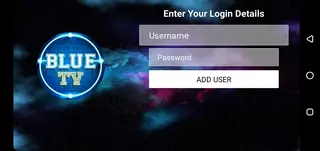
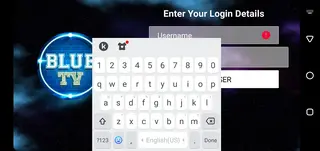
Interface and user experience
Blue TV focuses on a straightforward layout so users of all levels can manage it easily. The home screen usually presents main sections such as live TV, movies, series, and favorites. Within each section, channels or titles appear in clear grids or lists that you can scroll with touch or a remote.
This design is particularly useful on Android TV boxes, where a cluttered interface can become hard to navigate. Blue TV keeps menus simple, labels sections clearly, and offers quick access options like a favorites list, which reduces the time it takes to start watching something.
Streaming quality and performance
Streaming quality in Blue TV depends on your internet connection and the specific channel or video source. When bandwidth allows, the app aims to deliver HD playback for compatible streams, which makes it suitable for large screens as well as mobile displays.
To get consistent performance, users should connect through a stable Wi-Fi or high speed mobile network. Closing background apps and keeping the device updated can also help maintain smoother playback while using Blue TV.
Device compatibility and usage tips
Blue TV targets Android 4.2 and above, which covers a wide range of phones, tablets, and Android TV boxes. This makes it suitable for repurposing older devices as small TVs or multimedia hubs.
For the best experience on a big screen, you can install the app on a TV box or an Android TV device and control it with a remote or gamepad. On phones and tablets, using headphones or external speakers can improve audio, especially when watching sports or movies with detailed sound.
FAQs
Pros
- Combines live IPTV channels and on-demand movies in one app
- Simple interface that works well on phones, tablets, and TV boxes
- Favorites feature helps organize preferred channels and programs
- Wide variety of categories including sports, news, kids, and entertainment
- HD playback supported on compatible streams and connections
- APK file is available to download directly from our website
Cons
- Requires a stable internet connection for smooth streaming
- Content availability and channel list can change over time
- Not available on the Google Play Store
- Registration is required before using all features
Conclusion
Blue TV is a practical IPTV and streaming app for Android users who want live channels and on-demand titles inside one interface. If you watch a lot of TV on your phone, tablet, or TV box, downloading the latest Blue TV APK from our website can give you an easy way to explore sports, news, movies, and series without juggling multiple apps.




Comments
No approved comments yet.