

Clickmate
Clickmate is an Android auto clicker that records your screen actions and replays them automatically. It helps you handle repeated taps and swipes without doing everything manually.
With record and manual modes, you can capture full workflows or place tap points yourself, then let the app repeat them as many times as you need. This is useful for games, farming rewards, or automating routine tasks.
So, there are tons of different things, which you can easily access on Gloo Macro. But there are some tasks, which the user needs to perform over and over again. It includes writing your email address, playing games, and visiting a particular website or app. So, people have to go through a long process.
You can download the official Clickmate APK file directly from our website and start automating your daily screen actions on compatible Android devices.
Rate this app
App details
- App name
- Clickmate
- Category
- Tools
- Version
- v7.1.4
- Size
- 24.39 MB
- Requirements
- 7.0 and Above
- Package name
- com.inscode.autoclicker
- Publisher
- Battery Stats Saver
- Price
- Free
- Mod
- No
- Downloads
- 79,372
- Rating
- 4.7 / 5
- Rating count
- 31,841
- Play Store
- Yes
- Requires root
- No
- Offline support
- Yes
- Contains ads
- Yes
- In-app purchases
- Yes
- Updated
- May 8, 2026
- Age rating
- Rated for 3+
Table of contents
What is Clickmate APK
Clickmate is an automation tool for Android that records your touches, taps, and swipes on the screen and plays them back automatically. Instead of repeating the same actions again and again, you can let the app handle them for you.
The app provides a floating control bar that lets you start and stop recording, adjust playback speed, and manage saved scripts. You can build simple or complex sequences, from a few taps on a game to complete multi-step actions such as opening apps, scrolling, and confirming dialogs.
Clickmate works without root on most modern Android devices. It uses accessibility and screen recording permissions to detect and replay your interactions, making it more convenient and safer than many root-based auto clickers.
Why download Clickmate for Android
Downloading Clickmate on your Android device helps you save time whenever you repeat the same action over and over. Whether you are grinding in a mobile game, claiming daily rewards, or performing routine app checks, you can turn those actions into an automatic script.
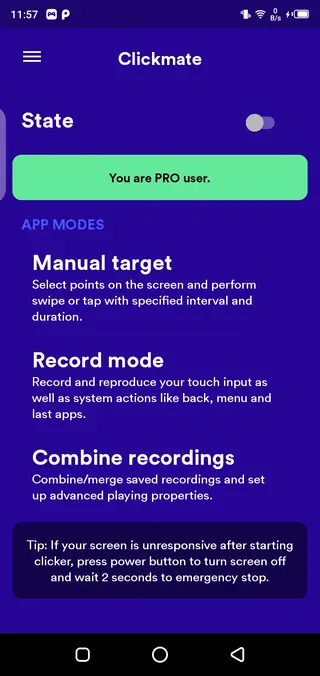
The app offers both a record mode and a manual mode, so beginners can simply record what they do, while advanced users can fine-tune tap locations, intervals, and loop counts. This flexibility makes Clickmate suitable for different use cases and skill levels.
You can get the official Clickmate APK directly from our website, install it on your device, and start creating automated tapping workflows without rooting your phone.
How Clickmate is useful
Clickmate is useful whenever repeated screen interactions waste your time or require constant attention. By recording your actions once and replaying them in loops, you can keep processes running while you focus on other tasks.
For mobile gamers, this means automated farming, auto-battles, or repeated level replays. For regular users, it can handle tasks like routine app checks, simple form inputs, or endless scrolling sessions.
The ability to customize intervals, loop counts, and tap coordinates gives you fine control over how each script behaves. You can experiment with different timings to make your automation smoother and closer to real user behavior.
How to download and install Clickmate APK
You can download the official Clickmate APK file directly from our website and install it on your Android device in a few simple steps.
Scroll to the download section on this page.
Tap the download button to get the Clickmate APK file from our server.
Wait for the download to complete on your device.
Open your device settings and enable installation from unknown sources if it is not already enabled.
Locate the downloaded APK file in your downloads folder.
Tap the file and follow the on-screen prompts to install Clickmate.
Open the app, grant the required permissions, and start creating your first automation script.
Features
No root required
Works on most Android 7.0 and above devices without root access, using standard system permissions.
Record mode
Records real-time taps, swipes, scrolls, and app transitions, then replays them as a script whenever you want.
Manual mode
Lets you manually place tap points and swipes on the screen and configure how and when they should be triggered.
Customizable intervals
Allows you to set time duration between taps and swipes, and adjust playback speed to match your needs.
Loop and repeat options
Supports repeating tasks multiple times or running scripts continuously until you stop them.
Floating control bar
Provides on-screen controls to start, pause, stop, and manage recordings while you use other apps.
Script management
Saves your recordings as separate scripts so you can reuse, rename, or modify them later.
In-app purchases for pro features
Offers optional paid features in the pro version for users who need more advanced automation options.
Screenshots
Permissions and security overview
To function properly, Clickmate needs specific system permissions such as accessibility access, overlay permission for the floating bar, and sometimes screen recording permission. These are standard for automation tools that need to observe and replay interactions.
You should review the requested permissions during installation and enable only what is necessary for your use. You can disable permissions or uninstall the app at any time through your device settings.
Tips for better automation results
For smoother automation with Clickmate, try to keep your device screen layout stable while recording and replaying scripts. Avoid moving icons or changing interface elements that the script depends on.
It is also helpful to:
Use fixed screen orientation during recording and playback.
Turn off notifications that could pop up over the area you tap.
Test scripts with shorter loops before running long sessions.
Adjust intervals if the app or game loads slower on your device.
These small adjustments can significantly improve script reliability and reduce the chance of missed taps or incorrect swipes.
FAQs
Pros
- Does not require root access on supported devices
- Record mode makes automation easy for beginners
- Manual mode offers precise control over tap positions and intervals
- Supports loops and repeated tasks for long sessions
- Floating bar allows quick control while using other apps
Cons
- Contains ads in the free version
- Some advanced features require in-app purchases
- May not work perfectly with every game or app due to protection mechanisms
- Requires accessibility permissions, which some users may find sensitive
Conclusion
Clickmate is a practical Android auto clicker that helps you automate repeated taps and swipes through simple recording and manual configuration. You can download the official APK from our website, install it on a supported device, and quickly turn repetitive screen actions into reusable scripts.




Comments
No approved comments yet.