

Cuaca
Cuaca APK is a dedicated weather app for Android that delivers real-time forecasts based on your current GPS location. It focuses on clear, accurate information so you can see what is happening in the sky right now and in the coming days.
With Cuaca, you can quickly check temperature, rainfall chances, wind speed, humidity, and pressure in a simple dashboard and widget. The basic version is free to use, and you can download the official APK file for Android devices directly from our website.
The app supports multiple languages, different units, and customizable themes, which makes it suitable for everyday planning as well as long trips. Whether you commute daily or travel often, Cuaca helps you prepare for changing weather conditions in time.
Rate this app
App details
- App name
- Cuaca
- Category
- Weather
- Version
- v12.8
- Size
- 13.13 MB
- Requirements
- 4.1 and Above
- Package name
- cuaca.app
- Publisher
- TOH Talent Team
- Price
- Free
- Mod
- No
- Downloads
- 91,625
- Rating
- 4.3 / 5
- Rating count
- 5,161
- Play Store
- No
- Requires root
- No
- Offline support
- No
- Contains ads
- Yes
- In-app purchases
- Yes
- Updated
- Jun 3, 2026
- Age rating
- Rated for 3+
Table of contents
What is Cuaca APK?
Cuaca APK is a mobile weather application for Android phones and tablets that provides live weather updates using your device’s GPS and internet connection. Instead of relying on static or outdated data, it refreshes the forecast according to your current location whenever you open the app.
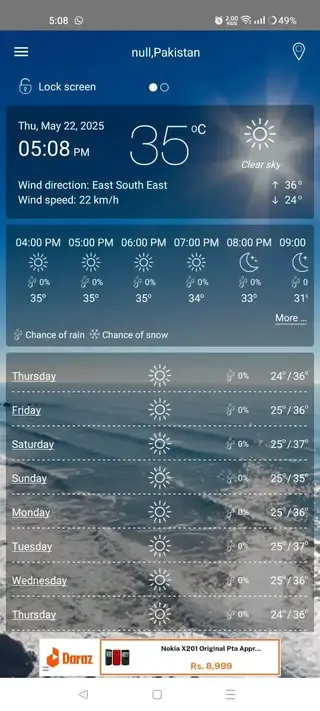
The app focuses on delivering essential weather details such as current temperature, feels-like temperature, humidity, wind speed, rainfall probability, and air pressure. It also offers short-term and weekly forecasts so you can plan ahead for work, travel, or outdoor activities.
Cuaca is free to download and use, and it includes optional premium features that you can unlock through in-app purchases. The interface is designed to be simple and intuitive, so even first-time users can read and understand the weather information without confusion.
The app finds your location through GPS and uses your internet connection to provide real-time weather updates. It works quickly and accurately, and you only need to give permissions once. It also shows the weekly forecast based on your location. If you are looking for an alternative to this application, check Mosam.
Why download Cuaca for Android?
Many Android devices come with a built-in weather widget, but these tools do not always update location correctly or refresh data often enough. Cuaca focuses on real-time data tied to your exact GPS position, which can make a noticeable difference when conditions change quickly.
If you travel frequently, commute long distances, or depend on outdoor plans, Cuaca helps you decide when to leave home, what to wear, and whether to reschedule events. You see upcoming rain, temperature shifts, and wind changes in one place, instead of checking multiple sources.
You can download the latest official Cuaca APK directly from our website, install it on your Android device, and start using it immediately without needing any complex setup. This makes it a practical choice for users who want a focused, lightweight weather app.
How Cuaca is useful in daily life?
Cuaca is useful whenever weather conditions affect your routine. It helps you check if rain is expected before a commute, see if wind will be strong during outdoor work, or verify temperature swings that may impact health or comfort.
For travelers, the weekly forecast view supports better trip planning. You can look at expected conditions for the coming days, adjust your itinerary, and pack clothing and gear accordingly. The widget keeps information visible on your home screen, so you do not need to open the app every time.
Because Cuaca supports multiple languages and measurement units, users from different regions can set it up in a familiar format. This combination of clarity, localization, and real-time data makes it a practical weather companion for both casual and power users.
How to download and install Cuaca APK?
You can get the official Cuaca APK file directly from our website and install it on any compatible Android phone or tablet. Make sure your device runs Android 4.1 or higher before you start.
Follow these steps to download and install Cuaca APK:
Scroll to the download area on this page and tap the Cuaca APK download button.
Wait a few moments until the APK file finishes downloading to your device.
Open your phone’s settings and enable installation from unknown or external sources if it is disabled.
Locate the downloaded APK file in your downloads folder and tap it.
Review the required permissions, then tap Install and wait for the process to complete.
Open Cuaca from your app drawer, grant location permission, and start checking live weather updates.
Once installed, you can update to newer versions by downloading the latest Cuaca APK from our website and installing it over the existing app.
Features
Real-time GPS-based forecasts
Cuaca updates weather data based on your current GPS location every time you open the app, helping you see conditions where you actually are.
Detailed current conditions
View temperature, feels-like temperature, humidity, wind speed, rain probability, and air pressure on a single, easy-to-read screen.
Short-term and weekly outlook
Check upcoming hours and the weekly forecast to plan commutes, outdoor events, and longer trips with more confidence.
Home screen weather widget
Add a widget to your Android home screen to see live weather information without opening the app each time.
Multiple display formats
Switch between different ways of viewing data, including charts or simple text, depending on what you find easiest to read.
Language support
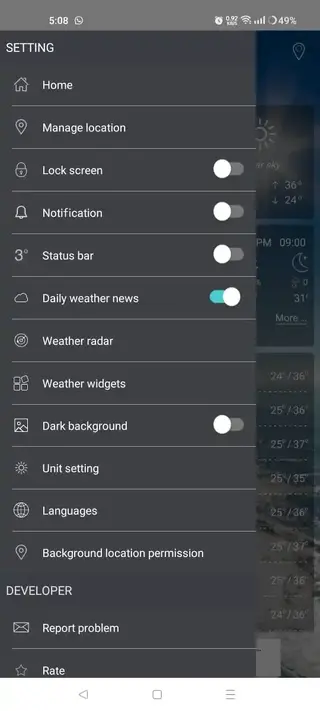
Use Cuaca in several supported languages and change the language quickly from the in-app settings menu.
Customizable themes
Adjust appearance with different theme modes to match your preferences or improve readability in bright or dark environments.
Metric and imperial units
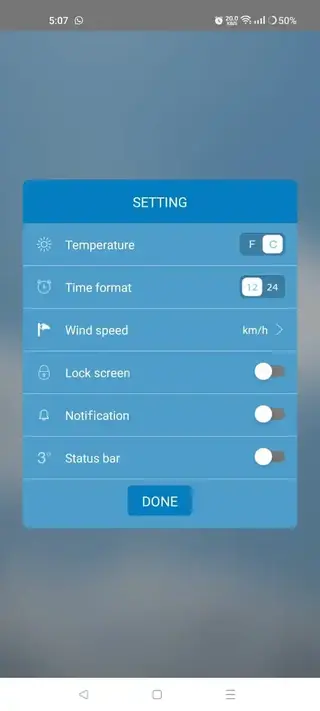
Choose between Celsius or Fahrenheit, and metric or imperial wind and distance units, according to your region.
Screenshots

System requirements and compatibility
Cuaca is designed for a wide range of Android phones and tablets. The APK shared on our website targets devices running Android 4.1 and above, which covers many older and newer models. Performance may vary depending on your hardware, GPS quality, and network speed, but the app remains lightweight enough for everyday use.
Because Cuaca depends on GPS and network access, you should keep location services and mobile data or Wi-Fi enabled to receive accurate, timely updates. You do not need root access or any special modifications to install or run the app.
Tips for getting more accurate weather data
To get the best results from Cuaca, allow the app to access your precise location and keep your GPS turned on when checking the forecast. This helps the app match your position with the nearest available weather data sources.
It is also useful to open the app shortly before you leave for work, school, or a trip, so the information is freshly updated. If you move to a different city or region, open Cuaca again to refresh the data based on your new location. Adjusting units and language in settings can also make the information easier to understand at a glance.
FAQs
Pros
- Real-time forecasts based on precise GPS location
- Simple and easy-to-read user interface
- Includes a home screen widget for quick weather checks
- Supports multiple languages and measurement units
- Free to download and use with optional premium features
- Works on older Android versions starting from 4.1
Cons
- Needs an active internet connection to update data
- May show ads in the free version
- Location accuracy depends on device GPS performance
Conclusion
Cuaca APK is a focused weather app that combines real-time GPS-based forecasts with a clear interface, widget support, and localization options. By downloading the official APK from our website, Android users can quickly install the app, monitor changing conditions, and plan daily routines or trips with more confidence.




Comments
No approved comments yet.