

Drama Wave
Drama Wave is a short-form drama streaming app for Android where you can watch bite-sized episodes in HD. It focuses on fast, emotional stories that fit into coffee breaks, commutes, or late-night binge sessions.
The app offers mini-dramas from different regions and genres, with multilingual subtitles and language options. You can stream online or save selected episodes for offline viewing directly on your device.
On our website, you can download the latest Drama Wave APK version for compatible Android phones and tablets and install it manually without needing any extra tools.
Rate this app
App details
- App name
- Drama Wave
- Category
- Entertainment
- Version
- v1.8.50
- Size
- 67.16 MB
- Requirements
- 5.0 and Above
- Package name
- com.dramawave.app
- Publisher
- SKYWORK AI PTE.LTD.
- Price
- Free
- Mod
- No
- Downloads
- 4,918,420
- Rating
- 4.4 / 5
- Rating count
- 498,172
- Play Store
- Yes
- Requires root
- No
- Offline support
- Yes
- Contains ads
- Yes
- In-app purchases
- Yes
- Updated
- Jun 3, 2026
- Age rating
- Rated for 3+
Table of contents
What is Drama Wave APK?
Drama Wave is a mobile streaming application for Android that delivers short, movie-style drama episodes instead of long traditional series. Most episodes run between 1 and 5 minutes, so you can complete a full storyline or several parts in a single sitting.
The app focuses on emotional, easy-to-follow plots that you can watch whenever you have a few spare minutes. It includes mini-dramas from different eras and regions, presented in multiple languages and supported by subtitles such as English, Spanish, French, German, Japanese, and Korean.
Drama Wave runs on Android phones and tablets, including many lower-spec devices, because it is relatively lightweight. You can browse by genre, use the built-in search to find specific titles, and manage your viewing list inside a simple, user-friendly interface.
The APK file for Drama Wave is available on our website, so you can download and install the official app build directly onto your Android device.
Why Download Drama Wave for Android?
Drama Wave appeals to viewers who enjoy drama but do not always have time for hour-long episodes. Its catalog is built around quick, engaging stories that you can watch on the go, before bed, or during any short break.
By downloading Drama Wave APK from our website, you get direct access to its latest available Android version without waiting for store rollouts. Once installed, you can explore a global library of mini-dramas, stream them in HD, and use subtitles to follow content in different languages.
The app does not force subscriptions for basic use, and you can combine online streaming with selective offline downloads, which makes it suitable for users with limited or unstable internet connections.
The good thing about DramaWave is that it supports subtitles in English, Spanish, French, German, Japanese, and Korean, opening it up to a global audience. All these features are totally free to use, and it doesn’t require any subscription or sign-up. The app is a bit like the popular apps aDrama & IcDrama.
How Drama Wave Can Be Useful?
Drama Wave is useful for anyone who wants entertainment that fits a busy lifestyle. Instead of planning around long episodes, you can finish several complete stories during a commute, lunch break, or while waiting in a queue.
Its multilingual support and subtitle options make the app accessible for viewers from different countries who want to explore foreign dramas without language barriers. You can discover shows across romance, action, thriller, horror, and more in one place.
The ability to adjust video quality helps you balance picture clarity and data usage. When you have a strong connection, you can watch in higher resolution, and when your network is weaker, you can lower the quality for smoother playback.
Offline downloads add another practical benefit. You can save selected episodes when you have Wi-Fi and watch them later without using mobile data, which is ideal for travel or areas with poor connectivity.
How to Download and Install Drama Wave APK?
You can get the latest Drama Wave APK directly from our website and install it manually on your Android device. Follow these steps to complete the process smoothly:
Scroll to the download section on this page and tap the Drama Wave APK download button.
Wait while the APK file finishes downloading to your phone or tablet.
Open your device's settings and enable installation from unknown sources or allow your browser/file manager to install apps.
Locate the downloaded APK file in your Downloads folder and tap it.
Review the on-screen prompts and tap Install.
After installation completes, open Drama Wave from your app drawer and start exploring the drama library.
If you update from an older version, install the new APK over the existing app so your basic data is more likely to remain intact, as long as the app supports this. For the latest available build, always return to our website and use the current download link provided on this page.
Features
Short drama-style episodes
Focuses on mini-dramas and short episodes, usually a few minutes long, so you can finish stories quickly.
Global drama library
Offers a wide range of short dramas from different regions and eras across multiple genres.
HD streaming support
Provides high-quality video playback with options to adjust resolution up to around 1080p depending on the content.
Subtitle availability
Includes subtitle support in languages such as English, Spanish, French, German, Japanese, and Korean for many titles.
Multilingual app interface
Allows you to switch the app interface language, including options like English, Filipino, Hindi, Korean, Turkish, and others.
Offline download option
Lets you download selected episodes or series parts so you can watch them later without an internet connection.
Genre-based organization
Categories content by genres like romance, action, horror, and drama to help you quickly find the type of stories you like.
Integrated search function
Provides a search bar to look up specific dramas, actors, or titles inside the app.
Screenshots
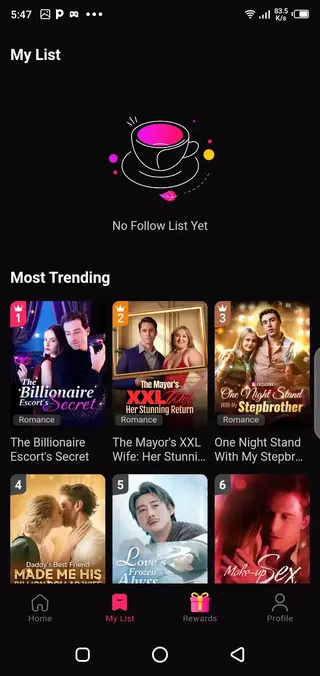
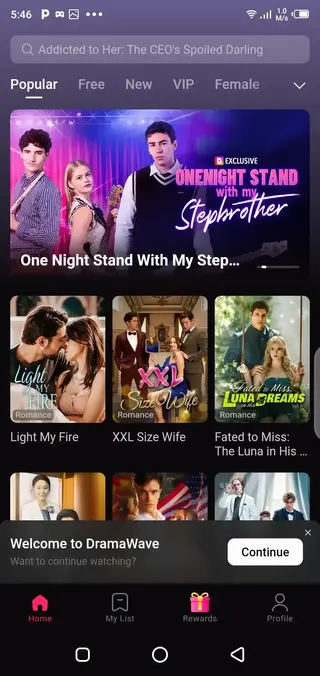
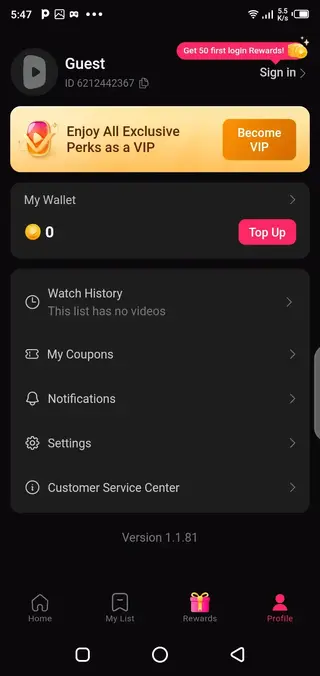
Streaming Quality and Performance
Drama Wave is designed to provide smooth playback on a wide range of Android devices. Within the player, you can usually adjust resolution, which helps you manage data usage and performance based on your connection.
On stronger networks, higher resolutions offer sharper images and clearer details, while lower settings can reduce buffering when you are on slower or unstable connections. Using headphones can also improve the audio experience when watching in noisy environments.
Content Variety and Genres
The app groups its mini-dramas into different categories, making it easier to discover stories that match your taste. Whether you prefer romance, suspense, light comedy, or darker thriller themes, you can browse by genre instead of scrolling through a mixed feed.
Because episodes are short, you can sample several shows quickly and decide which ones you want to follow. This structure is particularly helpful if you enjoy exploring new storytelling styles or international content without committing to long seasons.
Tips for Using Drama Wave Effectively
To get more value from Drama Wave, start by exploring the categories that match your mood and add a few promising titles to your viewing list. When you have access to Wi-Fi, set the quality higher and download episodes you plan to watch later.
If your device storage is limited, manage your offline downloads regularly by removing episodes you have already finished. Adjust language and subtitle settings early on so that every new video opens with your preferred options.
FAQs
Pros
- Short episodes are ideal for busy users who want quick entertainment
- Large collection of mini-dramas across multiple genres and regions
- Supports multilingual subtitles and interface languages for global audiences
- HD streaming with adjustable quality helps manage data and performance
- Offline download feature allows watching without an internet connection
- Simple, user-friendly layout makes navigation easy for new users
Cons
- Requires a stable internet connection for smooth HD streaming when not using offline downloads
- Content library focuses on short-form dramas, which may not suit fans of long, detailed series
- Contains advertising and possible in-app purchases, which some users may find distracting
Conclusion
Drama Wave provides a focused space for short, emotional drama episodes that fit into any schedule. With multilingual support, HD playback, and offline downloads, it offers a flexible way to enjoy global mini-dramas on Android. You can download the latest available Drama Wave APK directly from our website and start watching within minutes.




Comments
No approved comments yet.