

Fishing PT
Fishing PT is an auto clicker tool designed to automate fishing in the popular Play Together game on Android. It helps you repeat the same touch actions accurately so you can keep catching fish with less manual effort.
With a floating control panel, recording options, and customizable touch points, the app lets you set up a simple script and then sit back while it handles the repetitive taps for you.
You can download the official Fishing PT APK directly from our website and install it on compatible Android phones and tablets to streamline your fishing sessions in Play Together.
Rate this app
App details
- App name
- Fishing PT
- Category
- Tools
- Version
- v3.1
- Size
- 50.22 MB
- Requirements
- 5.0 and Above
- Package name
- com.miniaimer.fishingpt
- Publisher
- Mini Aimer
- Price
- Free
- Mod
- No
- Downloads
- 165,663
- Rating
- 4.4 / 5
- Rating count
- 12,347
- Play Store
- No
- Requires root
- No
- Offline support
- Yes
- Contains ads
- Yes
- In-app purchases
- No
- Updated
- May 11, 2026
- Age rating
- Rated for 3+
Table of contents
What is Fishing PT APK
Fishing PT is an Android auto clicker developed by Mini Aimer. It focuses on helping Play Together players automate the fishing minigame by repeating taps at the right spots on the screen. Instead of manually casting, reeling, and confirming every catch, you can configure the app to do these actions for you.
The tool works through a floating icon that appears over your game. You set the touch locations and timing once, and Fishing PT keeps repeating them according to your configuration. This makes repetitive in-game tasks smoother and reduces the effort needed to keep fishing for long periods.
Although it is popular among Play Together users, Fishing PT is a general-purpose auto clicker and can technically be used with other apps or games that require simple, repeated taps. It is a tool which works in a way as Macrorify and Food Fighter Clicker do.
Why download Fishing PT for Android
Players download Fishing PT to save time and effort while fishing in Play Together. The fishing mode requires repeating the same taps again and again, which quickly becomes tiring. With this tool, you can automate most of that routine and focus more on enjoying the game itself.
The app offers a straightforward interface, simple setup and a floating control button that is easy to access while you play. Once you have configured the touch points, the tool can keep running in the background and handle the actions for you.
Another reason to choose Fishing PT is that you can get the APK file directly from our website. This makes it convenient to install or reinstall the latest available version whenever you need it.
How Fishing PT is useful for Play Together players
Fishing PT is especially useful for players who spend a lot of time in the fishing minigame to earn coins and rewards. The tool reduces the physical tapping you need to do and helps maintain a steady fishing rhythm without constant manual input.
By recording taps and placing them accurately on the floating overlay, you can create a basic pattern that repeats casting and reeling. This can help you catch more fish in longer sessions and makes grinding less tiring on your hands.
The user-friendly design also makes it easier for new users to get started. You can enable the necessary permissions, place the overlay buttons, and quickly test your automation until it works smoothly with Play Together on your device.
How to download and install Fishing PT APK
You can get the official Fishing PT APK file directly from our website. Follow these steps to download and install it on your Android device:
Scroll to the download area on this page and tap the Fishing PT APK download button.
Wait for your browser to finish downloading the APK file to your device.
Open your phone settings and enable installation from unknown sources for your browser or file manager if it is not already enabled.
Locate the downloaded APK in your Downloads folder and tap it to start the installation.
Follow the on screen prompts to complete the installation of Fishing PT.
After installation, open the app, grant the requested accessibility and overlay permissions and then configure the auto clicker for Play Together.
Features
Auto clicker for Play Together fishing
Provides automated tapping sequences to handle repetitive fishing actions in the Play Together game.
Floating control icon
Displays a movable floating icon on the screen so you can start, pause or adjust auto clicking while the game is open.
Customizable tap locations
Lets you set exact touch points on the screen to match casting, reeling and confirmation buttons inside the game.
Screen recording based setup
Allows you to record or configure actions visually, making it easier to align click positions with in game controls.
Simple configuration process
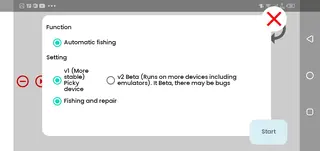
Offers a straightforward setup flow where you enable the service, adjust options and begin auto clicking in a few steps.
User friendly interface
Uses a clean and minimal interface so beginners can understand and use the auto clicker without complex menus.
Free to use
Available as a free application, so you can automate fishing without any upfront payment.
Ad free experience
The provided description indicates that the app does not display ads during use.
Screenshots
How to set up Fishing PT with Play Together
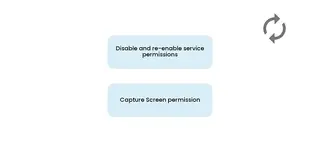
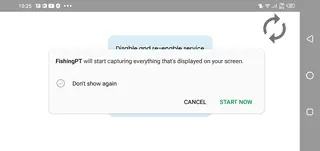
After installing Fishing PT, you need to complete a short setup before it can control your taps in Play Together. This involves granting accessibility and overlay permissions so the app can display its floating icon over other apps and perform taps on your behalf.
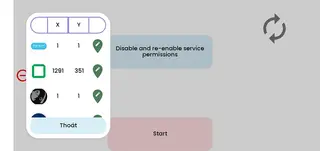
Once permissions are granted, open Fishing PT and activate the service. Launch Play Together, go to your preferred fishing spot and bring up the floating icon. From there you can place the tap points on the casting, reeling and confirmation buttons that appear on your screen.
Adjust the delay and repetition settings until the sequence matches the timing of the fishing minigame. Test the automation with a few casts, fine tune any positions if needed and then let the script run for longer sessions when you are satisfied with the results.
Safety and fair play considerations
Automation tools like Fishing PT can change the way you interact with games. Before using it extensively, review the terms of service and fair play rules of Play Together or any other game you plan to automate. Some games may restrict or discourage the use of auto clickers.
Use the tool responsibly and avoid configurations that negatively impact other players. It is also a good idea to keep your app and device updated, and to recheck your settings after major game updates, as button layouts or timings may change.
Tips for better performance
To get more consistent results from Fishing PT, try to keep your device brightness, resolution and orientation the same whenever you fish. Large changes in display settings or interface scale can affect your saved tap positions.
If you switch devices or change screen size, take a few minutes to recalibrate the tap points in the floating overlay. You can also test shorter sequences first, then gradually increase the duration once you are confident that the app is tapping in the right places every time.
FAQs
Pros
- Specialized auto clicker for fishing in Play Together
- Floating overlay controls make it easy to use while gaming
- Customizable tap positions and timing for better accuracy
- Simple interface that is suitable for beginners
- Available as a free download from our website
- Designed to work without root access
Cons
- Automation tools may violate terms of service in some games
- Requires careful setup to avoid misaligned clicks
- May not perform the same on all devices or screen sizes
- Primarily useful only for repetitive tap based tasks like fishing
Conclusion
Fishing PT is a focused auto clicker tool for Android that helps Play Together players automate repetitive fishing actions. If you often grind the fishing minigame and want a simpler, hands free way to keep catching fish, you can download the APK from our website and configure it to match your play style.




Comments
No approved comments yet.