

ForkPlayer
ForkPlayer is a free Android entertainment app that aggregates online video, TV streams, playlists, and music in one simple interface. It is especially popular for accessing FXML playlists and online media libraries from different sources.
With ForkPlayer you can browse, search, and play movies, series, live streams, and radio stations without switching between multiple apps. The app includes its own media player and playlist tools to make streaming more convenient on phones, tablets, and compatible Android TV devices.
You can download the official ForkPlayer APK directly from our website, install it on your Android device, and start exploring playlists, online channels, and multimedia collections in just a few minutes.
Rate this app
App details
- App name
- ForkPlayer
- Category
- Entertainment
- Version
- v2.06.9
- Size
- 20.61 MB
- Requirements
- 4.4 and Up
- Package name
- aforkplayer.aforkplayer
- Publisher
- AFORKPLAYER
- Price
- Free
- Mod
- No
- Downloads
- 100,042
- Rating
- 4.5 / 5
- Rating count
- 25,000
- Play Store
- No
- Requires root
- No
- Offline support
- No
- Contains ads
- No
- In-app purchases
- No
- Updated
- May 22, 2026
- Age rating
- Rated for 3+
Table of contents
What is ForkPlayer APK
ForkPlayer is a third-party Android entertainment application designed to work as a media browser and player for online content. It focuses on reading and playing FXML playlists, which can include links to movies, TV shows, live broadcasts, video hosting sites, and online radio stations.
Instead of visiting each platform separately, ForkPlayer offers a single interface where you can open playlists, explore categories, and start playback with the built-in media player. The app is widely used on Smart TV platforms, set-top boxes, and Android devices for streaming content from various online sources.
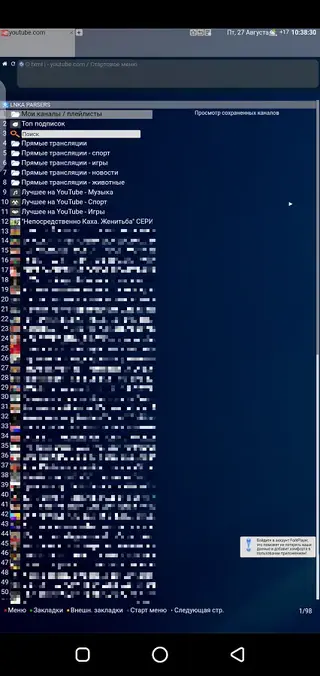
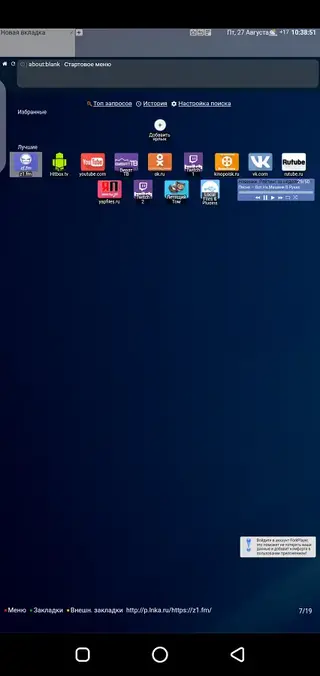
The Android version of ForkPlayer keeps the same idea: provide quick access to multimedia libraries, online channels, and user-created playlists. The interface is simple and functional, although most menus and descriptions are primarily available in Russian, which is important to know before installing.
More TV And Movies Streaming Apps to consider. Don’t forget to download additional apps like elMubashir IPTV and Bongngo TV.
Why Download ForkPlayer for Android
ForkPlayer is attractive for users who want one place to manage online playlists and streams. If you regularly watch movies, series, or live channels through FXML playlists, the app helps you organize and play that content on your Android phone, tablet, or TV box.
Because the application integrates a browser-like environment and a media player, you can navigate between sources, change playlists, and control playback without leaving the app. It supports video and audio content, online radio, and basic live streaming links, which makes it a flexible choice for people who like to experiment with different entertainment sources.
Another reason to download ForkPlayer is that the APK is available directly from our website. You do not need to search multiple sites or rely on app stores that do not list this type of application. You can get the current version here, install it manually, and start using its playlist features right away.
How ForkPlayer Can Be Useful
ForkPlayer can be useful if you already use FXML playlists or similar lists of media links. Instead of copying links into different apps, you can open them inside ForkPlayer and use one interface for browsing, searching, and playback.
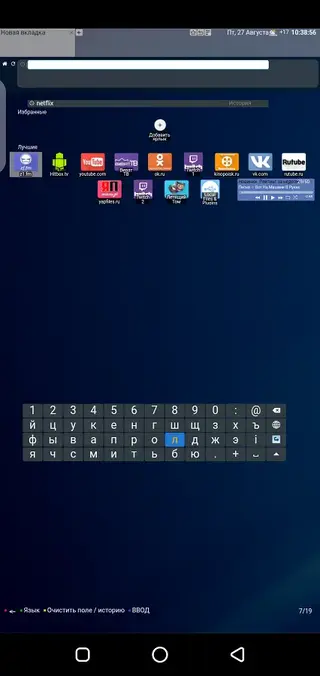
The application includes a convenient search function that helps you find content inside supported playlists and resources. Built-in video and audio players allow you to watch or listen without additional tools, while support for external players gives you flexibility if you prefer another player app.
For users with Android TV or TV boxes, ForkPlayer can help turn a screen into a basic media hub. You can explore online libraries, watch simple programs, and listen to background music or radio while doing other tasks. The interface is lightweight and focused on content lists, so once you understand the layout and Russian labels, daily use is straightforward.
How to Download and Install ForkPlayer APK
You can get the official ForkPlayer APK directly from our website. Follow these steps to download and install it on your Android device:
Scroll to the download area on this page and tap the APK download button for ForkPlayer.
Wait until the APK file finishes downloading to your phone or tablet.
On Android, open Settings and enable installation from unknown sources or allow your browser/files app to install unknown apps.
Open your file manager, find the downloaded ForkPlayer APK, and tap it to start the installation.
Confirm the prompts on screen and wait until the installation completes.
Launch ForkPlayer from your app drawer and start configuring your playlists and playback options.
Whenever a newer version becomes available, you can return to our website, download the updated APK, and install it over the existing app to keep your ForkPlayer up to date.
Features
Single hub for online entertainment
Access movies, series, live streams, and music from various online sources inside one application instead of switching between multiple apps.
FXML playlist support
Open and view FXML playlists to reach large collections of links to films, shows, music, and other multimedia content.
Built in video and audio player
Play video and audio directly inside ForkPlayer without needing a separate media player for basic playback tasks.
Background audio playback
Listen to music or radio stations in the background while you use other apps or work on your device.
Search and navigation tools
Use a convenient search system and structured menus to find streams, programs, and playlists more quickly.
Online streaming focused
Watch multimedia content online, including live broadcasts and on demand videos from supported resources and playlists.
External player support
Optionally open streams in external media players if you prefer different codecs, interfaces, or advanced playback controls.
User friendly interface
Simple and focused layout oriented around lists and playlists, designed to make navigation quick once you learn the menu structure.
Screenshots
System requirements and compatibility
ForkPlayer is built for Android devices running version 4.4 and above. This covers a wide range of smartphones, tablets, and Android TV boxes, including many older models.
The app focuses on online streaming, so performance depends on your internet connection as well as your hardware. A stable Wi-Fi or mobile data connection is recommended for smooth playback, especially for high-resolution video streams.
Interface and user experience
The ForkPlayer interface is structured around lists and categories. You primarily navigate through menus that display playlists, channels, and content groups. It does not try to look like a modern streaming service, but instead prioritizes functionality and speed.
Because the app is mostly in Russian, there is a learning curve for non-Russian speakers. However, once you understand the basic menu layout, browsing playlists, launching streams, and controlling playback becomes more intuitive.
Playback controls and options
ForkPlayer offers standard playback controls such as play, pause, seek, and volume adjustment. Depending on the stream, you may be able to change quality or switch to an external player for additional options.
For audio content and radio streams, you can let playback run in the background and continue using your device. This makes the app suitable for listening to music or talk stations while working or browsing.
FAQs
Pros
- Combines playlists, video, TV and music in one app
- Supports FXML playlists for flexible online streaming
- Includes built in video and audio player
- Background audio playback is supported
- Convenient search and navigation tools
- Works on phones, tablets and many Android TV boxes
Cons
- Requires constant internet connection for most content
- Interface is mainly in Russian and may be hard to understand for some users
- Not available on Google Play Store and must be installed manually
- Content availability depends on external playlists and links
Conclusion
ForkPlayer is a practical option if you rely on online playlists and want a simple way to stream movies, shows, live channels, and music on Android. You can download the official APK from our website, install it in a few steps, and use it as a central hub for your FXML playlists and multimedia streams.




Comments
No approved comments yet.