

Game Mode
Game Mode is a game booster and focus tool that optimizes your Android device whenever you launch a game or any selected app. It helps you reduce distractions so you can concentrate fully on your gameplay.
With this app you can block or filter notifications, manage calls, control internet access for background apps, and adjust brightness automatically for each game. All settings apply instantly when you start playing.
You can download the official Game Mode APK latest version directly from our website and start creating a dedicated gaming space on your Android phone or tablet in just a few steps.
Rate this app
App details
- App name
- Game Mode
- Category
- Tools
- Version
- v2.0.5
- Size
- 15.74 MB
- Requirements
- 5.0 and Up
- Package name
- com.zappcues.gamingmode
- Publisher
- ZipoApps
- Price
- Free
- Mod
- No
- Downloads
- 200,002
- Rating
- 4.6 / 5
- Rating count
- 70,000
- Play Store
- Yes
- Requires root
- No
- Offline support
- Yes
- Contains ads
- Yes
- In-app purchases
- Yes
- Updated
- Jun 5, 2026
- Age rating
- Rated for 3+
Table of contents
What is Game Mode APK?
Game Mode APK is a personalization and utility app for Android that creates a dedicated gaming profile on your device. It lets you define how your phone should behave whenever you open a game or any selected application.
Instead of manually turning off notifications, changing brightness, or closing background apps every time you play, Game Mode applies all these adjustments automatically. You can configure rules for each game, control calls and alerts, manage network access, and keep your screen ready for smooth gameplay.
Game Mode Android is the best available mobile application developed for all available Android devices. This highly compatible application provides multiple simple ways to enjoy gaming without facing any problems. Enjoy gaming without facing problems related to unnecessary notifications, switching networks, screen recording, or anything else. Sam Helper & Legit Game Booster also provides similar game space features.
The app works on most Android devices running version 5.0 or higher and focuses on a cleaner, distraction-free gaming experience rather than risky performance tweaks. It is developed by ZipoApps and is also available on Google Play under the package name com.zappcues.gamingmode.
Why download Game Mode for Android?
Mobile games often get interrupted by calls, messages, pop-up notifications, and apps constantly using the internet in the background. Game Mode helps you control all of this from a single place, so every gaming session feels smooth and focused.
By adding your favorite games and apps into Game Mode, you can make them a priority. When you launch them, your custom settings activate automatically. This can include blocking notifications, limiting data for other apps, locking screen brightness, and keeping the screen on while you play.
Downloading Game Mode APK directly from our website lets you install the latest available version quickly and start using these tools without waiting for device-specific game space features.
How is Game Mode useful?
Game Mode is useful for anyone who wants fewer interruptions and more control while gaming or using specific apps on Android.
Cleaner gameplay: Block or filter notifications, silence calls, and hide distracting alerts while you are in a match or campaign.
Better focus: Use transparent or minimized call pop-ups, so you see who is calling without losing track of your game.
Network control: Limit internet access for non-essential apps to reduce lag caused by random background activity.
Comfortable display: Fix or auto-manage brightness for each game to protect your eyes and save battery where possible.
One-time setup: Configure profiles once and let Game Mode apply them automatically every time you play.
This combination of notification control, network management, and display tweaks makes it a practical companion for everyday gamers and heavy app users.
How to download and install Game Mode APK
You can download the official Game Mode APK file directly from our website and install it on your Android device in a few minutes. Follow these steps carefully.
Scroll to the download section on this page.
Tap the download button to get the latest Game Mode APK file from our server.
Wait until the APK finishes downloading on your device.
Open your phone settings and enable installation from unknown sources, if it is not already allowed.
Locate the downloaded APK file in your Downloads or file manager app.
Tap the file and follow the on-screen prompts to complete the installation.
Open Game Mode, grant the required permissions for notifications, overlay, and usage access, then add your games and apps.
After setup, launch any game through Game Mode or from your app drawer and your chosen profile will activate automatically.
Features
Custom game profiles
Create game-specific profiles that automatically apply your preferred settings whenever you launch a selected game or app.
Add games and apps manually
Add any installed game or application into Game Mode so that it becomes a priority and uses your custom rules.
Notification blocking
Block all notifications including calls, messages, and app alerts while gaming to avoid interruptions.
Smart call and email handling
Use transparent or minimized call and email alerts that show important information without fully interrupting gameplay.
Internet access control
Limit or disable mobile data and Wi-Fi access for selected background apps while keeping your game online.
Brightness control
Fix screen brightness for individual games or use auto-brightness controls for a comfortable viewing experience.
Focus mode for apps
Apply the same distraction-free settings to non-gaming apps such as video streaming or reading apps when needed.
Simple user interface
Navigate a clean and beginner-friendly interface with well-organized sections for notifications, network, and display options.
Screenshots

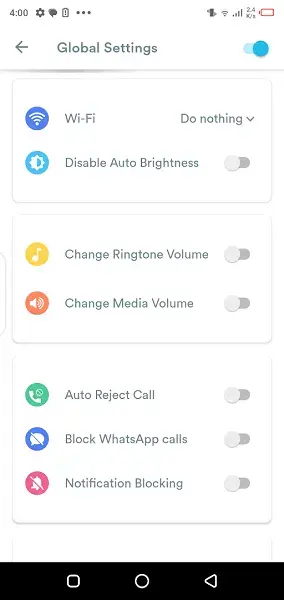
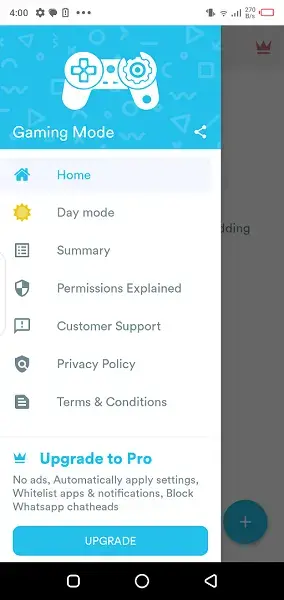
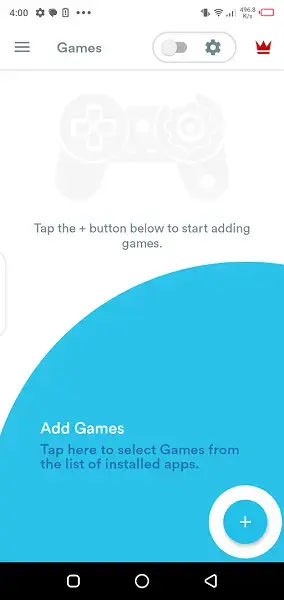
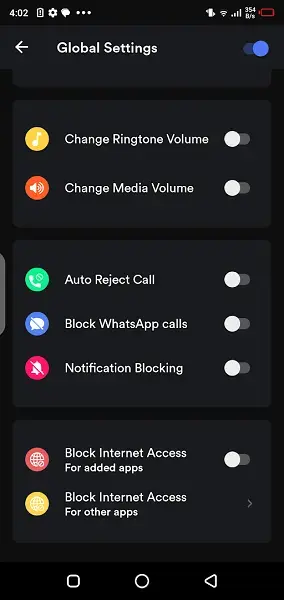

Adding games and apps to Game Mode
After installation, the first step is to add your favorite games and important apps into Game Mode. The app can scan your installed titles and suggest them, or you can select them manually.
Open Game Mode and tap the option to add apps or games.
Choose the titles you want to optimize.
Assign a profile that defines how notifications, internet, and brightness behave.
Save your settings so they apply automatically next time you launch the game.
This approach lets you use different rules for competitive shooters, casual games, or media apps depending on how much focus you need.
Configuring notification and call behavior
Notification control is one of the core features of Game Mode. You can decide whether to block everything or allow certain types of alerts while gaming.
Block all notifications for complete focus.
Allow transparent or minimized call pop-ups, so you see who is calling without a full-screen interruption.
Silence notification sounds but keep visual alerts if you still want basic awareness.
These options help you balance staying reachable with keeping your gameplay uninterrupted.
Network and brightness management
Background apps often use bandwidth and battery, which can affect online games. Game Mode lets you restrict internet access for non-essential apps while your game is active.
Limit data usage for selected apps so they do not consume bandwidth during matches.
Keep your game online while slowing or blocking traffic for others.
Fix brightness to a comfortable level or use auto-brightness controls linked to each profile.
Combined, these small changes can make gameplay feel smoother and more consistent, especially on mid-range devices.
FAQs
Pros
- Helps block or filter distracting notifications while gaming
- Allows custom profiles for individual games and apps
- Lets you control internet access for background apps
- Offers brightness and display controls linked to games
- Simple interface that is easy to configure on most devices
- Does not require root access to work
Cons
- Contains ads in the free version
- Some advanced options may require in-app purchases
- Effect on actual game performance may vary by device
- Requires multiple permissions which some users may find intrusive
Conclusion
Game Mode is a practical Android tool for gamers who want fewer distractions and more control over how their device behaves during play. With notification blocking, network limiting, and display tuning in one place, it offers a convenient way to create a focused gaming environment without needing root access.




Comments
No approved comments yet.