

Gauthmath
Gauthmath is a dedicated math problem solver app that helps students understand and practice mathematics using step by step explanations. It supports topics from basic arithmetic to advanced algebra and calculus.
By scanning a question with your camera or typing it manually, you can see detailed solutions that show how to move from one step to the next. This makes it easier to learn concepts, prepare for exams, and check homework.
You can download the official Gauthmath APK directly from our website and install it on your Android phone or tablet to start solving math problems anytime.
Rate this app
App details
- App name
- Gauthmath
- Category
- Educational
- Version
- v1.94.1
- Size
- 19.14 MB
- Requirements
- 8.0 and up
- Package name
- com.education.android.h.intelligence
- Publisher
- GauthTech Pte. Ltd
- Price
- Free
- Mod
- No
- Downloads
- 53,000
- Rating
- 4.7 / 5
- Rating count
- 20,000
- Play Store
- Yes
- Requires root
- No
- Offline support
- No
- Contains ads
- Yes
- In-app purchases
- Yes
- Updated
- May 22, 2026
- Age rating
- Rated for 3+
Table of contents
What is Gauthmath APK?
Gauthmath APK is the Android application package of the Gauthmath math learning app developed by GauthTech Pte. Ltd. It is designed to help students solve math problems and understand the logic behind each solution instead of just showing a final answer.
The app supports a wide range of topics, including arithmetic, fractions, algebra, linear and quadratic equations, functions, trigonometry, and more advanced areas covered in high school and early college. You can either scan a printed or handwritten question with the built in camera tool or enter the problem directly.
Once a question is submitted, Gauthmath analyzes it and generates a step by step explanation. In many cases, it also offers multiple solution approaches, graphs, and similar practice questions so that learners can reinforce the concept.
Gauthmath is mainly aimed at middle school, high school, and early college students, but anyone who wants extra help with math can use it. The APK file on our website gives Android users a direct way to install the official app without going through extra steps.
We have more educational applications available here for the users, which you can also try and enjoy. So, if you want to open the educational world by installing applications, then try Read Along App and Wings Ek Udaan. Both of these are quite popular apps, with amazing educational services.
Why Download Gauthmath APK from Our Website
Installing Gauthmath via the APK file gives you quick access to the full math solving experience on your Android device. You can get the official installer directly from our website and start using the app without waiting for staged rollouts or regional delays.
With the APK in hand, you can keep a backup copy of the installer and share it between your own devices when needed. This is especially useful if you often reset your phone or frequently switch between devices for study and homework.
Our download page provides the current release details such as version name, Android requirement, and file information so you know exactly what you are installing. After downloading, you can update the app again later whenever a newer APK becomes available on our site.
How Gauthmath Helps Students and Learners
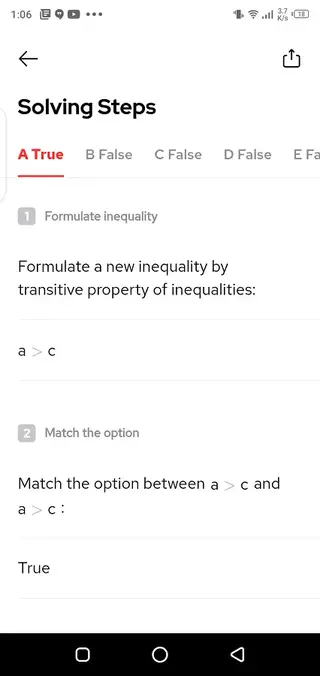
Gauthmath is useful because it focuses on learning, not just quick answers. For each supported math problem, the app breaks the solution into clear, logical steps. This helps students see which formula is used, what is substituted, and why each transformation is valid.
The camera based input is particularly helpful when you are working from textbooks, worksheets, or handwritten notes. Instead of retyping long expressions, you simply scan the question and let the app interpret it. This saves time and reduces input errors.
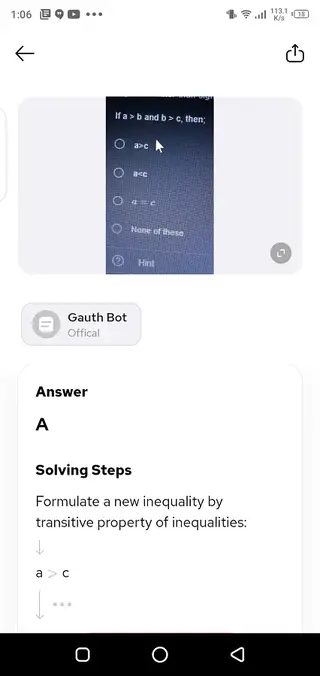
Gauthmath also supports multiple choice questions. You can capture the question along with all answer options, and the app indicates the correct choice with an explanation of why other options are wrong. This makes it valuable for test preparation and practice sessions.
Because the app covers topics from basic math to higher level algebra and calculus, learners can continue to use it as they progress through school. Used consistently, it can act as a personal study companion that reinforces classroom teaching and supports self study at home.
How to Download and Install Gauthmath APK
You can get the official Gauthmath APK directly from our website and install it on any compatible Android phone or tablet. Follow these basic steps to complete the process smoothly.
Scroll to the download area on this page and tap the APK download button for Gauthmath.
Wait for the APK file to finish downloading to your device.
Open your device settings and allow installation from your browser or file manager if prompted.
Locate the downloaded Gauthmath APK in your downloads folder and tap it.
Read the on screen information, then tap Install to begin the setup process.
After installation completes, open Gauthmath from your app drawer and follow any in app sign in or onboarding steps.
Once installed, you can update the app later by downloading the newer APK from our website and installing it over the existing version.
Features
Camera based problem scanning
Scan printed or handwritten math questions with the built in camera to get solutions without typing long expressions.
Step by step explanations
View detailed solution steps that show the full method instead of only the final answer, helping you understand each calculation.
Support for many math topics
Work with arithmetic, fractions, algebra, linear and quadratic equations, functions, trigonometry, and other school level math areas.
Multiple choice question support
Capture MCQ questions with their answer options and see which choice is correct with reasons for incorrect options.
Interactive solution process
Move through solution steps, check transitions, and review each line to learn how formulas and rules are applied.
Homework checking and verification
Use the app to check your homework answers and correct mistakes by comparing your method with the app’s solution path.
Clean and student friendly interface
Navigate easily with a simple layout that focuses on the problem, the solution area, and key tools with minimal clutter.
Personal study helper on mobile
Keep a portable math helper in your pocket to use during study sessions, revision, and exam preparation on Android.
Screenshots
Compatibility and System Requirements
Gauthmath runs on a wide range of Android phones and tablets. The APK build available on our website targets devices running Android 5.0 or higher, which covers most modern smartphones used by students.
For the best experience, it is recommended to have a stable internet connection, a working rear camera with decent focus for scanning, and enough storage for regular updates. Performance will generally be smoother on devices with more recent Android versions and sufficient RAM.
Tips for Getting Better Results with Gauthmath
To get accurate solutions, make sure your question is clear and complete before scanning. Place your worksheet or notebook on a flat surface, use good lighting, and center the equation or problem in the camera frame.
If the app misreads part of the question, you can edit the expression manually before submitting it. For word problems and complex expressions, double check that all numbers, symbols, and variables match what you see in your textbook or assignment.
After you receive a solution, spend time reading through each step instead of jumping straight to the final answer. This approach turns Gauthmath into a learning partner instead of just a shortcut.
FAQs
Pros
- Fast camera based math problem recognition for printed and handwritten questions
- Detailed step by step explanations that support real understanding
- Covers a wide range of school and early college math topics
- Can handle both open ended and multiple choice questions
- Convenient Android app that works as a portable study companion
Cons
- Requires a stable internet connection for full functionality
- Free plan has limitations compared to premium access
- Camera recognition may struggle with unclear handwriting or poor lighting
Conclusion
Gauthmath is a practical math learning app for Android that combines camera scanning with clear step by step solutions. By installing the official APK from our website, students can quickly turn difficult problems into structured explanations and use those insights to improve their skills over time.




Comments
No approved comments yet.