

gCMOB
Convert your Android device into a smart surveillance monitoring device with gCMOB application. The application allows instant access of security cameras from anywhere. The app offers remote access to live feeds and advanced-level monitoring tools directly on your Android device.
Rate this app
App details
- App name
- gCMOB
- Category
- Tools
- Version
- v3.4.1
- Size
- 205.35 MB
- Requirements
- 5.0 and Above
- Package name
- com.mm.android.direct.g_CMOB_XU
- Publisher
- Aditya Infotech Ltd
- Price
- Free
- Mod
- No
- Downloads
- 91,858
- Rating
- 4.8 / 5
- Rating count
- 21,849
- Play Store
- Yes
- Requires root
- No
- Offline support
- No
- Contains ads
- No
- In-app purchases
- No
- Updated
- Jul 31, 2026
- Age rating
- Rated for 3+
Table of contents
What is gCMOB APK?
gCMOB App is an Android tool specially developed for monitoring and managing CP PLUS security cameras remotely. It supports DVRs, NVRs, IP Cameras, Video encoders, and more surveillance systems. Additionally, the application also offers users access to live video streams and recorded footage from their Android smartphone.
The application is designed to provide a complete remote surveillance system on Android. Users can get features such as live viewing, video playback, PTZ camera control, two way audio, device management, and more. With this application, monitoring a home, office, or any other property will be easy and fast. Hence, get the advanced-level security system and have fun.
This gives users complete control on tracking instantly. Apart from this, of you want to get additional vehicle tracking system on Android device, then you should try Muliatrack.
Why download gCMOB App?
Downloading this application is ideal, especially for CP PLUS CCTV camera users. This application allows users instant connectivity with the cameras, no matter where they are. With this app, staying connected with your CCTV from anywhere at any time. Downloading it makes your surveillance easier and smarter.
How is gCMOB Android useful?
No more spending time in front of surveillance monitors with this application. This application allows users to get all advanced-level services of CCTV surveillance. Apart from basic features, this app even allows PTZ (Pan, Tilt, and Zoom) controls. These controls allows Android users to remotely adjust cameras to monitor from different angles and zoom in/out services.
How to download and install gCMOB APK?
We are here with a simple and fast downloading system for users to download the APK file. We are going to share a tested and scanned APK file here on this website, which anyone can easily download. So, get the APK file of this amazing surveillance application on your Android device.
Follow these steps to download and install the APK file:
Swipe down and reach the top of this post.
Find and tap on the Download APK button, wait for the process to complete.
Open Android Settings and navigate the Security panel.
Checkmark install from unknown sources, if it is unchecked.
Open the Android File Manager and access the Downloads folder.
Find the downloaded APK file and tap on it.
Tap on the install option and wait for the process to complete.
Once done, launch the application, connect your CCTV cameras, and get nonstop surveillance through your smartphone.
Features
Live Multi-Channel Monitoring
It supports live viewing of multiple CCTV camera feeds on a single screen. This allows users to monitor different locations/camera screens at once from their Android device.
Remote Video Playback
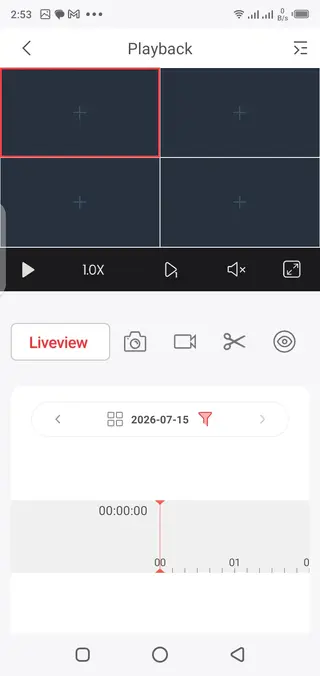
Access the recorded footage directly from the storage with this application. No need to connect the DVR or NVR to access the recording anymore.
QR Code Device Setup
Compatible security devices can be added directly with a QR code scanner. This is the newly added setup process to reduce the manual configuration.
Two-Way Audio Communication
The application supports two-way audio communication services. This allows users to directly communicate through the app to camera or door phones.
CCTV Status Monitoring
Get complete information related to the status of camera devices through your phone. With the HDD, identify any CCTV device issues before affecting it completely.
Smart Stream Management
The application offers movement based stream based on the network and battery. This maintains the monitoring smooth and flexible for the users.
Picture-in-Picture Mode
Use Android applications while keeping the live camera feed visible with the PVP mode. Users can access different applications with an eye on the live camera feeds using this PVP.
Snapshot and Video Recording
With this app, users can also capture snapshots at any point in time. Apart from snapshots, get a built-in instant video record system. So, record video live using your Android device with this app.
Screenshots
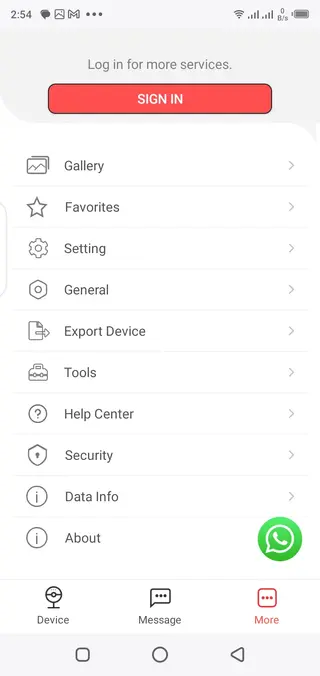
How to Add a CP PLUS Device in gCMOB?
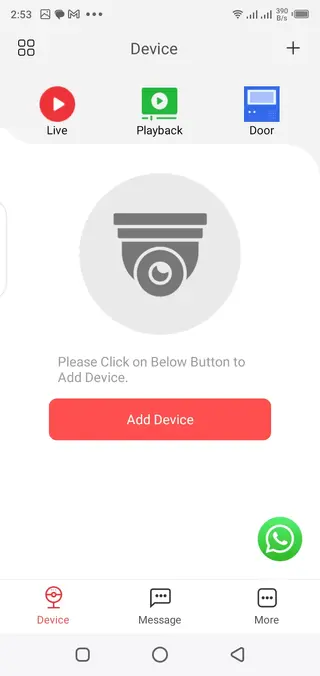
Adding a compatible CP PLUS device to this application is a simple process. Open the application. Select the option to add a new device, and scan the QR code available on your DVR, NVR, or IP camera. Additionally, users can also add manually by providing device details.
After the device is added, the application will synchronize with the surveillance system and the live feeds will be available on your Android. So, the whole process will be complete within a few seconds.
How to Remove a Device from gCMOB?
If you are removing any device from your surveillance, then you can also remove it using this app. The application offers a simple and fast device management system. To remove, open the app, navigate to the device list, select the connected device, and choose to delete it. This will remove the device from the list of connected devices. Once removed, the device won’t be visible in the device manager.
FAQs
Pros
- Remote live CCTV monitoring.
- Supports DVRs, NVRs, and IP cameras.
- QR code device setup.
- PTZ camera support.
- Two-way audio support.
- Remote playback system.
- Picture-in-Picture mode.
- Friendly Interface.
- Smooth and easy to use.
- Well-defined sections.
Cons
- Supports only CP PLUS devices.
- An internet connection is required.
- Some features require new devices.
- No support for all devices.
Conclusion
gCMOB Download on your Android device to connect the CP PLUS cameras. The latest version offers advanced-level services for users. So, use this application to stay connected with your camera easily. Download the application and start exploring all available unique features.




Comments
No approved comments yet.